Manual for K900

Manual for K900

Brand: Lenovo

Category: Smartphone

Document Type:

Language: EN
Uploaded: Aug. 10, 2025, 12:05 a.m.

Manual Publish Date: 2013-10-01

Warranty Information

No warranty information is provided in this manual.

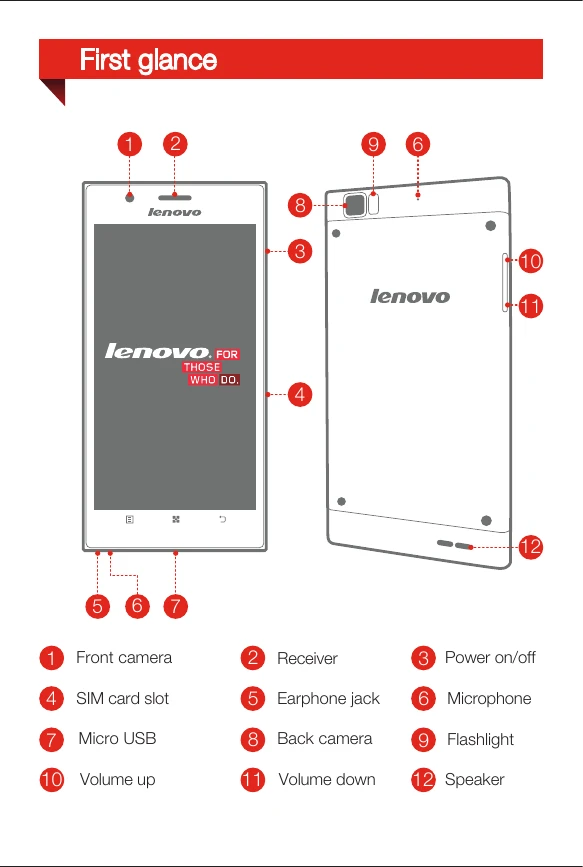
  • First Glance: Familiarize yourself with the phone's buttons, ports, and cameras (front/back, flashlight).
  • Installation: Insert the Micro SIM card using the eject tool. Charge the battery using the provided cable and adapter or a computer.
  • Power & Lock: Turn the phone on/off by pressing and holding the power button. Lock/unlock the screen using the power button and swipe gestures.
  • Syncing: Connect the phone to a computer via USB to transfer files using MTP or Mass Storage modes.
  • Customization: Rearrange apps, organize folders, change wallpaper, and create new home screens.
  • Communication: Make calls, manage contacts, send/receive messages, and back up data.
  • Internet: Connect to wireless networks, browse webpages, check email, and use the personal hotspot feature.
  • Photos & Videos: Take photos and videos using the Super Camera app. View and manage them in the Super Gallery. Take screenshots by pressing power and volume down buttons.
  • Battery Saving: Access Lenovo Power settings to monitor usage, adjust power modes, and extend battery life.
  • Notifications: Swipe down from the status bar to view notifications and quick settings. Swipe up to close the panel.

Troubleshooting and error codes

Header 1 Header 2 Header 3 Header 4
Data 1A Data 2A Data 3A Data 4A
Data 1B Data 2B Data 3B Data 4B
Data 1C Data 2C Data 3C Data 4C
Privacy Policy