Brand: Lenovo
Category: Smartphone
Document Type:
Language: EN
Brand: Lenovo
Category: Smartphone
Document Type:
Language: EN
Uploaded: Aug. 10, 2025, 12:07 a.m.
Manual Publish Date: 2018-05-24
Warranty periods vary by country/region, with a general warranty of 12 months for the handset.
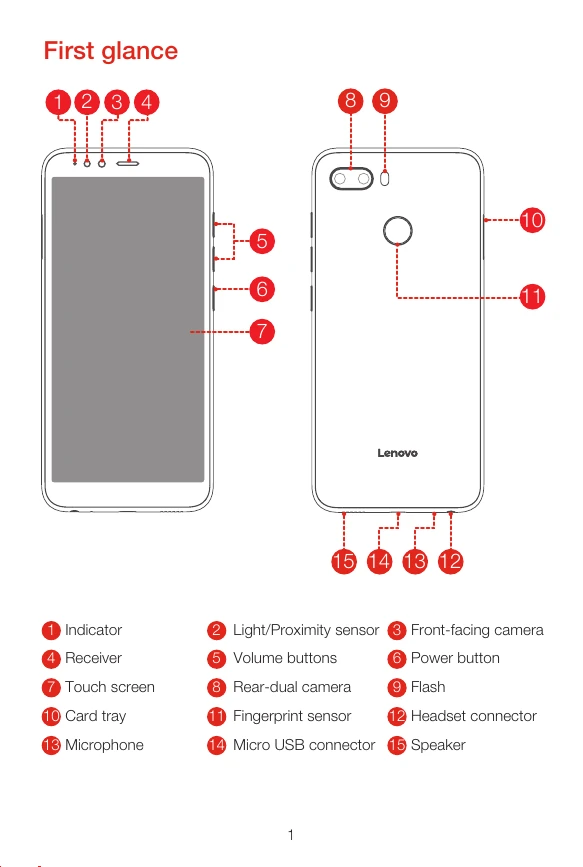
First glance: Familiarize yourself with the physical components of your Lenovo K5 play, including indicators, sensors, cameras, buttons, ports, and speakers.
Installing SIM & microSD: Insert your Nano-SIM and microSD cards correctly into the designated slots for cellular services and data storage. Ensure the device is off before inserting or removing cards.
Charging the battery: Connect your smartphone to a power outlet or computer using the provided USB cable and adapter. The device can be charged when the battery is low, fully charged, or in the process of charging.
Turning on/off: Press and hold the Power button to turn the device on or off. A short press and hold followed by tapping 'Reboot' will restart the phone.