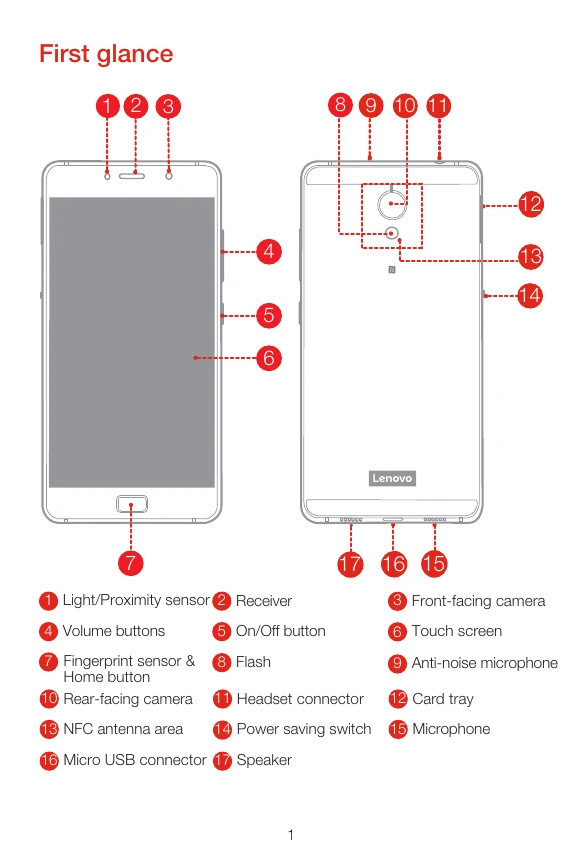
First glance: Familiarize yourself with the physical layout of your Lenovo P2, identifying key components like sensors, cameras, buttons, and ports.
Installing SIM and microSD cards: Insert your Nano-SIM and microSD cards into the appropriate slots as illustrated. Remember to turn off your phone before doing so.
Charging the battery: Connect your phone to a power outlet using the provided USB cable and adapter, or connect it to a computer.
Turning the phone on/off: Press and hold the On/Off button to turn the device on or off. A short press and hold will allow you to restart.
Safety and handling: Adhere to operating temperature guidelines and be aware of potential hazards related to batteries and plastic bags. Dispose of batteries responsibly.
Support and warranty: Access online technical support, find telephone support numbers, and review the Lenovo Limited Warranty for your device.
Recycling and environmental information: Learn about responsible recycling practices for your Lenovo product and its components, including battery disposal guidelines.
EU compliance: Review the compliance statements for the European Union and specific directives like R&TTE and RoHS.
SAR information: Understand Specific Absorption Rate (SAR) values and guidelines for safe usage.