Preparing your smartphone
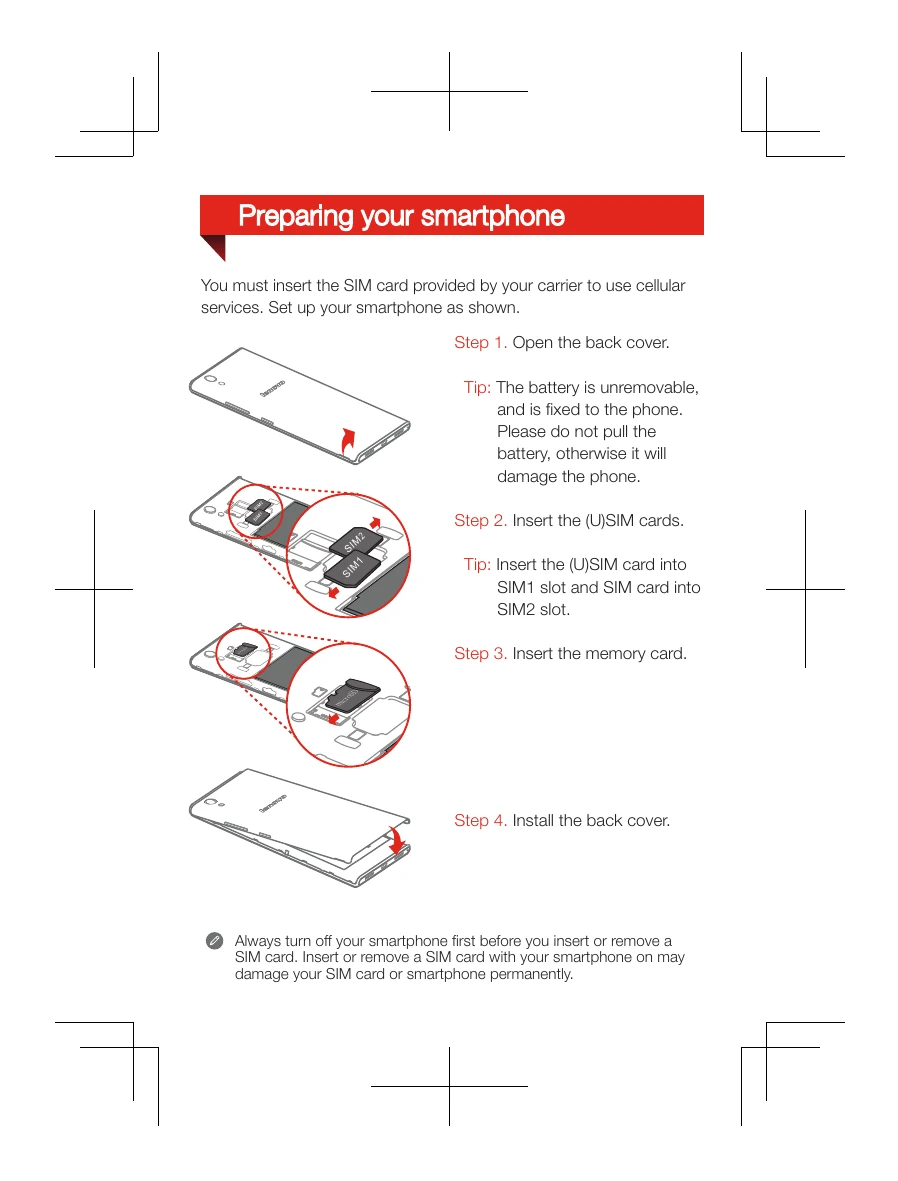
You must insert the SIM card provided by your carrier to use cellular services. Set up your smartphone as shown.
Step 1. Open the back cover.
Tip: The battery is unremovable, and is fixed to the phone. Please do not pull the battery, otherwise it will damage the phone.
Step 2. Insert the (U)SIM cards.
Tip: Insert the (U)SIM card into SIM1 slot and SIM card into SIM2 slot.
Step 3. Insert the memory card.
Step 4. Install the back cover.
Always turn off your smartphone first before you insert or remove a SIM card. Insert or remove a SIM card with your smartphone on may damage your SIM card or smartphone permanently.
Charging the battery
Charge the battery as shown.
Method 1. Connect your smartphone to a power outlet using the cable and USB power adapter that come with your smartphone.
Method 2. Connect your smartphone to a computer using the cable that comes with your smartphone.
Turning on or turning off your smartphone
Turn on: Press and hold the On/Off button until the Lenovo logo appears.
Turn off: Press and hold the On/Off button for a few seconds, then tap Power off.