Brand: Lenovo
Category: Smartphone
Document Type:
Language: EN
Brand: Lenovo
Category: Smartphone
Document Type:
Language: EN
Uploaded: Aug. 10, 2025, 12:06 a.m.
Manual Publish Date: 2015-09-21
Lenovo products do not have International Warranty Services.
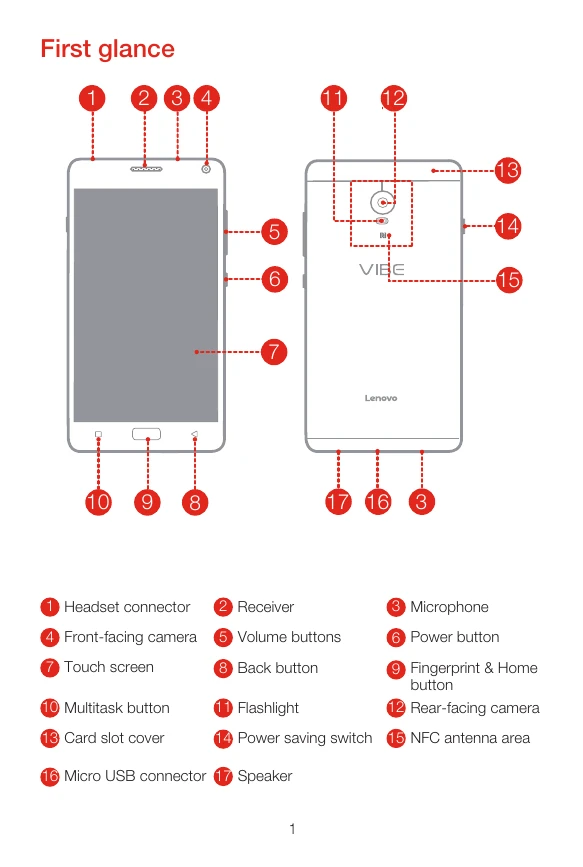
The smartphone has various buttons and connectors: Headset connector, Receiver, Microphone, Front-facing camera, Volume buttons, Power button, Touch screen, Back button, Fingerprint & Home button, Multitask button, Flashlight, Rear-facing camera, Card slot cover, Power saving switch, NFC antenna area, Micro USB connector, and Speaker.
To install a Nano-SIM card and microSD card: Open the card slot cover, pull out the tray, position the Nano-SIM card correctly, and reinsert the tray. Insert the microSD card into its slot. Ensure the Nano-SIM card is the only SIM card used.
Charge the battery by connecting the smartphone to a power outlet via USB power adapter or to a computer via USB cable.
Turn on by pressing and holding the power button until the Lenovo logo appears. Turn off by pressing and holding the power button and tapping 'Power off'.
| Header 1 | Header 2 | Header 3 | Header 4 |
|---|---|---|---|
| Row 1 Data 1 | Row 1 Data 2 | Row 1 Data 3 | Row 1 Data 4 |
| Row 2 Data 1 | Row 2 Data 2 | Row 2 Data 3 | Row 2 Data 4 |
| Row 3 Data 1 | Row 3 Data 2 | Row 3 Data 3 | Row 3 Data 4 |