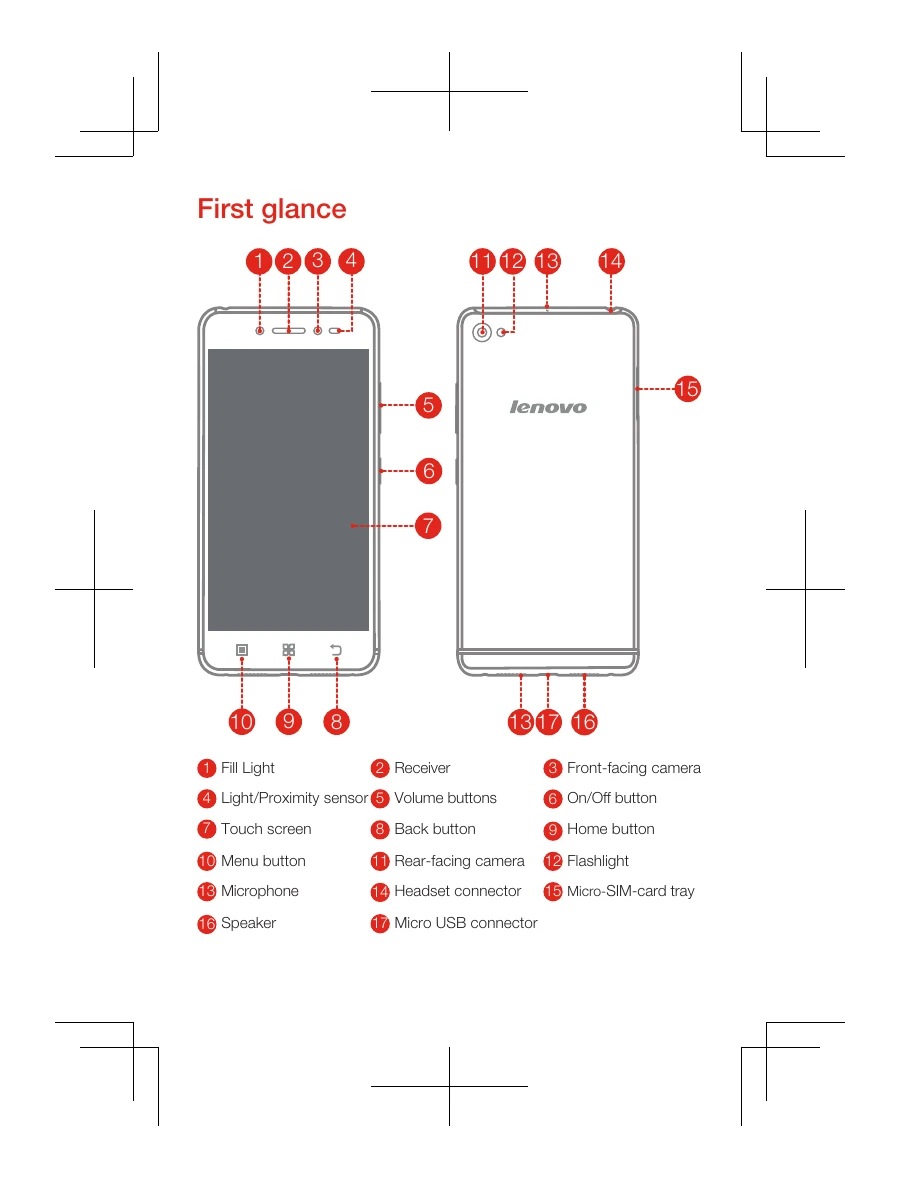
Installing the Micro SIM card: Insert the SIM eject tool into the tray hole, pull out the tray, position the Micro SIM card, and reinsert the tray.
Charging the battery: Connect your smartphone to a power outlet or computer using the provided cable and adapter.
Turning on/off: Press and hold the On/Off button to turn on. To turn off, press and hold the On/Off button and tap 'Power off'. To restart, press and hold the On/Off button for about 10 seconds.
Important safety information: Avoid using headphones at high volumes for prolonged periods to prevent hearing damage. Use the phone within the operating temperature range of -10°C to 40°C. Handle cords with care due to potential lead exposure. Dispose of the phone responsibly according to local laws and regulations.
Support: For online support, visit http://www.lenovo.com/support. For telephone support, find the latest numbers at http://support.lenovo.com/serviceproviders. The Lenovo Limited Warranty (LLW) is available at http://support.lenovo.com/smartphone-llw.
Recycling: Recycle electronic equipment responsibly. Information for India is at http://www.lenovo.com/social_responsibility/us/en/sustainability/ptb_india.html. Country-specific WEEE information is at http://www.lenovo.com/recycling.