Manual for VIBE S1

Manual for VIBE S1

Brand: Lenovo

Category: Smartphone

Document Type:

Language: EN
Uploaded: Aug. 10, 2025, 12:06 a.m.

Manual Publish Date: 2015-07-01

Warranty Information

Refer to the Lenovo Limited Warranty for complete warranty terms.

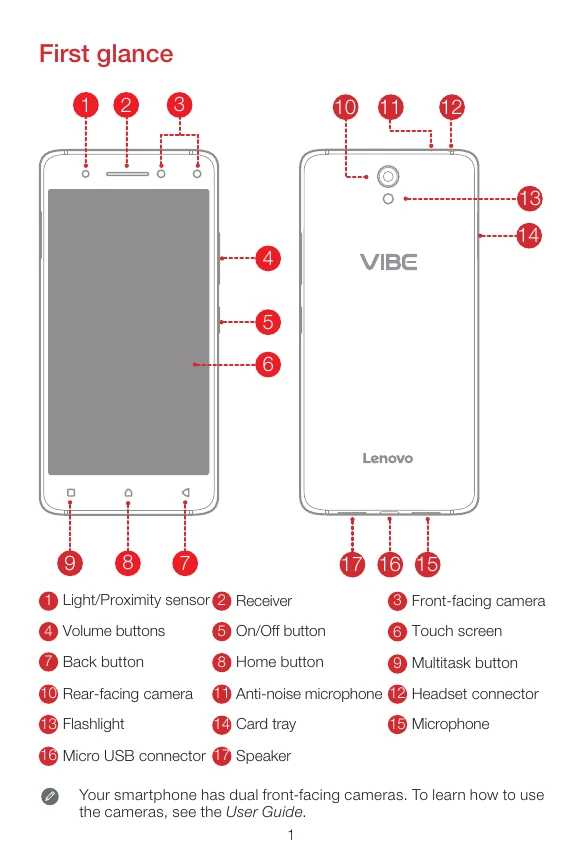
First glance: Familiarize yourself with the front and rear components of your Lenovo VIBE S1, identifying buttons, cameras, speakers, and ports. Installing SIM & microSD: Insert the Nano-SIM and microSD cards into the designated slots using the provided eject tool. Ensure the phone is powered off before insertion. Charging: Connect your smartphone to a power outlet or computer using the provided USB cable and adapter to charge the battery. The device indicates charging status. Turning on/off: Press and hold the power button to turn the device on or off. A short press and hold allows for power options like restarting or powering off.

Troubleshooting and error codes

Header 1 Header 2 Header 3 Header 4
Data 1a Data 2a Data 3a Data 4a
Data 1b Data 2b Data 3b Data 4b
Data 1c Data 2c Data 3c Data 4c
Privacy Policy