Brand: Lenovo
Category: Smartphone
Document Type:
Language: EN
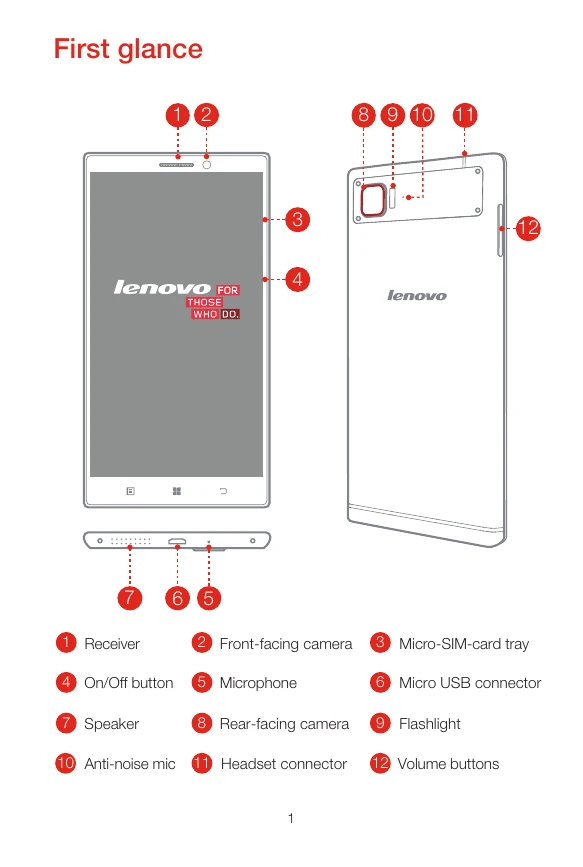
Brand: Lenovo
Category: Smartphone
Document Type:
Language: EN
Uploaded: Aug. 10, 2025, 12:05 a.m.
Manual Publish Date: 2014-08-01
Warranty varies by region, with product/charger typically covered for 1 year.
Insert the SIM eject tool into the tray hole. Pull out the tray and position the Micro SIM card in the correct orientation. Carefully insert the tray back into the slot.
Connect your VIBE to a power outlet using the cable and USB power adapter, or connect to a computer via USB. The battery icon indicates charging status.
Turn on/off/restart: Press and hold the On/Off button. For turn off or restart, follow the on-screen prompts.
| Header 1 | Header 2 | Header 3 | Header 4 |
|---|---|---|---|
| Row 1 Data 1 | Row 1 Data 2 | Row 1 Data 3 | Row 1 Data 4 |
| Row 2 Data 1 | Row 2 Data 2 | Row 2 Data 3 | Row 2 Data 4 |
| Row 3 Data 1 | Row 3 Data 2 | Row 3 Data 3 | Row 3 Data 4 |