Manual for Z2 PLUS

Manual for Z2 PLUS

Brand: Lenovo

Category: Smartphone

Document Type:

Language: EN
Uploaded: Aug. 10, 2025, 12:06 a.m.

Manual Publish Date: 2016-06-07

Warranty Information

Lenovo provides a limited warranty for its products, with varying periods for different components.

Getting Started

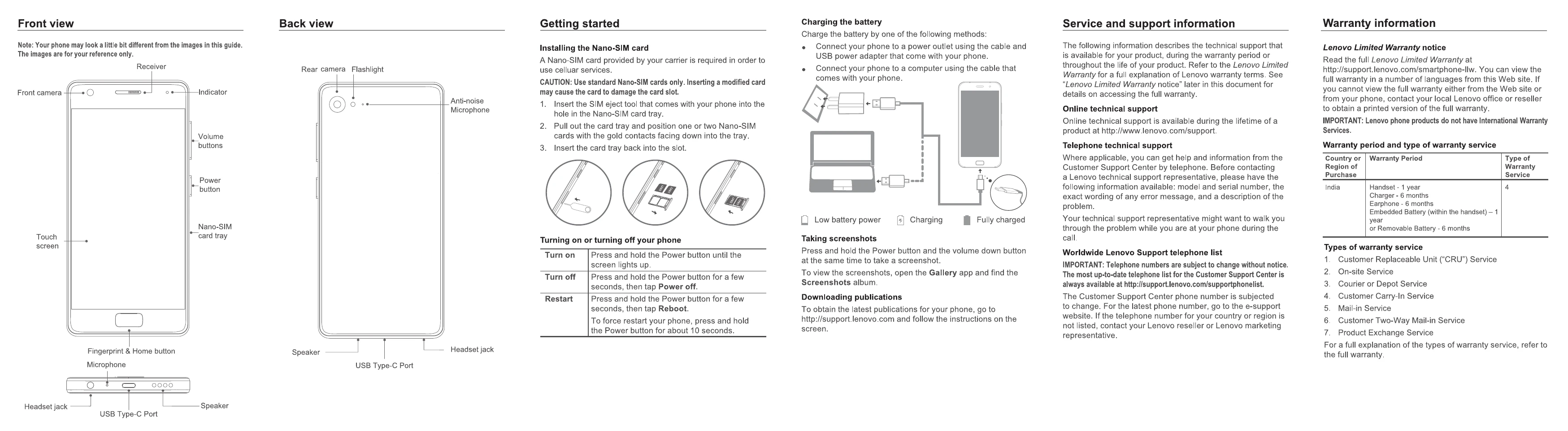
Installing the Nano-SIM card

  1. Insert SIM eject tool into the Nano-SIM card tray hole.
  2. Pull out the tray, position Nano-SIM cards with gold contacts facing down.
  3. Insert the tray back into the slot.

Turning on or turning off your phone

  • Turn on: Press and hold the Power button until the screen lights up.
  • Turn off: Press and hold the Power button for a few seconds, then tap Power off.
  • Restart: Press and hold the Power button for a few seconds, then tap Reboot. For a forced restart, hold the Power button for about 10 seconds.

Charging the battery

  • Connect your phone to a power outlet using the cable and USB power adapter.
  • Connect your phone to a computer using the cable.

Taking screenshots

  • Press and hold the Power button and the volume down button simultaneously.
  • View screenshots in the Gallery app under the Screenshots album.

Downloading publications

  • Visit http://support.lenovo.com for the latest publications.

Troubleshooting and error codes

Position The highest SAR value Regulation
Head 0.71 W/kg India 1g SAR Limit (1.6 W/kg)
Body-worn 1.49 W/kg
Privacy Policy