Brand:
LG
Category: Home Theater System
Document Type: Manual
Language: EN
Brand:
LG
Category: Home Theater System
Document Type: Manual
Language: EN
Uploaded: Nov. 21, 2025, 7:42 p.m.
Refer to the warranty card for specific warranty details. LG typically offers a standard warranty period for its home theater systems.
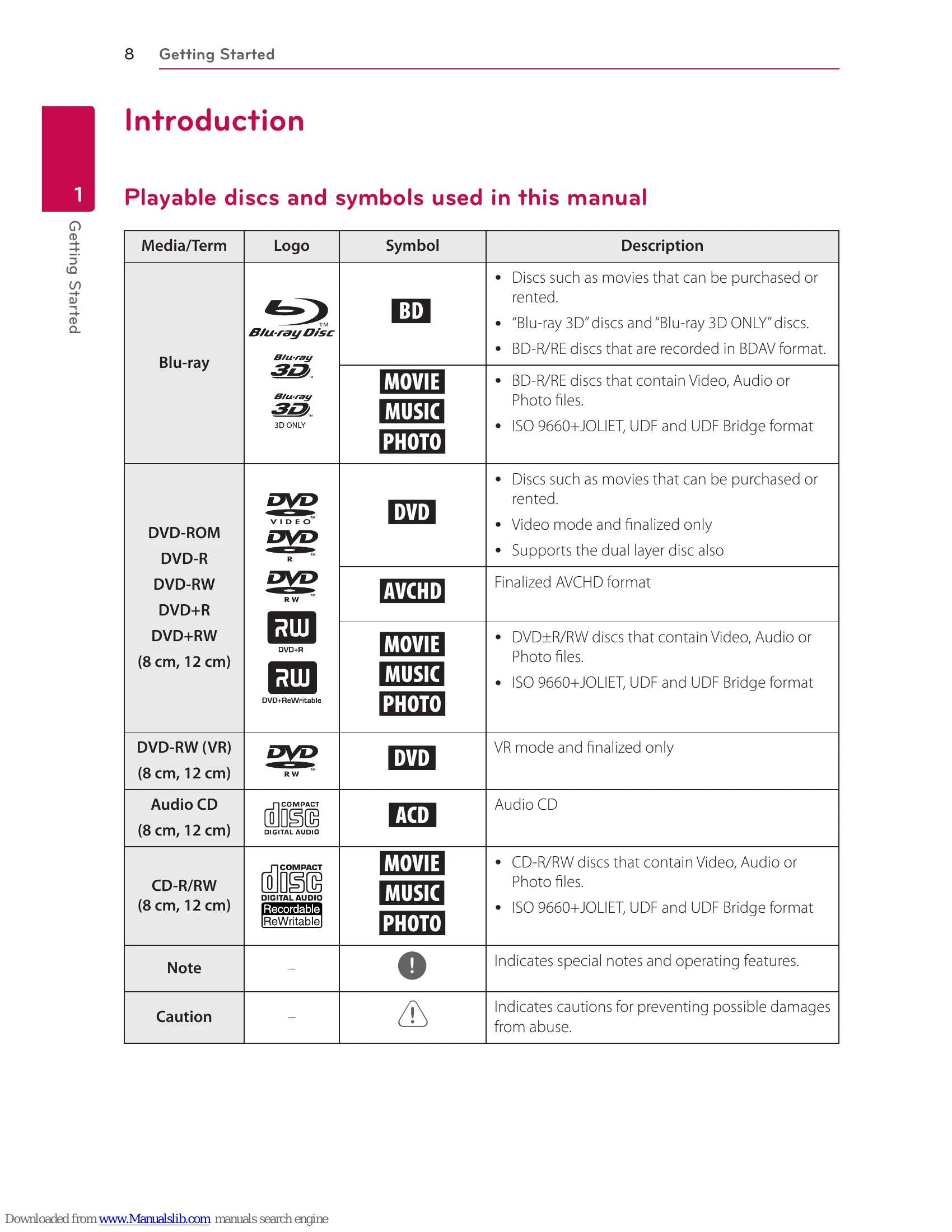
To operate this LG Home Theater System, begin by connecting your speakers and then your TV. You can control basic functions like Play, Pause, Stop, and Volume using the remote control. The system supports various disc types including Blu-ray, DVD, and CD. You can also connect external devices via HDMI, AUX, or optical inputs. For network features, connect the system to your home network via LAN or Wi-Fi to access online content and software updates.
Use the directional buttons on the remote to navigate menus and select options. The HOME button accesses the main menu, while the DISC MENU button brings up disc-specific options. The INFO/MENU button displays on-screen information.
| Issue | Possible Cause | Solution |
|---|---|---|
| No power | Power cord is not plugged in. | Plug the power cord securely into the outlet. |
| No sound | Volume is set to minimum. | Increase the volume. |
| Speakers are not connected properly. | Check speaker connections. | |
| Disc not playing | Disc is dirty or damaged. | Clean or replace the disc. |
| Disc is not supported. | Use a compatible disc format. | |
| Network connection failed | Incorrect network settings. | Check your network settings and reconnect. |
| Picture is distorted | HDMI cable is loose or damaged. | Ensure the HDMI cable is securely connected and undamaged. |