Manual for MC2146BRT

Manual for MC2146BRT

Brand: LG logo LG

Category: Microwave Oven

Document Type: Manual

Language: EN
Uploaded: Nov. 21, 2025, 6:09 p.m.

Warranty Information

LG Electronics provides a 24-month warranty on this appliance.

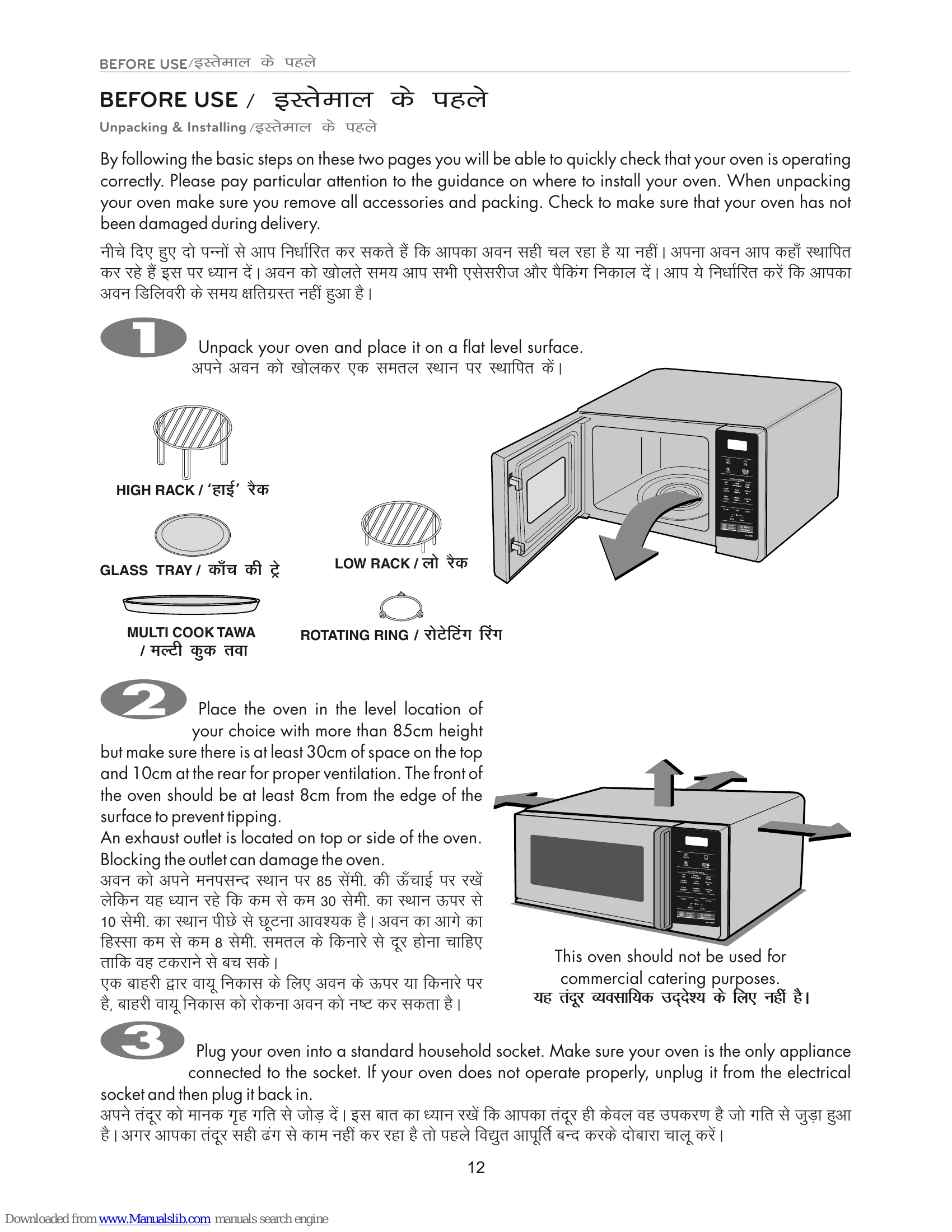
  • Unpacking & Installing: Place the oven on a flat, level surface with proper ventilation. Ensure at least 30cm of space on top and 10cm at the rear. The front should be at least 8cm from the edge. Plug into a standard household socket, ensuring it's the only appliance connected.
  • Basic Operation: Open the door, place the rotating ring and glass tray. Fill a microwave-safe container with 300 ml of water and place it on the tray. Close the door. Press the START button to set cooking time (e.g., 30 seconds). The display will count down. Open the door and check if the water is warm.
  • Using Accessories: A table indicates which accessories (High rack, Low rack, Glass tray, Multi Cook Tawa) are acceptable for different cooking modes (Microwave, Grill, Convection, Grill Combi, Conv. Combi).
  • Microwave-Safe Utensils: Use only heat-resistant, non-metallic utensils. Test any questionable items by microwaving them with a bowl of water for 1 minute. If the water heats and the utensil stays cool, it's safe.
  • Control Panel Functions: The control panel features buttons for Micro, Grill, Convection, Combi modes, Auto Cook Menus (Diet Fry, Indian Roti Basket, Dosa/Ghee, Indian Cuisine, Low Calorie, Tandoor Se..., Kids' Delight, Paneer/Yoghurt, Cooking Aid), time adjustments (+/- More/Less), STOP/CLEAR, and START/Add 30 secs.
  • Child Lock: To activate, press and hold STOP/CLEAR until 'L' appears on the display and a beep sounds. To cancel, press and hold STOP/CLEAR until 'L' disappears.
  • Micro Power Cooking: Select the desired power level (5 options available) and set the cooking time. The oven has 5 power settings from LOW (20%) to HIGH (100%).
  • Quick Start: Allows setting 30-second intervals of HIGH power cooking with a single touch of the START button. Press START multiple times to extend cooking.
  • Cleaning: Keep the inside and outside clean. Wipe up spills immediately. Do not use harsh detergents or abrasive cleaners. Clean the control panel with a damp cloth after unplugging the oven.

Troubleshooting and error codes

FAQ Answer
What's wrong when the oven light will not glow? There may be several reasons why the oven light will not glow. Either the light bulb has blown or the electric circuit has failed.
Does microwave energy pass through the viewing screen in the door? No. The holes, or ports, are made to allow light to pass; they do not let microwave energy through.
Why does the BEEP tone sound when a button on the control panel is touched? The BEEP tone sounds to assure that the setting is being properly entered.
Will the microwave function be damaged if it operates empty? Yes. Never run it empty.
Why do eggs sometimes pop? When baking, frying, or poaching eggs, the yolk may pop due to steam build up inside the yolk membrane. To prevent this, simply pierce the yolk before cooking. Never microwave eggs in the shell.
Why is standing time recommended after microwave cooking is over? After microwave cooking is finished, food keeps on cooking during standing time. This standing time finishes cooking evenly throughout the food. The amount of standing time depends on the density of the food.
Why don't my oven always cook as fast as the cooking guide says? Check your cooking guide again to make sure you've followed directions correctly, and to see what might cause variations in cooking time. Cooking guide times and heat settings are suggestions, chosen to help prevent overcooking, the most common problem in getting used to this oven. Variations in the size, shape, weight and dimensions of the food require longer cooking time. Use your own judgment along with the cooking guide suggestions to test food conditions, just as you would do with a conventional cooker.
Privacy Policy