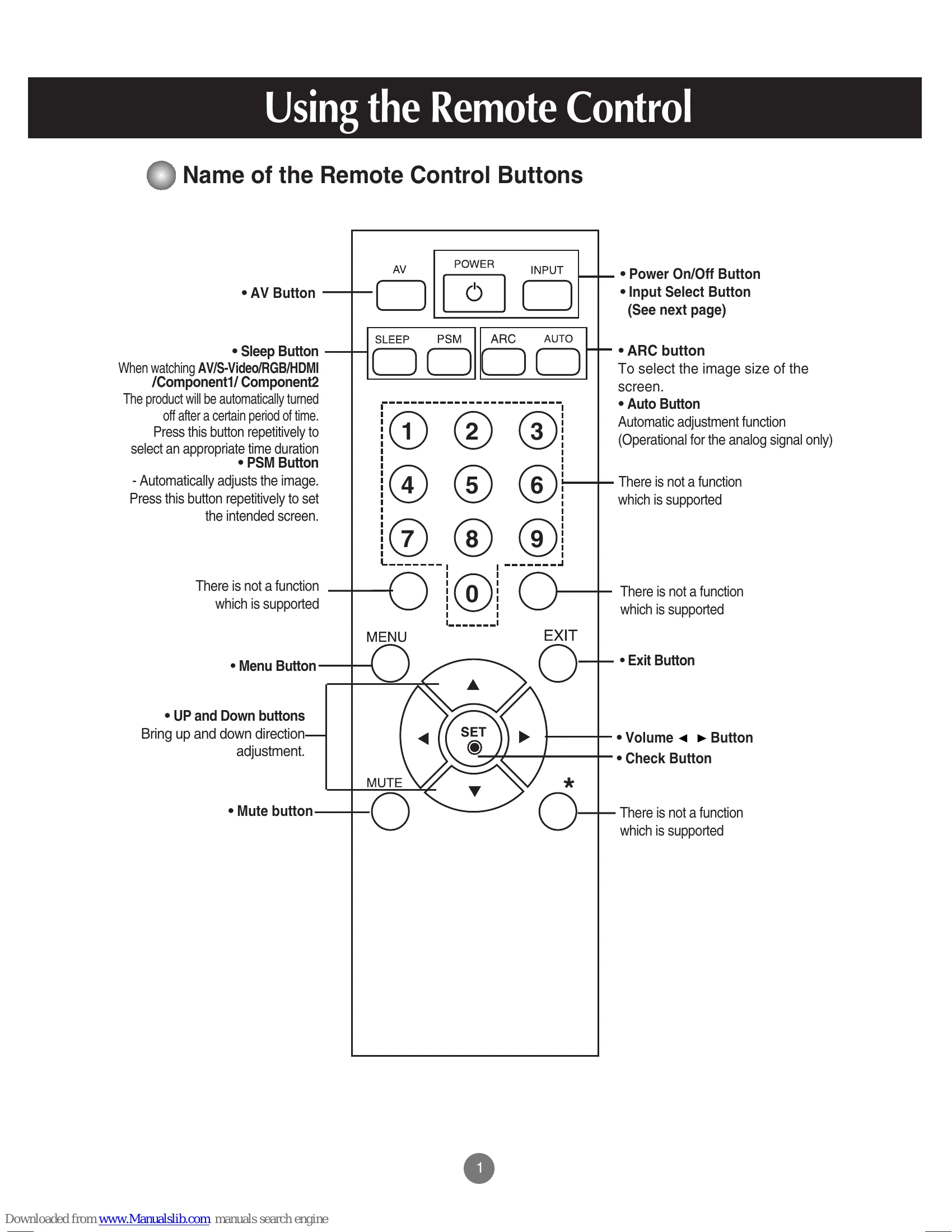
Using the Remote Control: Familiarize yourself with the remote's buttons for power, input selection, image size (ARC), automatic adjustment (AUTO), menu navigation, and volume control.
Connecting to External Devices: Instructions cover connecting PCs via RGB or HDMI/DVI, audio cables, and power cords. It also details connections for VCR/DVD players, HDTVs, and set-top boxes using various cable types (BNC, S-Video, Component).
Selecting and Adjusting the Screen: Learn to navigate the OSD menu to adjust picture settings like brightness, contrast, and color. Options include PSM for automatic quality adjustment and CSM for factory color presets. XD technology enhances picture quality. Audio functions, timer settings, and special options like child lock and tile mode are also explained.
Controlling Multiple Products (RS-232C): This section details the communication protocols for controlling multiple LG products via RS-232C, including commands for volume, contrast, brightness, color, tint, sharpness, OSD control, remote lock, and ISM modes.
IR Codes: Information on connecting a wired remote control and the structure of IR frames for remote control operation is provided.