Brand: Mamiya
Category: Camera
Document Type:
Language: EN
Brand: Mamiya
Category: Camera
Document Type:
Language: EN
Uploaded: Aug. 9, 2025, 11:44 p.m.
Loading Film: Open the back cover, insert the film roll and take-up spool, ensuring correct alignment of the leader paper. Advance film using the crank until the "1" appears in the counter window.
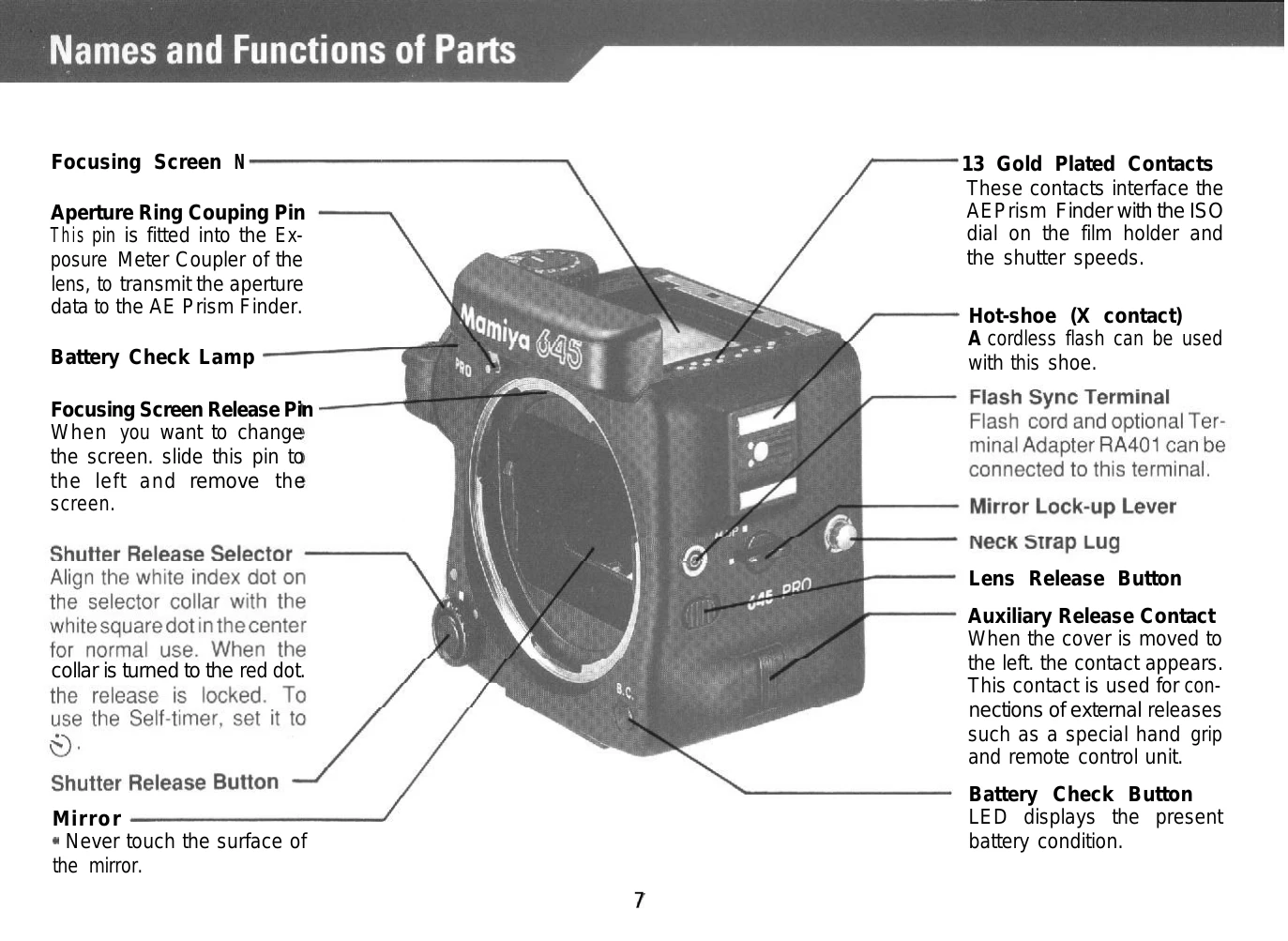
Attaching Lenses: Align the lens alignment dot with the camera's alignment dot, insert the lens, and turn clockwise until it clicks. Ensure the aperture ring coupler pin engages.
Setting Exposure: Use the Shutter Speed Dial and aperture ring. For automatic exposure, use the AE Prism Finder FE401. Set the film speed on the roll film holder's ISO dial.
Taking a Photo: Hold the camera steady, frame your shot, and gently press the shutter release button. Use the Film Advance Crank to advance to the next frame.
Important Features: Includes self-timer, mirror lock-up, interchangeable viewfinders, and a system of compatible accessories.
| Problem | Possible Cause & Solution |
|---|---|
| Shutter Release Button does not move | Check battery: Is it inserted correctly? Is it dead? Has the Dark Slide been pulled? Is the Shutter Release Selector in the locked position? Is the Shutter Speed Dial in "A" or "AEL"? |
| Finder is black or very dark | Has the lens cap been removed? Is the Mirror-up Lever in the "M.UP" position? Is the "AM" setting on the lens at "M"? |
| Roll Film Holder cannot be removed | Insert the Dark Slide. |
| Fewer exposures than specified | Start Mark alignment issue during film loading. Refer to loading instructions page 20. |
| Film Advance Crank continues to turn and does not stop | Check if the Roll Film Insert is placed correctly in the holder. Check if the empty film spool was left in the upper compartment. |