Brand: Mamiya
Category: Camera
Document Type:
Language: EN
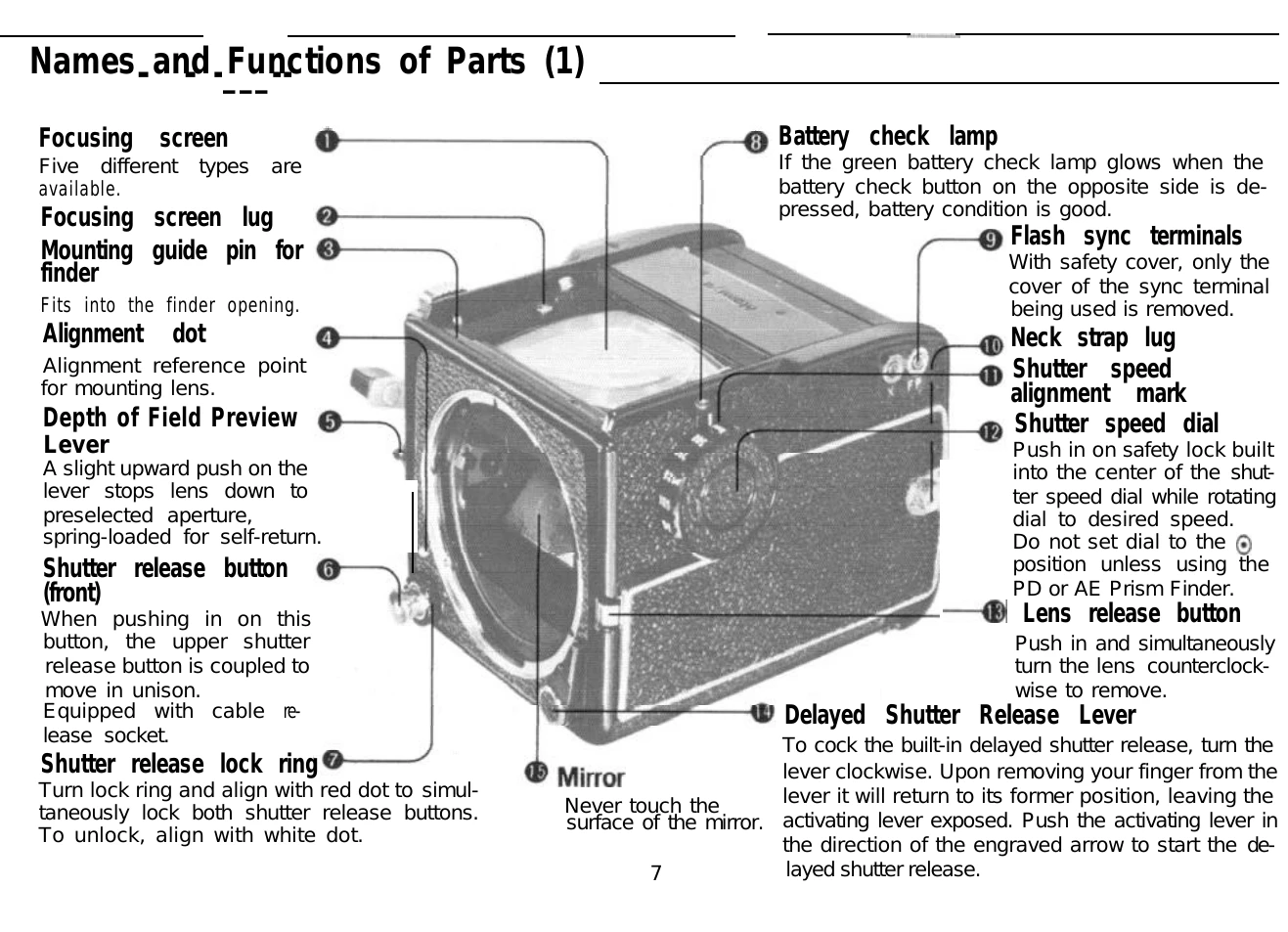
Brand: Mamiya
Category: Camera
Document Type:
Language: EN
Uploaded: Aug. 9, 2025, 11:44 p.m.
Camera Setup and Operation:
Key Features: Interchangeable finders and focusing screens, built-in electronic shutter, multiple-exposure capability, depth-of-field preview.
| Problem | Possible Cause & Solution |
|---|---|
| Shutter release button will not move |
A) Unlock shutter release button. B) Ensure film advance crank is turned to the stop position. |
| Mirror is locked in the up position (Cannot see through finder) |
A) Check battery: ensure it is correctly inserted, of the right type, and has sufficient charge. Press battery check button to lower mirror. B) If mirror lock-up lever was used, raise it. C) If shutter was released at the ◎ position, move dial to B or 1/1000 sec. |
| Developed film has fewer frames than expected |
A) Align start marks correctly when inserting film roll. B) Ensure film and insert start marks are properly aligned. |
| PD Prism Finder LED's do not illuminate | Ensure the shutter speed dial is not set to the ◎ position. |
| Electric shock when using flash | Always keep safety covers on unused terminals when attaching flash units. |