Manual for KF 1801 Vi

Manual for KF 1801 Vi

Brand: Miele

Category: Fridge-Freezer

Document Type: Manual

Language: EN
Uploaded: Nov. 21, 2025, 6:04 p.m.

Warranty Information

Contact Miele Technical Service for any questions regarding electrical connection.

  • Before use: Clean interior with mild soap and water, dry with a soft cloth. Wait 30 minutes after installation before turning on.
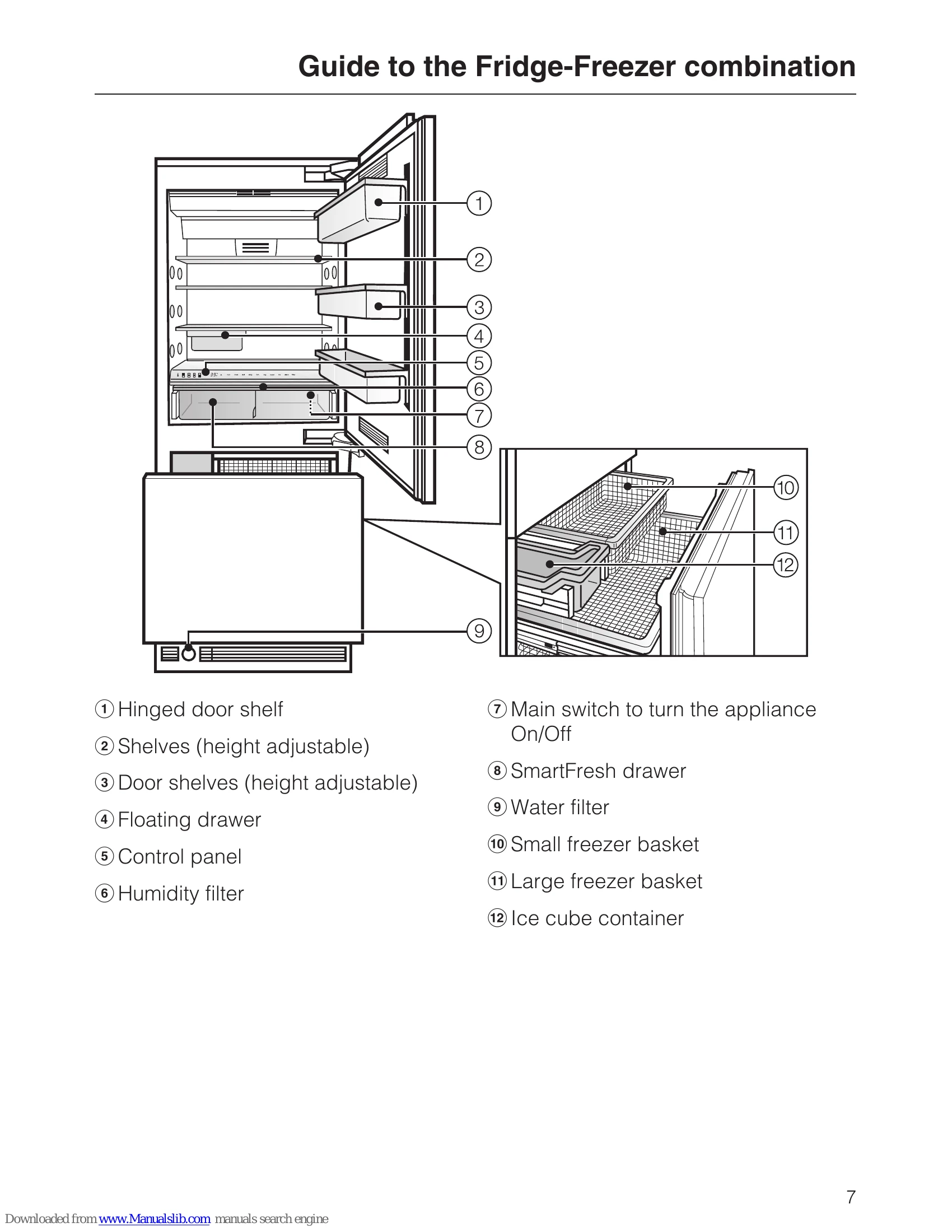
  • Turning On/Off: Use the main switch located underneath the control panel. All zones switch on/off together.
  • Settings: Touch the access button "i" to activate settings. Select zones (refrigerator, freezer, SmartFresh drawers) to adjust temperature, SuperCool, or SmartFresh settings. Touch "i" again to exit.
  • Button Sound: Turn the button sound on/off via custom settings.
  • Longer Periods Off: Shut off water, unplug, empty ice cube maker, clean interior, remove filter, leave doors open.
  • Alarms: Temperature and door alarms activate automatically. Press "alarm" button to silence early.
  • Temperature Setting: Use "V" and "∧" buttons to adjust temperature in refrigerator and freezer sections independently. Recommended temperatures: Refrigerator 37°F (4°C), Freezer 0°F (-18°C).
  • SmartFresh Drawers: Optimize freshness with combined temperature and humidity. Select food types for optimal humidity.
  • Refrigerator Efficiency: Utilize different storage zones (coldest area for highly perishable items, warmest area for butter/cheese). Ensure ventilation slits are not covered.
  • Freezer Efficiency: Freeze food quickly. Use SuperCool for large quantities. Place food to freeze evenly. Keep dry packaging.
  • Defrosting: Frozen food can be defrosted in microwave, at room temp, in refrigerator, or steam oven. Observe hygiene for poultry.
  • Cooling Drinks: Use SuperCool function. Do not leave bottles in freezer for more than 1 hour.
  • SuperCool: Activates rapid cooling. Switches off automatically after a set time or can be turned off early.
  • Ice Cube Maker: Connect to water supply. Ensure container is in place. First batch of ice should be discarded.

Troubleshooting and error codes

FunctionDisplay text
Temperature °C - °FF
RemoteVision Module settingsr
Button sound on/offb
Confirm filter changesh
Exit Custom Settings modec
Selectable optionsDescription of function
rBack
r 2Reboot the module
r 3Reset the module to factory settings
r 4Enter Ad-Hoc Mode
Status indicatorsDescription of function
Flashing r -Module booting phase
Flashing r =Connection to router established, no IP address assigned
Flashing r =In Ad-Hoc Mode, not connected
Solid r =In Ad-Hoc Mode, connected
Flashing r =No connection to Network
Solid r =Connected to Network
Privacy Policy