Brand: Miele
Category: Oven
Document Type: Manual
Language: EN
Brand: Miele
Category: Oven
Document Type: Manual
Language: EN
Uploaded: Nov. 21, 2025, 9:14 p.m.
Miele cannot be held liable for damage caused by non-compliance with these instructions.
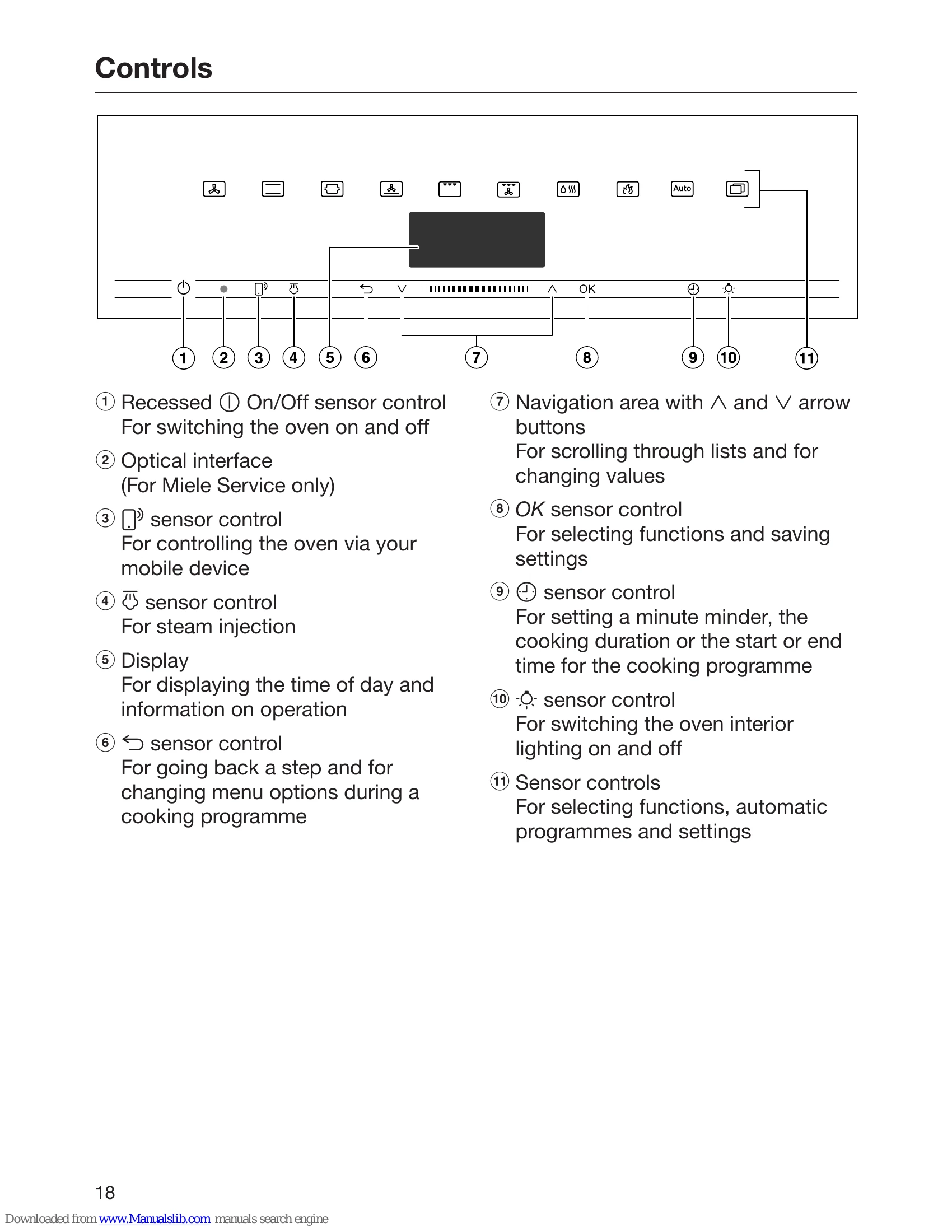
Switching On/Off: Use the recessed On/Off sensor control to turn the oven on and off.
Display: The display shows time, operational information, functions, temperatures, durations, and settings.
Navigation: Use the arrow buttons (∧, V) or the touch-sensitive area for scrolling and changing values. The OK sensor control lights up orange when a confirmable selection is reached.
Menu Navigation: Select menu options by highlighting them with arrow buttons and confirming with OK. Back a step or return to the main menu using the dedicated sensor control.
Adjusting Settings: Settings are changed using arrow buttons or the touch area, and confirmed with OK. Some settings are represented by segment bars.
Selecting Functions: Touch the sensor control for the desired function. The control illuminates orange. Scroll through further options and set values, then confirm with OK.
| Problem | Possible Cause | Solution |
|---|---|---|
| Oven does not heat up | Power supply interrupted | Check fuse or circuit breaker. |
| Display is off | Oven switched off | Switch the oven on. |
| Error message appears | Internal fault | Refer to the problem-solving guide or contact Miele Customer Service. |