Brand: Miele
Category: Washing Machine
Document Type: Manual
Language: EN
Brand: Miele
Category: Washing Machine
Document Type: Manual
Language: EN
Uploaded: Nov. 21, 2025, 6:41 p.m.
Miele guarantees functional spare parts for 10 to 15 years after discontinuation.
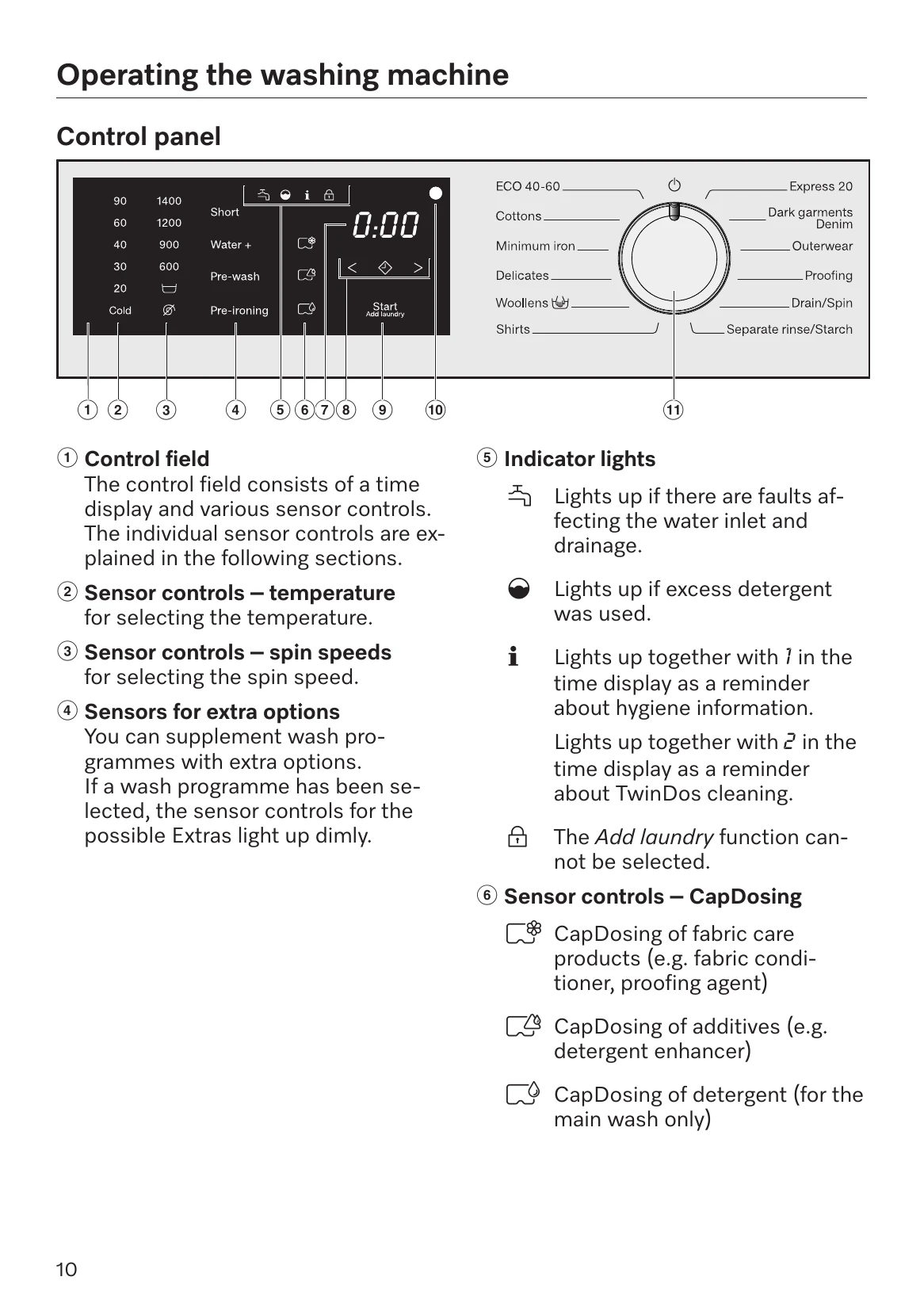
The control field includes a time display and various sensor controls for temperature, spin speed, and extra options. Indicator lights alert to faults, excess detergent, or hygiene information. CapDosing allows for fabric care products, additives, or detergent in capsules.
Select a programme using the programme selector. Adjust temperature and spin speed as needed. Extras can be added. Detergent and fabric conditioner are added to the dispenser drawer or via CapDosing. Touch the flashing Start/Add laundry sensor control to begin. Laundry can be added during the cycle if the lock symbol is not illuminated.
The door remains locked during the anti-crease phase. Turn the programme selector to the 'O' position to unlock the door.
Load the machine to its maximum capacity for efficiency. Use programmes with longer running times for better energy and water conservation. Modern detergents allow for lower temperature washing. Regular machine cleaning is recommended.
| Problem | Possible Cause | Solution |
| The programme does not start. | The machine is not switched on. | Turn the programme selector. |
| The door is not closed properly. | Close the door until it clicks shut. | |
| The Start/Add laundry sensor control has not been touched. | Touch the Start/Add laundry sensor control. | |
| Delay start is activated. | Wait for the Delay start time to elapse or cancel the Delay start. | |
| The programme is cancelled and a fault indicator light lights up in the control panel. | Water inlet issue. | Check the water supply and stopcock. Clean the water inlet filter. |
| Drainage issue. | Clean the filter and drain hose. Check for blockages. | |
| During the programme, a symbol appears in the time display. | (See programme chart for symbols) | Refer to the programme chart for explanations. |
| At the end of the programme, an indicator light lights up in the control panel. | Excess detergent used. | Use less detergent. |
| Hygiene information required. | Clean the washing machine. | |
| General problems with the washing machine. | See 'Problem solving guide' in the manual. | Refer to the detailed troubleshooting section in the manual. |
| An unsatisfactory wash result. | Incorrect amount of detergent. | Adjust detergent dosage. |
| Overloading the machine. | Reduce the load size. | |
| Wrong programme or temperature selected. | Select appropriate programme and temperature. | |
| The door will not open. | The programme has not finished. | Wait until the programme has finished. |
| Anti-crease phase is active. | Wait for the anti-crease phase to complete. | |
| Delay start is activated. | Wait for the Delay start time to elapse. | |
| Opening the door in the event of a blocked drain outlet and/or power cut. | Emergency door release procedure. | Follow the specific instructions in the manual for emergency door opening. |