Manual for W 3831 WPS

Manual for W 3831 WPS

Brand: Miele

Category: Washing Machine

Document Type: Manual

Language: EN
Uploaded: Nov. 21, 2025, 8:13 p.m.

Warranty Information

Warranty details are not explicitly stated in the provided pages. Consult the full manual or manufacturer for specific warranty information.

The manual provides detailed instructions for operating the Miele W 3831 WPS washing machine. Key operational steps include:

  • Before First Use: Ensure correct installation and connection. Run a wash programme without laundry and detergent to prepare the spinning function.
  • Loading: Unfold laundry and load loosely, mixing large and small items for even distribution. Avoid overloading.
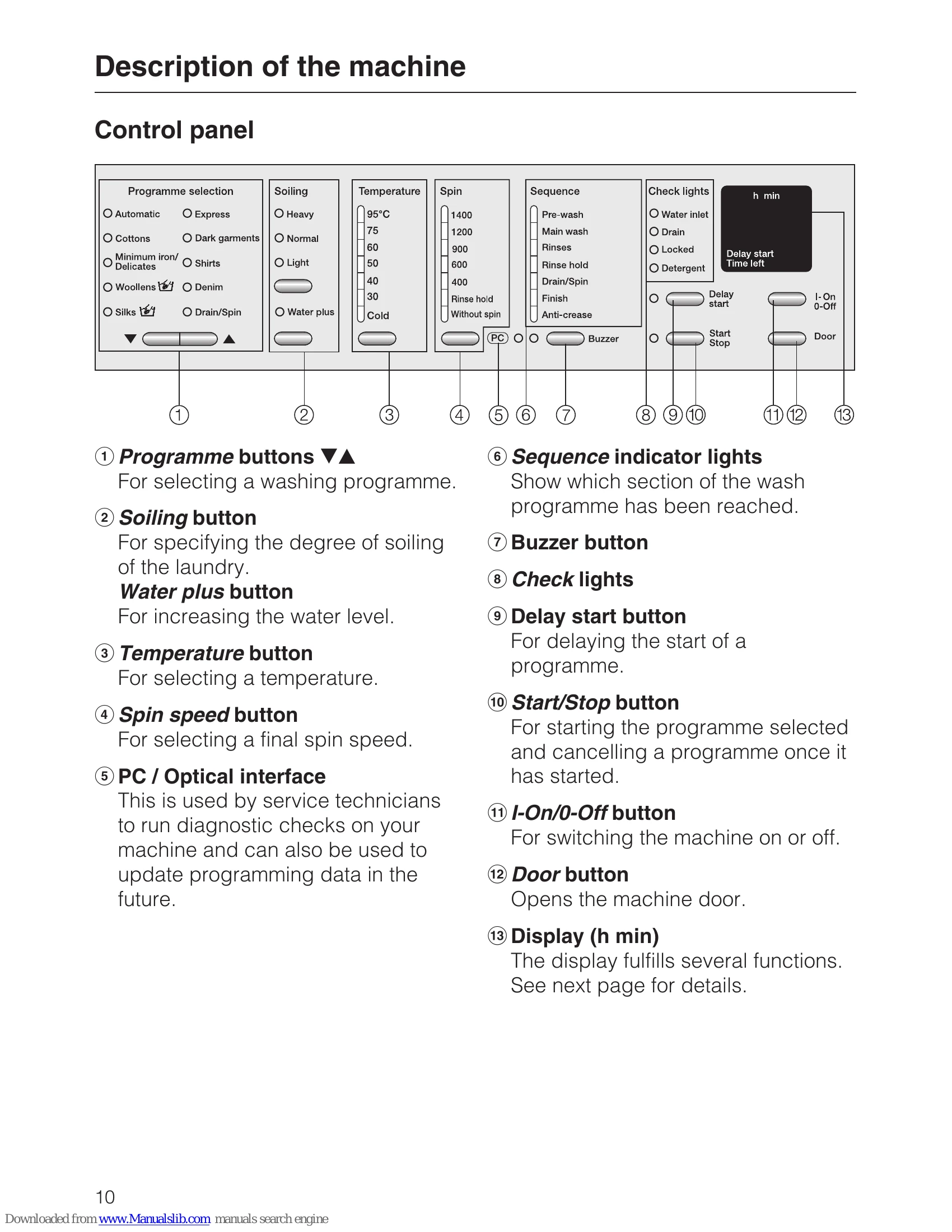
  • Selecting Programme: Use programme buttons to select the desired wash cycle based on fabric type and soiling.
  • Setting Options: Adjust soiling degree, temperature, spin speed, and optional functions like Water plus or Buzzer.
  • Adding Detergent: Dispense the correct amount in the designated compartments for pre-wash and main wash.
  • Starting Programme: Press the Start/Stop button. The display shows estimated duration.
  • Delay Start: Option to delay the start of a programme.
  • Removing Laundry: Wait for the drum to stop completely. Check door seal for small items.
  • Care: Cleaning the machine, detergent drawer, and filter.
  • Troubleshooting: Guide for common problems and error indicators.

The manual also covers environmental care, safety instructions, and technical data.

Troubleshooting and error codes

What to do, if . . . Possible cause / Solution
The programme does not start
  • Machine is not switched on. → Switch on.
  • Door is not closed properly. → Close the door firmly.
  • Delay start is activated. → Cancel Delay start.
  • Tap is not turned on. → Turn on tap.
The wash programme stops and a fault indicator light comes on.
  • Water inlet light flashes: Tap not turned on or water pressure too low. → Turn on tap, check water pressure.
  • Drain light flashes: Drain hose kinked or blocked. Filter blocked. → Remove kinks, clean filter.
  • 'Door' light flashes: Door not closed properly. → Close door firmly.

For all other fault indicator lights, refer to the "General problems" section.

General problems
  • Unsatisfactory wash result: Too little/too much detergent used. → Use correct amount. Programme or temperature too low. → Select appropriate programme/temperature. Laundry not sorted correctly. → Sort laundry by colour and care label.
  • White residue on laundry: Too much detergent used, or detergent not rinsed out properly. → Use less detergent or select a programme with an extra rinse.
  • Machine vibrates or spins noisily: Transit bars not removed. → Remove transit bars (see "Installation and connection"). Not levelled. → Level machine using the feet. Load too small or unevenly distributed. → Add more laundry or redistribute.
  • Water remains in the drum after programme: Filter is blocked. → Clean filter. Drain hose kinked or blocked. → Remove kinks, clean drain hose.
An unsatisfactory wash result
  • Too little detergent used. → Use correct amount.
  • Programme or temperature too low. → Select appropriate programme/temperature.
  • Laundry not sorted correctly. → Sort laundry by colour and care label.
  • Programme not suitable for the degree of soiling. → Select a more intensive programme or use the "Heavy" soiling setting.
The drum door cannot be opened by pressing the Door button.
  • Programme has not finished. → Wait until programme is finished.
  • Door lock is still engaged. → Wait until the 'Door' indicator light goes out.
  • Power failure or fault. → See "Opening the drum door in the event of a blocked drain outlet and/or power failure".
Opening the drum door in the event of a blocked drain outlet and/or power failure.
  • Release the handle on the emergency release cover (usually located at the bottom front of the machine).
  • Pull the handle to open the door.
  • Ensure the machine is switched off and unplugged from the mains before attempting this.
Privacy Policy