Brand: Mio
Category: Automotive Electronics
Document Type: Manual
Language: EN
Brand: Mio
Category: Automotive Electronics
Document Type: Manual
Language: EN
Uploaded: Aug. 10, 2025, 12:46 a.m.
Manual Publish Date: 2017-10-01
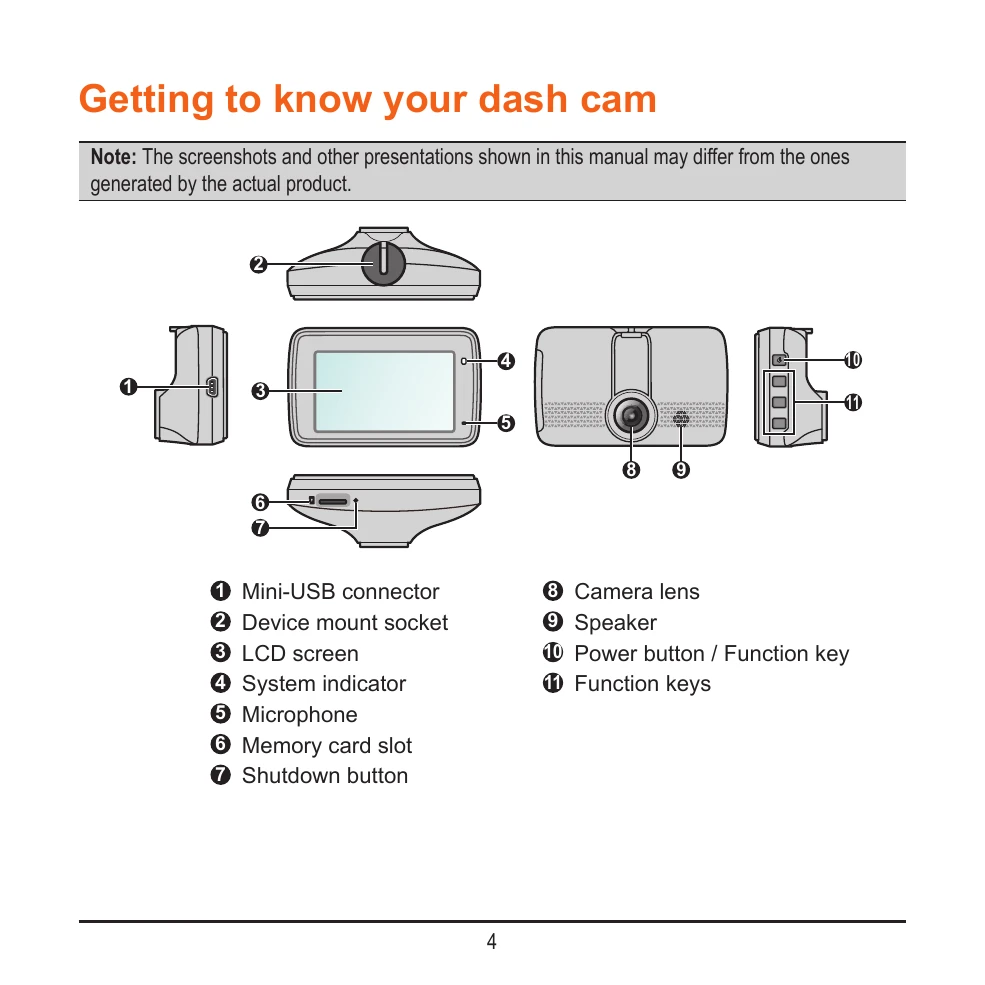
Familiarize yourself with the device components, including the Mini-USB connector, device mount socket, LCD screen, system indicator, microphone, memory card slot, and shutdown button. Also identify the camera lens, speaker, and power/function buttons.
Ensure safe installation by mounting the dash cam securely, adjusting the lens angle for a 6/4 ground-to-sky ratio, and routing cables properly to avoid interfering with driving or safety features. Avoid operating while driving and ensure the camera lens is clear.
Insert a Class 10 memory card (8GB-128GB) into the slot. Format the card before first use. Connect the dash cam to your computer via USB to access data.
The dash cam turns on automatically when the vehicle engine starts. Press and hold the power button for 2 seconds to manually turn it on/off. Restart by holding the power button or using the shutdown button if unresponsive.
Understand the status icons on the screen (recording, Wi-Fi, time, mic, GPS, speed) and how the function keys control different modes and settings.