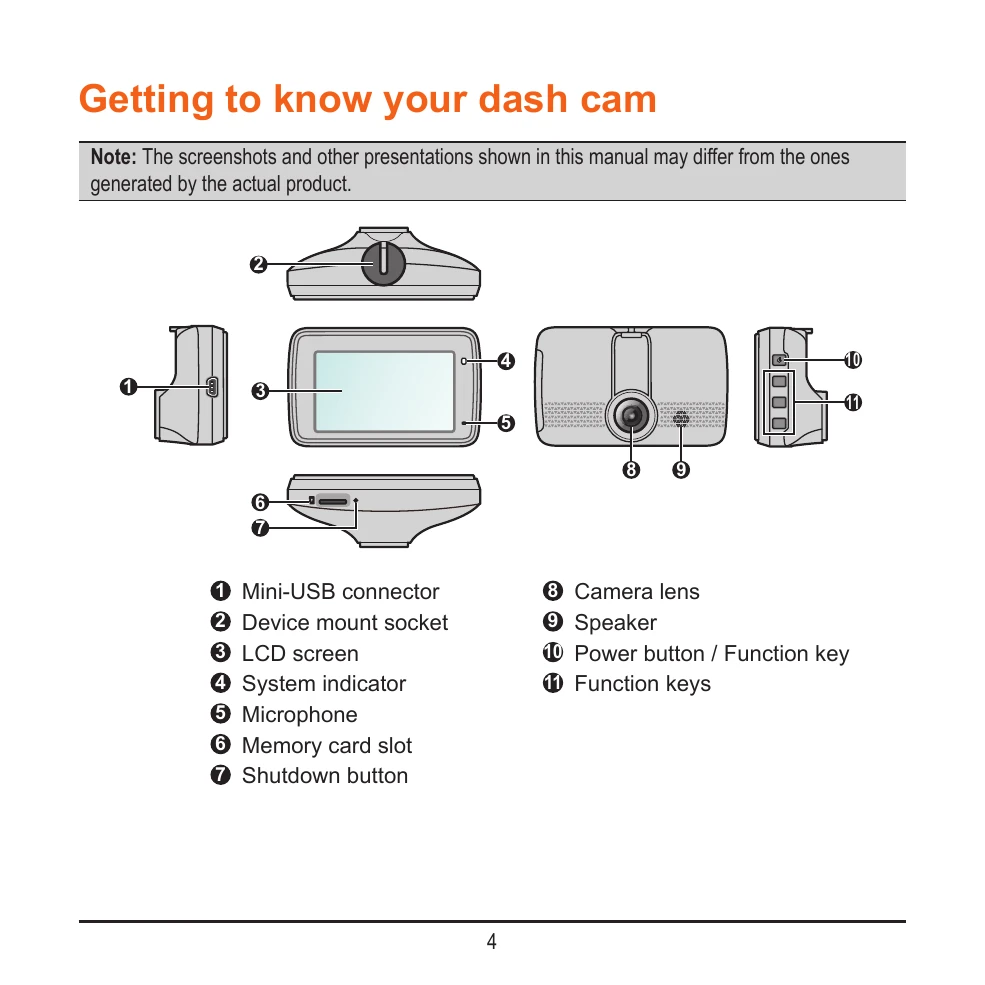
Getting to know your dash cam:
1. Identify the components: Mini-USB connector, device mount socket, LCD screen, system indicator, microphone, memory card slot, shutdown button, camera lens, speaker, power button/function key, and function keys.
Using your dash cam in a vehicle:
1. Mount the dash cam securely using the window mount, ensuring it doesn't obstruct the driver's view or airbags.
2. Adjust the lens angle so the camera's view is parallel to the ground.
3. Route cables safely, ensuring they don't interfere with driving or safety features.
Inserting a memory card:
1. Insert a Class 10 microSD card (8 GB - 128 GB) into the memory card slot.
2. Format the card before use.
Turning the dash cam on:
1. The dash cam turns on automatically when the vehicle engine starts. The system indicator glows green.
2. Press and hold the power button for 2 seconds to manually turn the device on/off.
3. To restart, press and hold the power button, or use the shutdown button with a small rod if unresponsive.
System icons and function keys:
Familiarize yourself with the status bar icons (recording indicator, Wi-Fi status, time, microphone, GPS, speed) and function keys for navigation and control.
Setting date and time:
Access Settings > System > Date/Time. Choose between GPS time or manual setting.
Recording modes:
- Continuous recording: Starts automatically after start-up.
- Event recording: Activates automatically upon detecting impact or sudden movements (G-sensor).
- Parking mode: Requires an additional power source (e.g., Mio Smart Box) and can be enabled in settings.
Camera and Playback modes:
- Camera mode: Press to take photos.
- Playback mode: Access recorded videos and photos via File Playback.
Getting connected:
- MiVue app: Download to share and back up videos via Wi-Fi.
- Wi-Fi connection: Enable in settings to connect to your smartphone.
System settings:
Customize various settings including File Playback, Camera, Wi-Fi, Sound Recording, Parking Mode, Video Recording, and System options. Format the memory card from System settings.