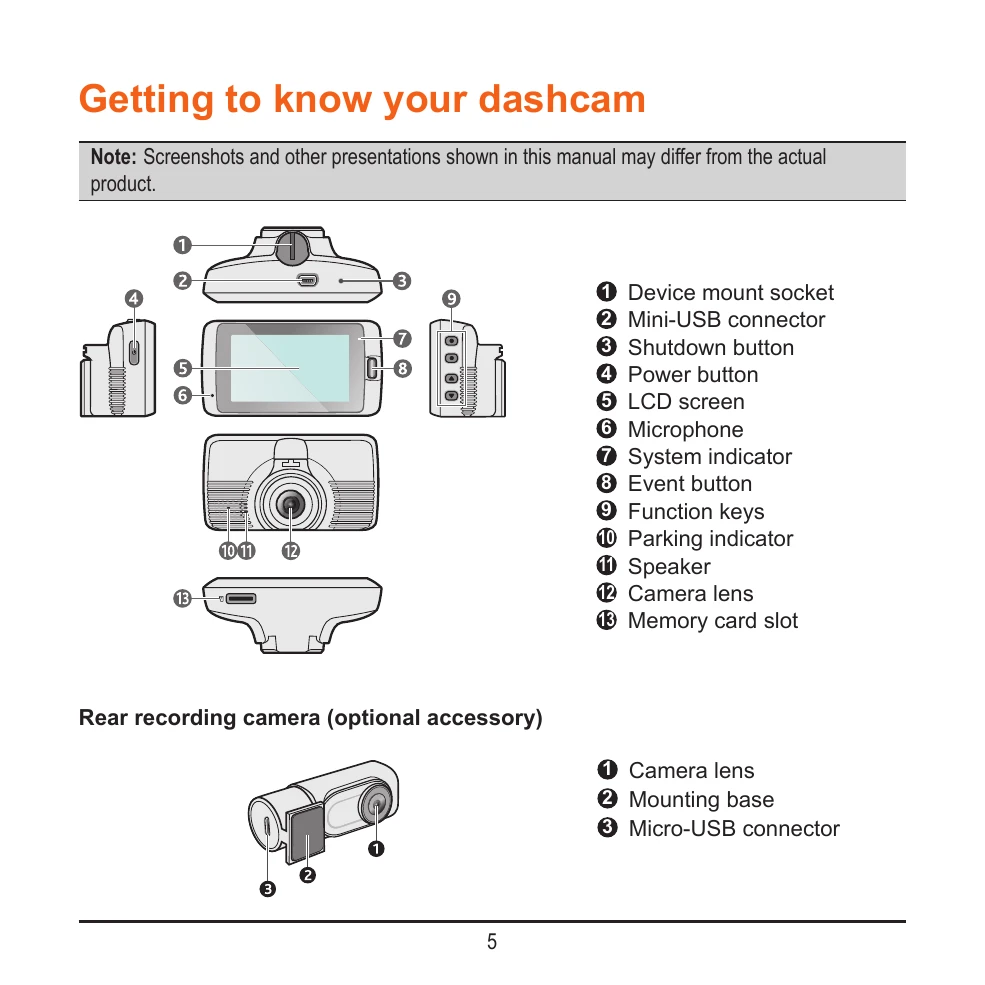
Mounting the dashcam: Ensure the windscreen is clean and the mount is securely attached. Adjust the angle for a 50/50 ground/sky split.
Memory card: Insert a Class 10 MicroSD card (8GB-256GB). Format the card before use.
Powering on: The dashcam turns on automatically when the vehicle engine starts. Press and hold the power button to turn it on/off manually.
Recording modes: Continuous recording starts automatically. Event recording is triggered by G-sensor or manually. Parking mode activates after 5 minutes of inactivity and records when motion or vibrations are detected.
Camera mode: Take photos by pressing the camera button.
Playback mode: Access recordings via the menu, select file type, and use playback controls.
WIFI connection: Connect to your smartphone via the MiVue Pro app to view, share, and back up videos.
System settings: Customize various settings including date/time, sound recording, safety camera alerts, driving safety features, and more.