Manual for C300

Manual for C300

Brand: Mio

Category: Automotive Electronics

Document Type: Manual

Language: EN

Uploaded: Aug. 10, 2025, 12:46 a.m.

Warranty Information

None

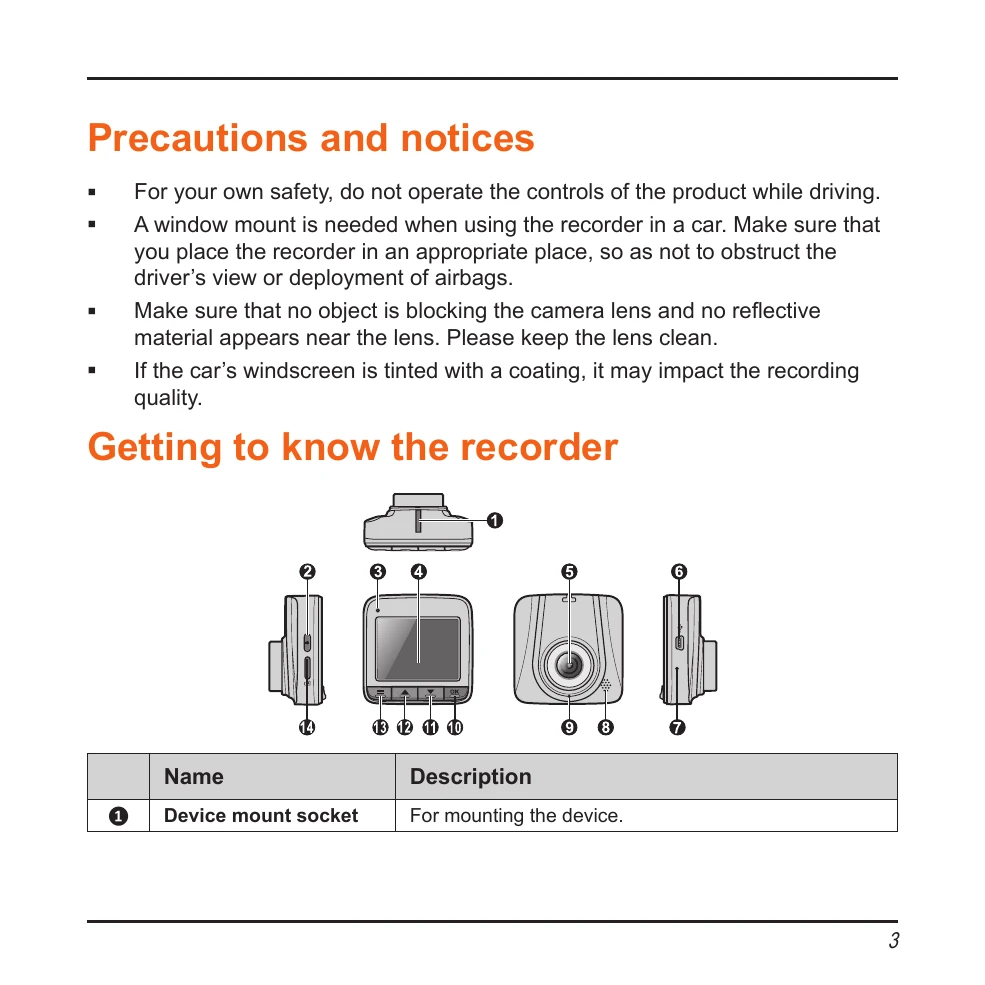
Getting to know the recorder

  • Device mount socket: For mounting the device.
  • Power key: Turns the device on/off and cycles through operation modes (video, capture, playback).
  • Status indicator: Shows charging status (red) and recording status (flashing green).
  • LCD screen: Displays the device output.
  • Camera lens: Ensure it is clear and unobstructed.
  • Mini-USB connector: Connects to the charger.
  • Shutdown switch: Turns off the device.
  • Speaker: Outputs audio.
  • Microphone: Receives sounds.
  • OK key: Starts/stops recording and acts as the ENTER button.
  • Down key: Navigates down and zooms out.
  • Up key: Navigates up and zooms in.
  • Menu key: Opens settings or returns to the previous screen.
  • Memory card slot: For MicroSD card.

Operating basics

  • Setting the date and time: Access Setup menu and adjust Date/Time fields.
  • Continuous recording: Starts automatically when connected to car charger.
  • Event recording: Automatically triggered by G-sensor for impacts or manually started.
  • Capture mode: Press Power key to switch, then OK to capture photo.
  • Playback mode: Press Power key to switch, OK to play/pause, Up/Down keys to navigate files.
Privacy Policy