Brand: Mio
Category: Automotive Electronics
Document Type: Manual
Language: EN
Brand: Mio
Category: Automotive Electronics
Document Type: Manual
Language: EN
Uploaded: Aug. 10, 2025, 12:46 a.m.
Manual Publish Date: 2024-06-01
None
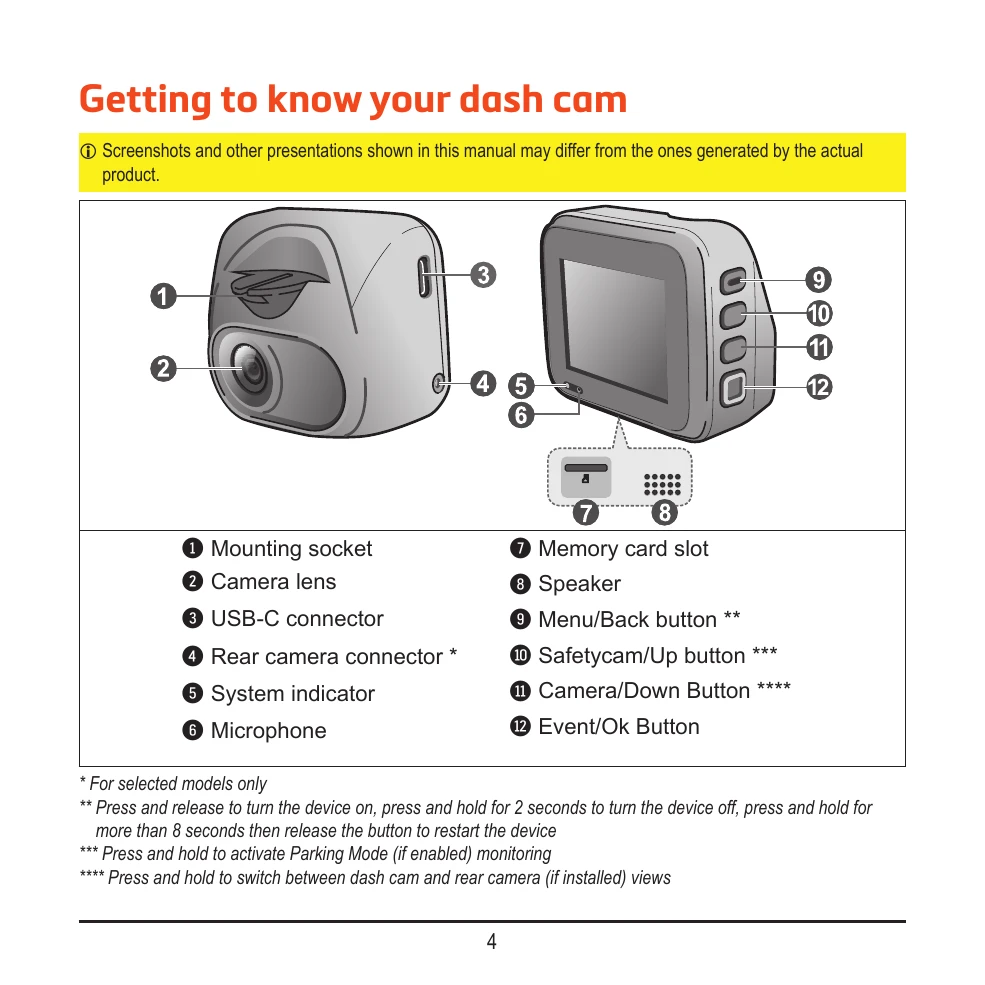
Powering On: The dash cam turns on automatically when the vehicle engine starts. You can also manually turn it on/off using the power button. Upon first power-up, follow on-screen prompts to select language, set date/time, and choose distance units.
Continuous Recording: The device starts recording automatically. Recordings are saved as clips. The oldest files are overwritten when the memory card is full.
Event Recording: Automatically starts recording when the G-sensor detects an impact, sudden braking, or sharp turn. Manual event recording can also be initiated.
Parking Mode: Supports recordings triggered by G-sensor and motion detection when the vehicle is parked. Requires an external power source (e.g., Mio SmartBox).
Access recorded videos and photos through the 'File Playback' menu. You can select file types, navigate through files, play, pause, zoom, and delete recordings.
Connect to your smartphone via WIFI using the MiVue Pro app to view, share, and back up recordings.
Access the system settings menu to customize various options including sound recording, safety camera alerts, parking mode, video recording, and system preferences like language and display.