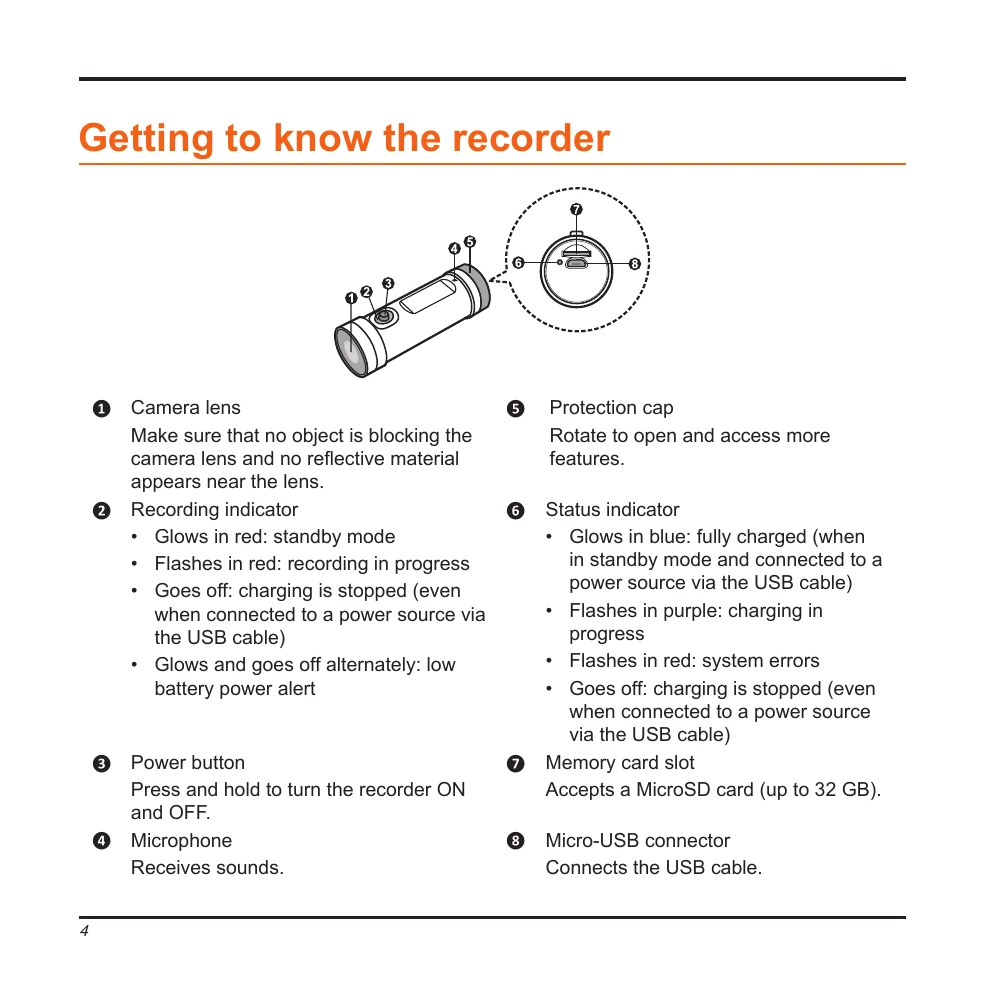
Powering On/Off: Press and hold the power button to turn the MiVue ON or OFF. Connecting/reconnecting the USB cable also turns it ON.
Standby Mode: Briefly press the power button to enter standby mode. The recording indicator will remain lit. Press again to resume.
Recording: After turning on, the MiVue automatically starts continuous recording. The red indicator flashes during recording. Recordings are saved in clips (approx. 1 minute each).
Stopping Recording: Briefly press the power button to stop recording and enter standby mode.
Memory Card: A MicroSD card is required. Insert it before recording. Format the card before first use.
Charging: Connect the MiVue to a power source using the USB cable. The status indicator shows charging progress.
Mounting: Use the supplied mount to attach the MiVue to a motorbike or helmet.
Settings: System settings can be adjusted via a "setting.txt" file on the MicroSD card.
MiVue Manager: Use this software to view and manage recordings on your computer.