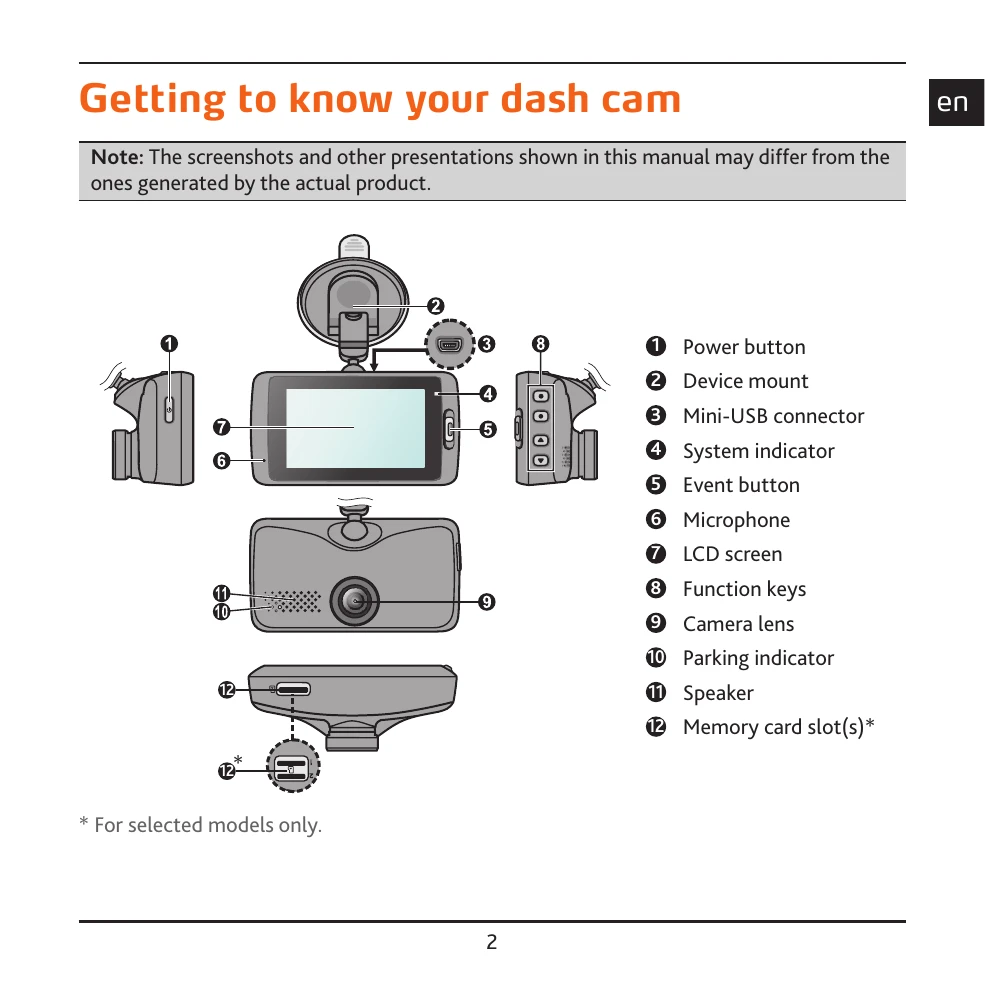
Turning the recorder on: Ensure the device is installed correctly and then start the vehicle's engine; the recorder will turn on automatically.
Restarting the recorder: If the device becomes unresponsive, press and hold the power button to shut it down. Then, press the power button again to turn it back on. For persistent issues, a small rod can be used to activate the shutdown button.
Function keys: These keys control various functions displayed on the LCD screen, with their specific actions changing based on the current screen.
System icons: Located on the title bar, these icons provide status information about the device, such as recording status, time, GPS signal, and battery power.
Setting date and time: Access the Settings Menu, navigate to System > Date/Time, and choose to use GPS time or set it manually.
Recording modes: The device supports Continuous Recording, Event Recording (triggered by G-sensor or manually via the Event button), and Parking Mode (which can be enabled to record automatically based on detected motion or events).
Camera mode: Allows taking photos by pressing the camera button.
Playback mode: Access recorded videos and photos through the File Playback menu, select the desired file type (Video, Event, Parking, Photo), and use the playback controls.