Getting to know your dash cam
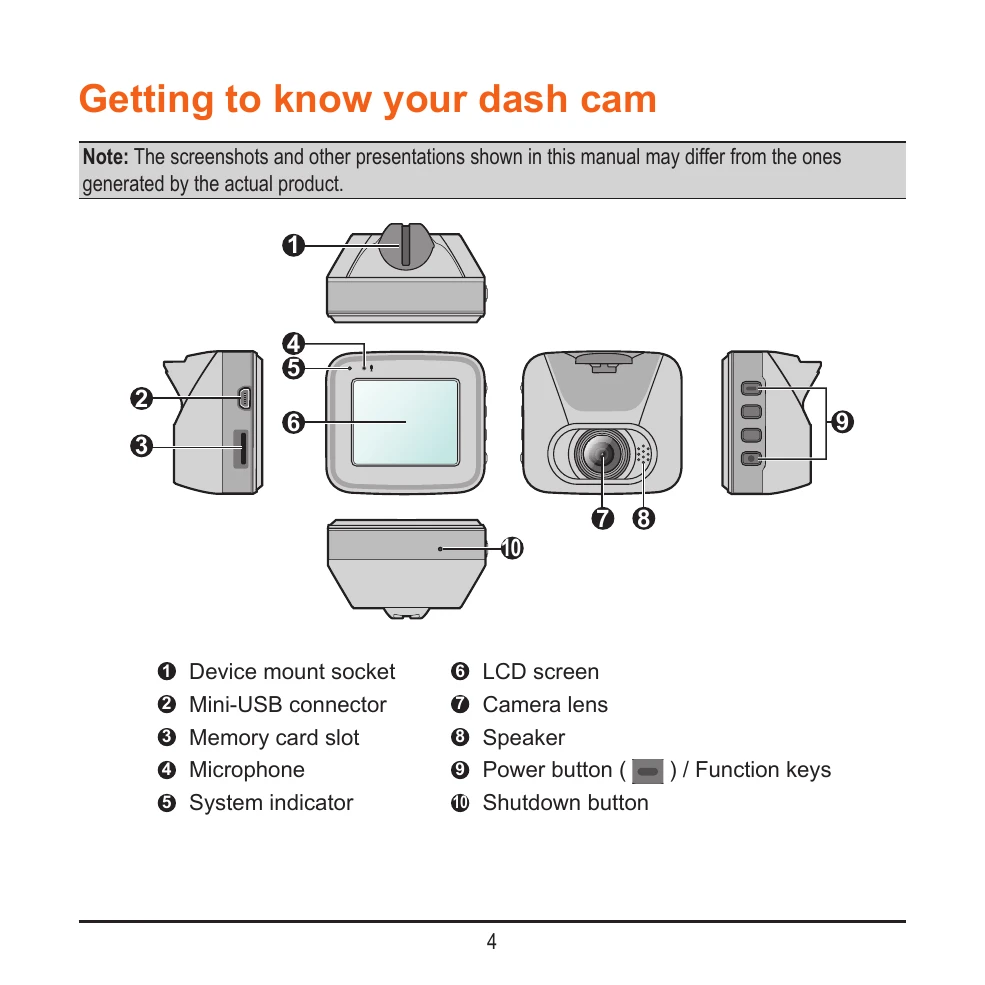
This section introduces the components of your dash cam, including the device mount socket, mini-USB connector, memory card slot, microphone, system indicator, LCD screen, camera lens, speaker, and power button. It also shows the shutdown button.
Using your dash cam in a vehicle
This section provides precautions and notices for using the dash cam while driving, emphasizing driver responsibility and safe placement of the device to avoid obstructing the view or airbags. It details how to mount the dash cam using a suction cup or adhesive tape mount, ensuring the camera's view is parallel to the ground and routing cables safely. It also covers connecting a rear camera and using a memory card, including formatting.
Basic Operations
Learn how to turn the dash cam on and off, understand system icons, use function keys, switch screens, and set the date and time.
Recording Modes
Explore continuous recording, event recording (triggered by G-sensor), and parking mode (requires additional power source).
Camera and Playback
Discover how to take photos and playback recorded videos and photos, including using the MiVue Manager software for viewing and managing recordings. The playback controls and additional driving information (map, G-sensor chart) are also explained.