Manual for MiVue™ 730 Series

Manual for MiVue™ 730 Series

Brand: Mio

Category: Automotive Electronics

Document Type: Manual

Language: EN
Uploaded: Aug. 10, 2025, 12:46 a.m.

Manual Publish Date: 2019-05-01

This manual provides instructions for using the Mio MiVue™ 730 Series dash cam. It covers:

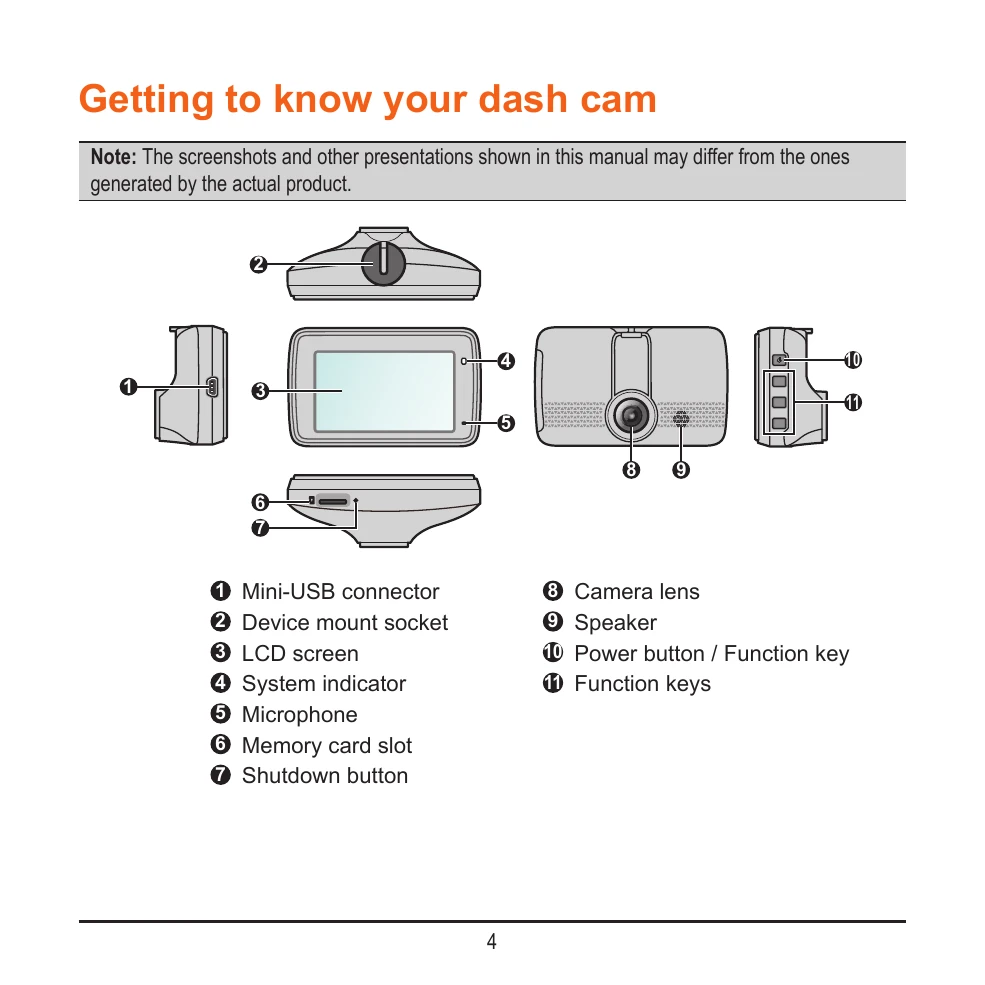
  • Getting to know your dash cam: Identifies components and their functions.
  • Using your dash cam in a vehicle: Covers mounting, connecting cables, and initial setup.
  • Inserting a memory card and formatting it.
  • Turning the dash cam on and restarting it.
  • Understanding system icons and function keys.
  • Setting the date and time.
  • Recording modes: Continuous, Event, and Parking modes.
  • Camera mode for taking photos.
  • Playback mode for reviewing recordings.
  • Connecting to your smartphone via the MiVue Pro app and Wi-Fi.
  • System settings for customization.
  • Using MiVue Manager for playback on a computer.
  • Caring for your device and safety precautions.
  • Information on charging, battery, GPS, and regulatory compliance.
Privacy Policy