Getting to know your dash cam
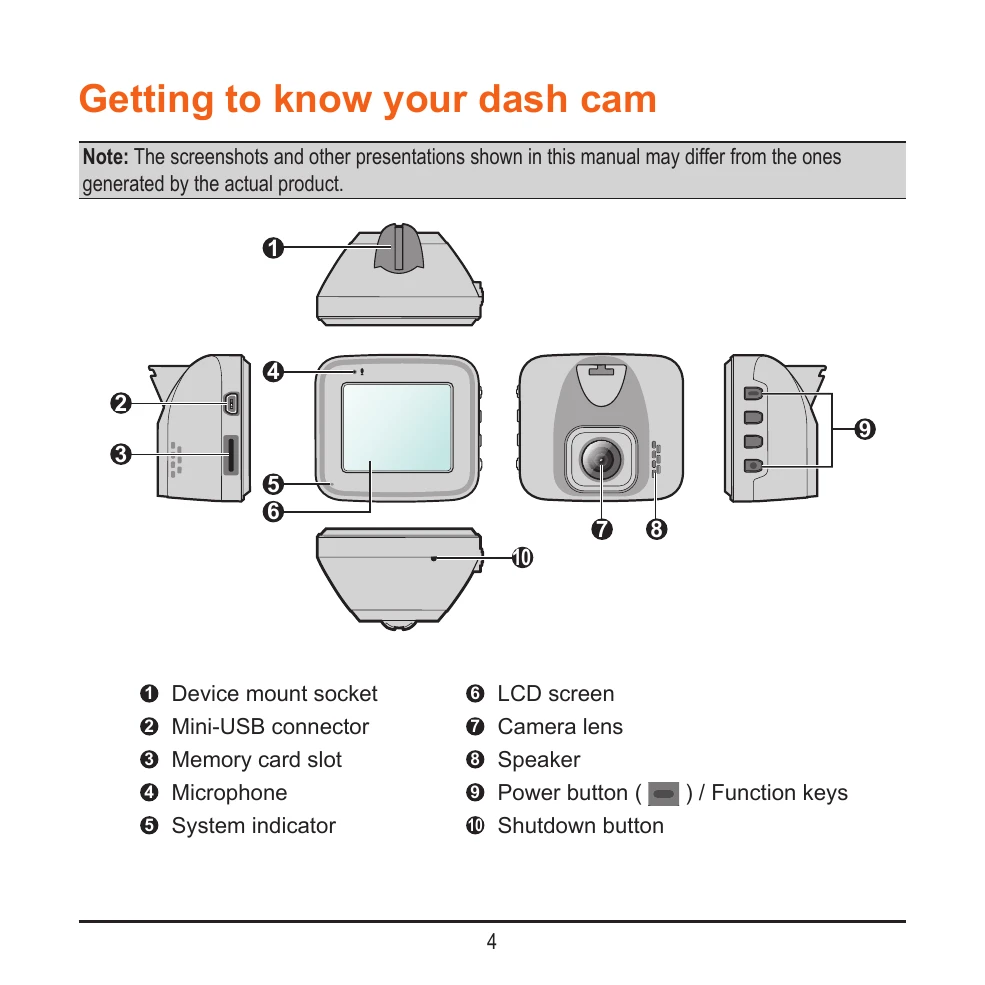
This section provides an overview of the dash cam's components, including the device mount socket, Mini-USB connector, memory card slot, microphone, system indicator, LCD screen, camera lens, speaker, power button, and shutdown button.
Using your dash cam in a vehicle
This section covers essential precautions and notices for using the dash cam in a vehicle, such as not operating it while driving, proper mounting on the windshield, ensuring the camera lens is clear, and advice on optimal placement for recording quality and GPS reception. It also details the G-sensor calibration process.
Mounting the dash cam
Instructions on how to securely mount the dash cam in a vehicle, including cleaning the windshield, attaching the mount, adjusting the angle, and routing the cable safely.
MiVue rear camera
Information on connecting and using an optional rear camera.
Using a memory card
Guidance on inserting and removing a microSD card, including compatibility, formatting, and precautions.
Turning the dash cam on
Details on how the dash cam turns on automatically with the vehicle engine and manual power-on/off instructions.
Shutting down the dash cam
Procedures for shutting down the dash cam, including a hardware reset option.
System icons
An explanation of the various icons displayed on the status bar for device information.
Function keys
How to use the four function keys to control the dash cam's various functions.
Switching screens
How to switch between front and rear camera views.
Setting the date and time
Instructions for setting the correct date and time using GPS or manually.
Recording in driving mode
Details on continuous recording, event recording, and how the G-sensor triggers event recordings.
Parking mode
Information on enabling and using the parking recording function, including its triggers and recording duration.
Camera mode
How to take photos with the dash cam.
Playback mode
Instructions on how to select and play back recorded videos and photos.
Safety camera alerts
How to receive alerts for safety cameras and customize alert settings.
Adding a safety camera
Instructions on how to add custom safety camera locations.
Updating safety camera data
Information on how to update safety camera data.
System settings
An overview of various system settings, including File Playback, Camera, Sound Recording, SafetyCam, Parking mode, Video Recording, and System configurations.
MiVue Manager
Information on installing and using MiVue Manager software to view recorded videos.
Caring for your device
Guidelines for maintaining and caring for the dash cam to ensure its longevity and proper function.
Safety precautions
Important safety information related to charging, using the charger, and battery handling.
About GPS
Information about the GPS functionality and its limitations.
Regulatory information
Details on regulatory compliance and certifications.