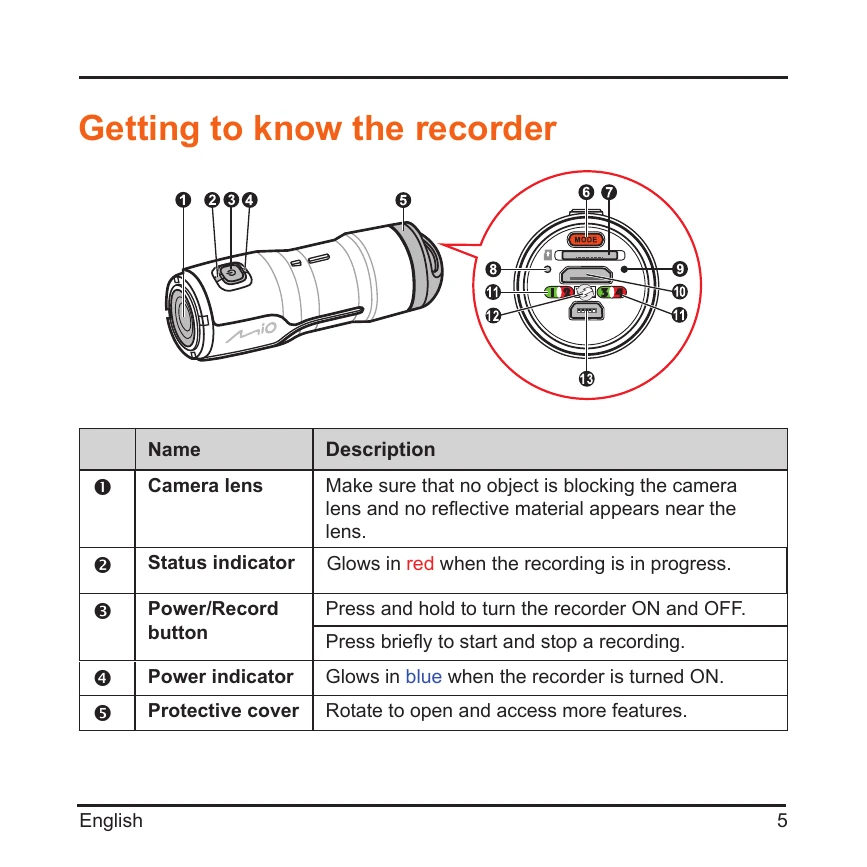
Turning the recorder ON and OFF: Press and hold the Power/Record button for 5 seconds.
Setting Date and Time: Connect to computer, edit `Time.txt` file on the MicroSD card, set format to YYYY/MM/DD and hh:mm:ss, update setting to [Y], and restart the recorder.
Standard Recording: Ensure MicroSD card is inserted, turn on the recorder, press Power/Record button briefly to start recording. Press again briefly to stop.
Continuous Recording: Ensure MicroSD card is inserted, turn on the recorder, press and hold the Mode button until the amber indicator lights up to start. Press the Power/Record button briefly to stop.
Playback: Connect to an external viewing device using the HD cable. Use playback controls on the recorder or the playback screen to navigate and play videos.