Manual for FT SERIES

Manual for FT SERIES

Brand: MITSUBISHI ELECTRIC

Category: Computer

Document Type: Manual

Language: EN
Uploaded: Nov. 21, 2025, 6:14 p.m.

Welcome

  • Unpacking: Keep all original packaging for future transport needs. Record component details for service purposes.
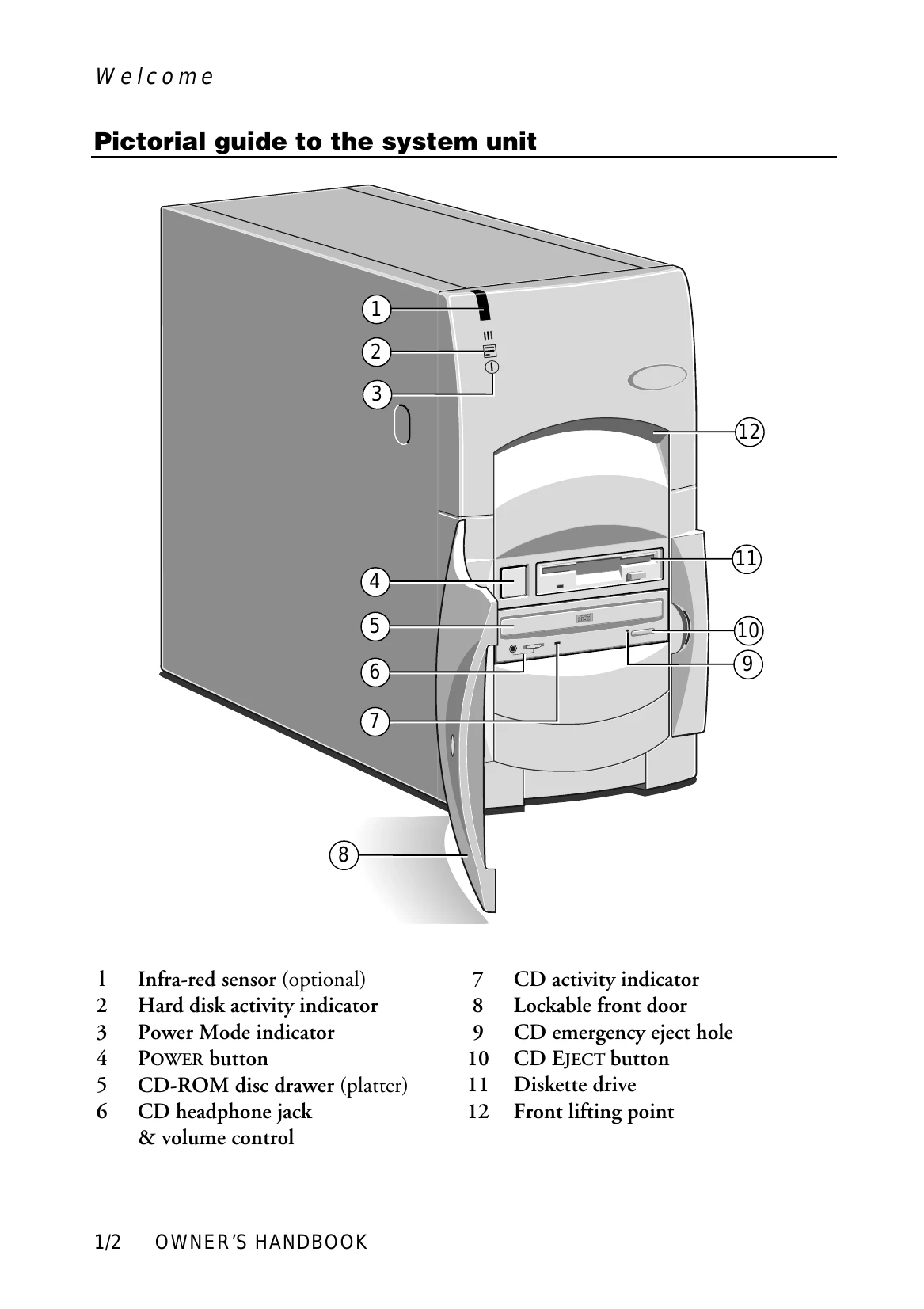
  • System Unit Guide: Familiarize yourself with the various buttons, indicators, and ports of the system unit.
  • Removing Panels: Learn how to safely remove side and top panels for internal access, ensuring power is disconnected and anti-static precautions are taken.
  • General Advice: Choose a suitable site for the computer, considering temperature, humidity, ventilation, and ergonomics. Ensure power cords are not a tripping hazard.
  • Connecting Components: Follow the steps to connect signal and power cables, ensuring all components are turned off before starting.

Getting Started

  • Turning on the PC: Press the POWER button; the indicator will change color to show the power mode.
  • Power-on Self-Test (POST): The system runs a diagnostic test on hardware components.
  • Booting the Operating System: The computer attempts to load the pre-installed operating system (Windows 95, NT, or MS-DOS/Windows for Workgroups).
  • Power Saving: Understand the different power modes (Off, Suspend, On/Standby) indicated by the Power Mode indicator color.

Troubleshooting and error codes

Code Beeps Test which failed
16 1-2-2-3 BIOS ROM checksum
20 1-3-1-1 DRAM refresh.
22 1-3-1-3 8742 keyboard controller
2C xxxx 1-3-4-1 RAM failure on address line xxxx.
2E xxxx 1-3-4-3 RAM failure on data bits xxxx of low byte of memory bus.
30 xxxx 1-4-1-1 RAM failure on data bits xxxx of high byte of memory bus.
46 2-1-2-3 Check ROM copyright notice
58 2-2-3-1 Test for unexpected interrupts
98 1-2 Video configuration failure, or option ROM checksum failure. (One long, two short beeps.)
Privacy Policy