Brand: MITSUBISHI ELECTRIC
Category: Printer
Document Type: Manual
Language: EN
Brand: MITSUBISHI ELECTRIC
Category: Printer
Document Type: Manual
Language: EN
Uploaded: Nov. 21, 2025, 7:47 p.m.
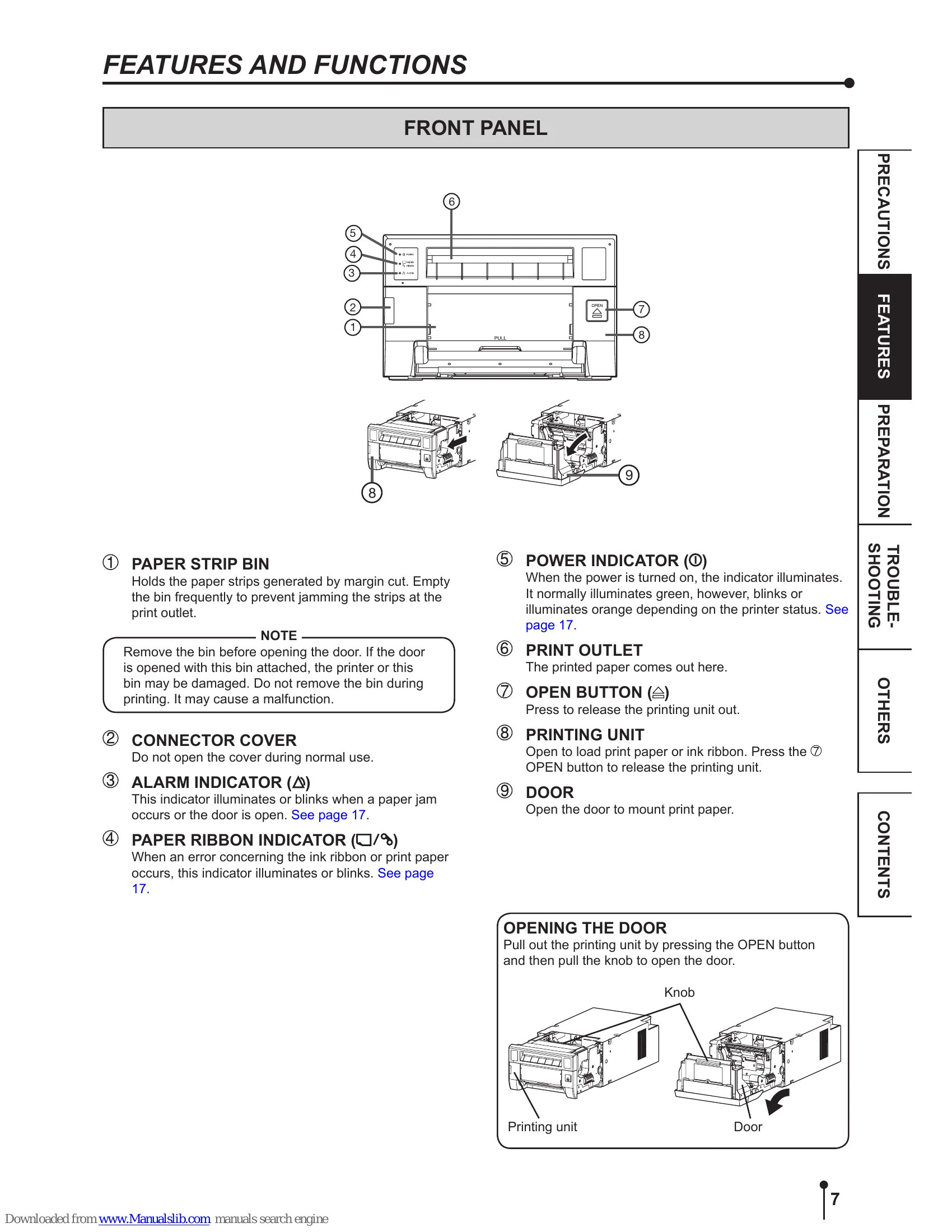
Ensure the printing unit is closed after setup.
| ALARM | PAPER RIBBON | POWER | Causes and Countermeasures | Page |
|---|---|---|---|---|
| (Orange) | This printer is in standby mode. Connect a USB cable to the printer when not connected. It may take time for the printer to be ready to print images after the image data is sent. |
7, 16 | ||
| ■ | (Green) |
The printing unit is open. Close the printing unit. |
7 | |
| ■ | ■ | (Green) |
A paper jam or a problem concerning the ink ribbon occurs. Refer to "Overcoming paper jams." |
18 |
| ■ | (Green) |
The temperature of the thermal head is too high or too low. Wait until the indication goes off. When the indicator stops blinking, the printer resumes printing automatically. |
7 | |
| ■ | (Green) |
The ink ribbon which is not available to this printer is installed. Replace the ink ribbon with a new one. The actual combination of ink ribbon and print paper is inconsistent with the setting made by the personal computer. Open the printing unit and confirm that the actual combination of ink ribbon and print paper is consistent with the setting made by the personal computer. After checking, close the printing unit. |
13-14 | |
| ■ | (Green) |
The print paper or ink ribbon is not installed. The print paper or ink ribbon is used up. Install new print paper or ink ribbon. |
11-14 | |
(Green) |
Other errors | 20 |