Brand: MITSUBISHI ELECTRIC
Category: Printer
Document Type: Manual
Language: EN
Brand: MITSUBISHI ELECTRIC
Category: Printer
Document Type: Manual
Language: EN
Uploaded: Nov. 21, 2025, 7:08 p.m.
Manual Publish Date: 2006-01-01
This manual does not contain specific warranty period information.
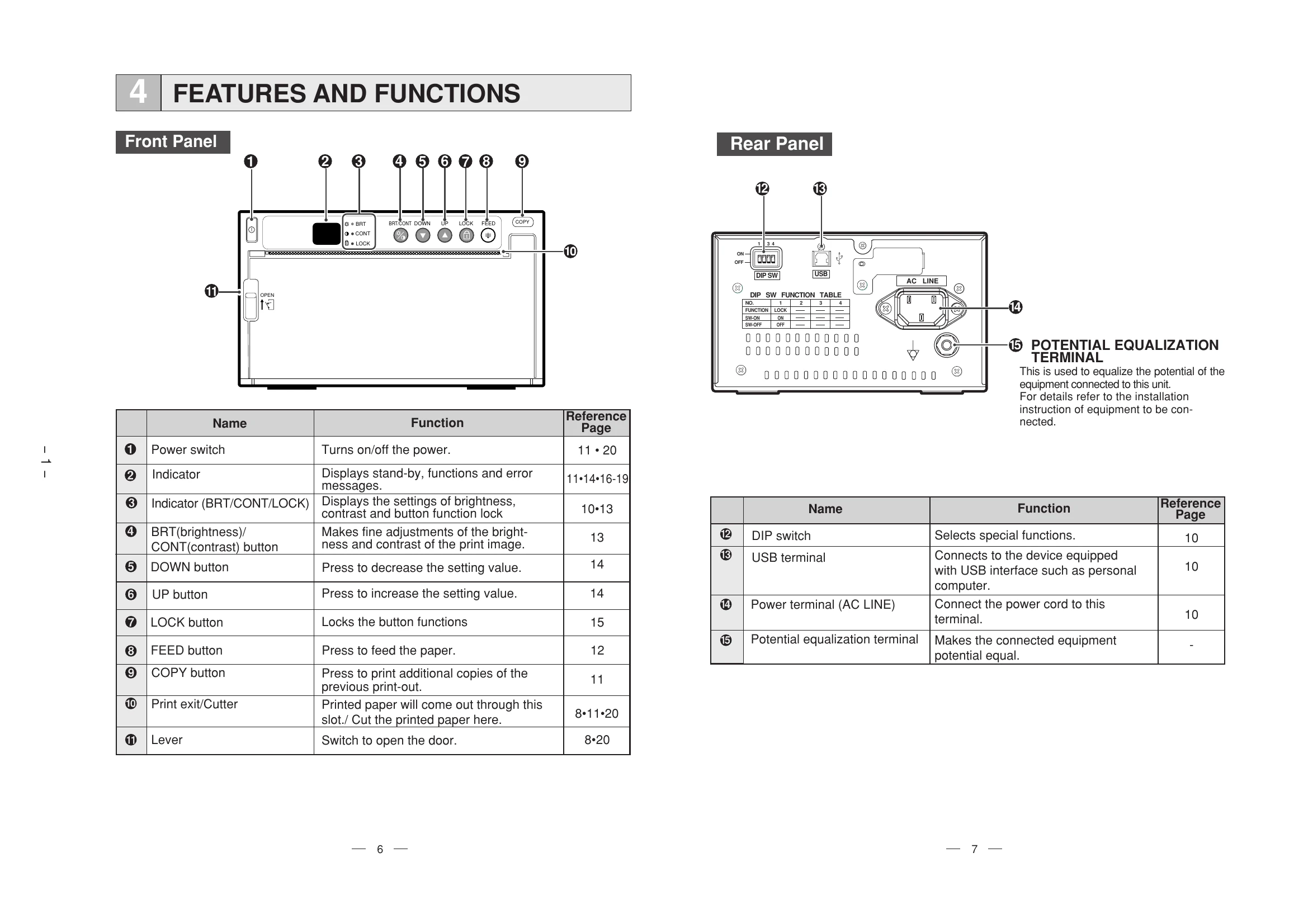
The P93DW is a digital monochrome printer. It supports printing via USB connection. Key functions include paper installation, error display, status and mode indicators, and cleaning procedures for the thermal head. The printer also has features for adjusting print brightness and contrast. Specific procedures are outlined for error handling, such as overheat, no paper, button input errors, door errors, and gear lock errors. The manual also details the status and modes of the printer, including power status, data receiving, and print states, as well as how to use cleaning paper.
| Cause/Error display | Symptom/Remedy |
|---|---|
| Overheat | When the head gets overheated, the indicator blinks. Printing starts as soon as the error is solved. Wait until the head cools down. |
| No paper (EP) | When paper runs out or is not installed, printing is impossible and an alarm tone is heard. All buttons become invalid. Printing is cancelled at the occurrence of the error. Install a new roll of paper. |
| Button input error (Eb) | Button becomes invalid and alarm tone is heard. Occurs during brightness/contrast adjustment or when functions are locked. Indicator displays 'b' for one second. No specific remedy other than resolving the cause. |
| Door error (Eo) | When the door opens, an alarm tone is heard. Indicator displays 'E' for one second. All buttons and switches become invalid. Printing is cancelled. Close the door. |
| Gear lock error (EL) | Thermal head does not move correctly, alarm tone is heard. Indicator displays 'EL', buttons invalid. Printing cancelled. Turn the power off and then on again. |