Brand: MITSUBISHI ELECTRIC
Category: Projector
Document Type: Manual
Language: EN
Brand: MITSUBISHI ELECTRIC
Category: Projector
Document Type: Manual
Language: EN
Uploaded: Nov. 21, 2025, 7:18 p.m.
Refer to the contact information for warranty registration and support.
Getting ready for projection: 1. Connect the power cord to the projector and the wall outlet. 2. Remove the lens cap.
Adjusting the angle of projection: 1. Tilt the projector to an appropriate angle using the front and rear adjustment feet.
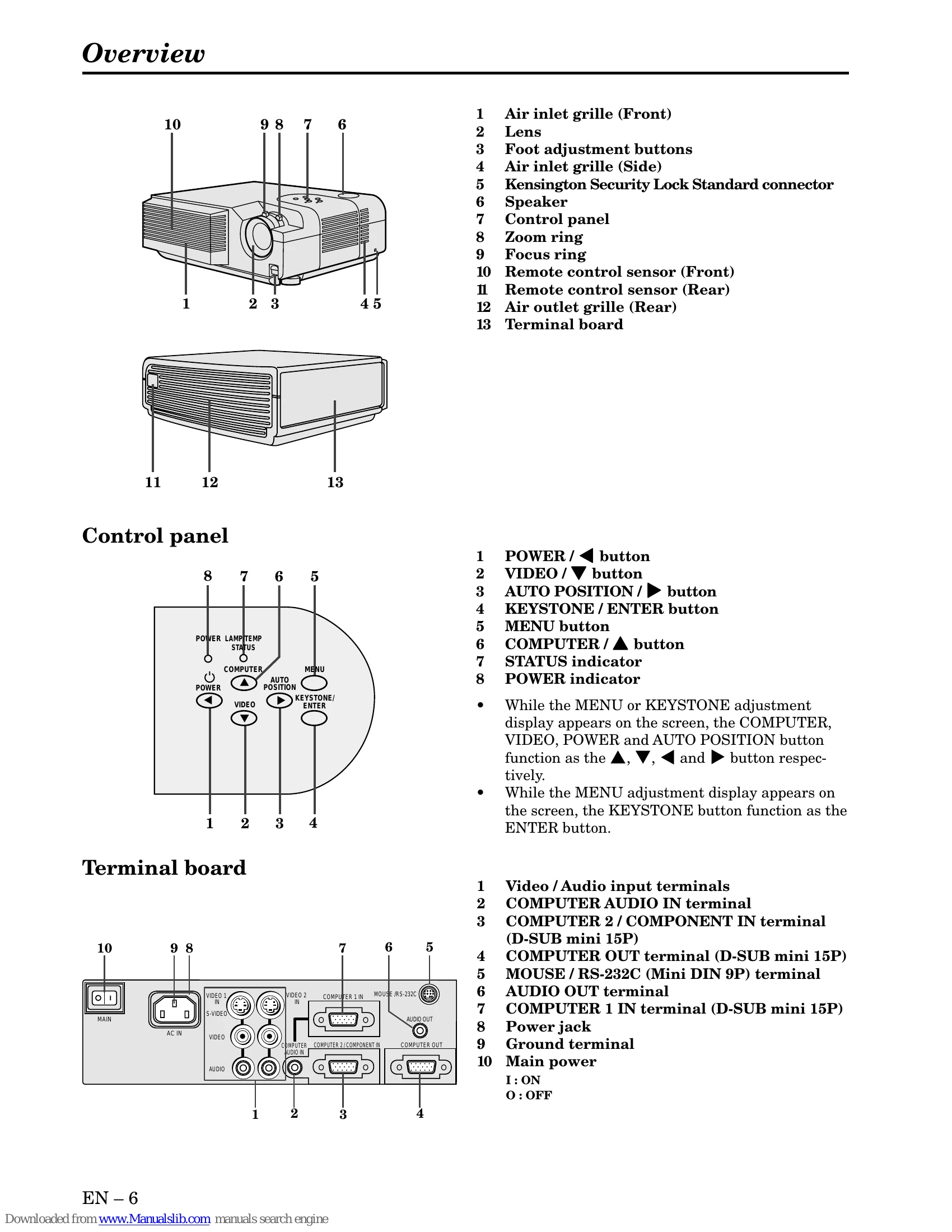
To operate projector power ON: 1. Turn on connected equipment. 2. Set projector to standby mode (main power switch). 3. Turn on projector (POWER button). 4. Select input source (COMPUTER/VIDEO buttons). 5. Adjust image size with zoom ring and focus with focus ring.
Turning off the projector: 1. Press POWER button twice. 2. Wait for exhaust fan to stop (120 seconds). 3. Turn off main power switch. 4. Unplug power cord.
| PROBLEMS | CAUSE | POSSIBLE SOLUTIONS |
|---|---|---|
| The power is off. | The air inlet grille, outlet grille or air filter is clogged with dust or some other obstruction. POWER indicator does not light up. Power cord is unplugged from the outlet. Power cord is disconnected from the projector. The main switch is turned off. The lamp lid is open. | Remove the obstruction. Plug the power cord into the outlet. Insert the power cord into the projector. Turn the main switch on. Close the lamp lid. |
| Power indicator blinks red. | The projector has been turned on again too soon after having been turned off. When the power switch was turned off while the fan was running, during or after lamp operation. The room temperature is too high. | Wait for the lighting sequence. Turn the power switch on and off several times. Refer to "Indicators" on page 26. |
| Lamp is no longer working. | Lamp is no longer working. | Replace the lamp with a new one. |
| POWER indicator blinks between red and green. | The lamp cover is not closed. When the STATUS indicator is on or blinking, the main unit requires repairs. | Close the cover correctly. Contact your dealer. |
| No picture appears on the screen. | Lens is covered by lens cap. When the STATUS indicator is on or blinking, the main unit requires repairs. The equipment connected to this projector is not turned on. Other equipment is not connected properly. The input source is not selected correctly. A long RGB cable is being used instead of the attached RGB cable. The air inlet grille, outlet grille or air filter is clogged with dust or obstructed. | Take the lens cap off. Replace the lamp with a new one. Turn on the connected equipment. Confirm the connections. Select the correct source according to the equipment connected to this projector. Check whether a picture appears or not using the attached RGB cable. If a picture appears, use an RGB signal amplifier in addition to the long RGB cable. Remove the obstruction and turn off the main power switch. After about 10 minutes, turn the projector on. |
| The image is turned off. | When the STATUS indicator is on or blinking, the main unit requires repairs. | Replace the lamp with a new one. |
| The image is distorted. | The projector is not at a right angle to the screen. Brightness, tint and color are not adjusted correctly. | Adjust the angle of the projector to make a right angle to the screen. See page 12. Adjust brightness, tint and color correctly. |
| The image is dark. | The projecting distance is beyond the focused area. Lens is dirty. Screen size exceeds screen size specifications. Brightness and contrast are not adjusted correctly. | Adjust the projecting distance. See page 9. Clean lens. Use a screen size to within 40" to 300". Adjust brightness, contrast. Make FINE adjustment. |
| The image is blurred. | FINE adjustment is not made correctly. Tracking is not adjusted. The projector is not at a right angle to the screen. | Make FINE adjustment. Adjust tracking. Adjust the angle of the projector to make a right angle to the screen. See page 12. |
| The image is distorted on the screen and noise is heard. | The cable for connection with other equipment is not plugged securely into the terminal. The projector is installed too close to other equipment. | Plug the connecting cable securely into the terminal. See pages 10-11. Increase the distance between the projector and other equipment. |
| No sound is heard. | Volume is not turned up. Connection to other equipment is not made correctly. | Turn up the volume. Check connections. See pages 10-11. |
| Nothing is displayed on the PC monitor. | The PC monitor is not turned on. | Turn on the monitor. |
| Warm air comes out of the exhaust vents. | This is typical of the projector. | - |
| A rainbow blur appears on the image. | Such blur appears based on the principle of the DLP system. It isn't a failure. | - |
| Adjustments cannot be made. | The operation is incorrectly made due to noise or interference. | Turn off the main power, wait about 10 minutes, and turn on the main power again. |
| is displayed. | This mark is displayed when an invalid operation is executed. This is not failure. | - |