Manual for XL8U / XL5U / SL4SU

Manual for XL8U / XL5U / SL4SU

Brand: MITSUBISHI ELECTRIC

Category: Projector

Document Type: Manual

Language: EN
Uploaded: Nov. 21, 2025, 6:18 p.m.

Warranty Information

Refer to the "Declaration of Conformity" section for compliance information. Specific warranty details are not provided in this document.

Power-on

  1. Turn on the connected device first.
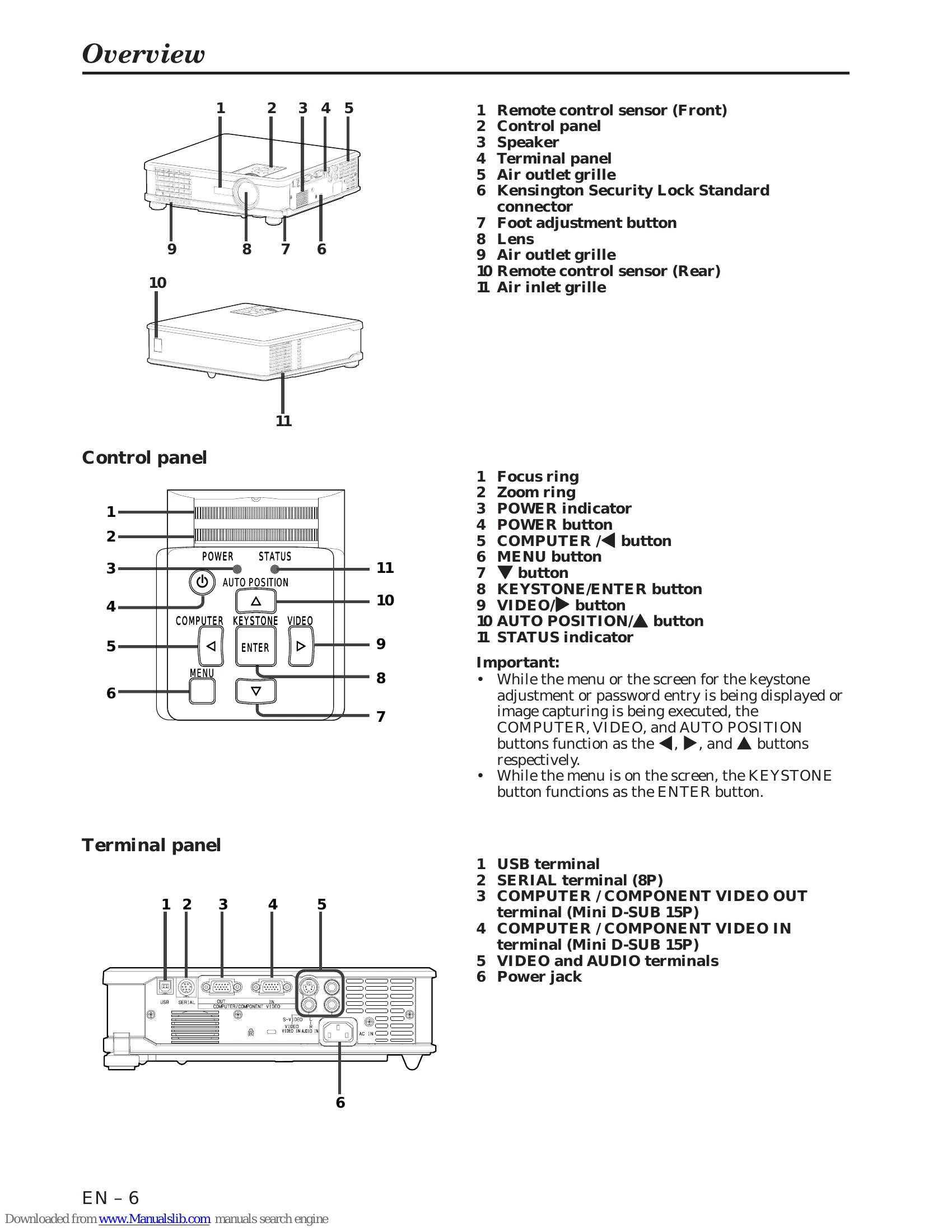
  2. Plug in the projector's power cord. The POWER indicator will light up.
  3. Press the POWER button. The lamp may take up to a minute to light up. Images may flicker briefly.
  4. Adjust focus using the focus ring.
  5. Select the input source (COMPUTER, VIDEO, S-VIDEO) using the SOURCE button or control panel.
  6. Adjust image size using the zoom ring.

Power-off

  1. Press the POWER button. A confirmation message will appear.
  2. Press the POWER button again within 10 seconds to turn off the projector. Fans will continue to cool the unit.
  3. Unplug the power cord after the fans stop.

Volume and Mute

  • Use VOLUME +/- buttons to adjust volume.
  • Press MUTE to temporarily silence video and audio. Press again to cancel.

Auto Position

  • If the image is not positioned correctly, press AUTO POSITION.
  • Adjust position manually using the SIGNAL menu if needed.

Troubleshooting and error codes

Problem Cause and solution
Images aren't projected on the screen. Power isn't turned on: Check POWER STATUS indicator. Ensure power cord is connected and projector is not blocked. Reset lamp operation time if needed. Attach lamp cover correctly. Contact dealer if lamp is end of life.
Images aren't projected on the screen. Cancel AV mute. Remove lens cap. Lamp may take time to light up. Check for issues after power outage. Set SCART INPUT to OFF. Ensure filter is clean and lamp cover is closed.
Images suddenly disappear. Check external device connection. If using an extension cord, replace with supplied cable or use an RGB signal amplifier. Check for blocked air grilles; clean filter if necessary. Replace lamp if STATUS indicator blinks red.
"NO SIGNAL" is displayed. Turn on connected device. Check external device output. Ensure correct cable and terminals are used. Check selected input source.
The screen for entering the password appears. Password function is enabled. Enter password or contact administrator.
Images aren't projected correctly.
  • Shaking/Displaced: Check cable, connect firmly, press AUTO POSITION, adjust SIGNAL menu.
  • Distorted: Adjust projector and screen perpendicularity.
  • Dark: Adjust BRIGHTNESS, replace lamp.
  • Blurred: Adjust focus, use +/- buttons for flicker, adjust BRIGHTNESS/CONTRAST.
  • Afterimages: Project evenly bright images.
  • Red, blue, green dots / Black dots: This is normal for LCD projectors.
  • Fine streak pattern: Change screen or readjust focus.
  • Wavy/Distorted (audio): Connect cable firmly, move away from interfering equipment. Keystone adjustment may cause issues; minimize its use.
  • Tint incorrect: Check COMPUTER INPUT setting.
  • Only motion areas not displayed: Contact computer manufacturer.
  • Projected images obscured: Match computer output resolution to projector resolution. Avoid keystone adjustment for obscured images.
Others
  • Hot air from grilles: Normal cooling process.
  • No audio: Check volume, reset projector by unplugging and replugging power cord.
  • "TEMPERATURE!!" displayed: Ambient temperature is high. Eliminate causes or move projector. Air inlet/outlet blocked; remove obstructions and clean filter.
  • ☾ mark: Ineffective operation.
  • Remote control issues: Check battery, sensor exposure, operation range.
  • Control panel buttons (except POWER) not functioning: Password lock (MENU ACCESS) enabled; cancel it.
Problems after lamp replacement
  • Power not turned on: Attach lamp cover correctly.
  • STATUS indicator blinks: Reset lamp operation time.
Privacy Policy