Brand: Motorola
Category: Mobile Phone
Document Type: Manual
Language: EN
Brand: Motorola
Category: Mobile Phone
Document Type: Manual
Language: EN
Uploaded: Nov. 21, 2025, 8:13 p.m.
Review the warranty on your phone, or visit www.motorola.com/device-legal.
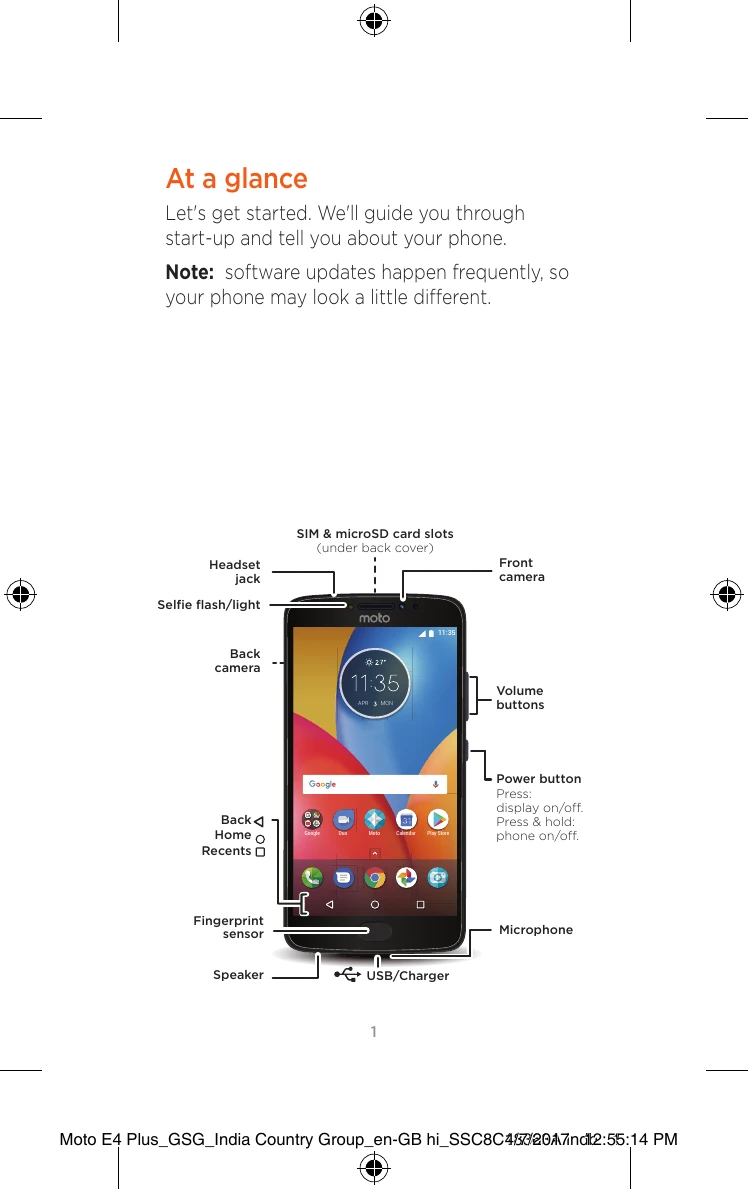
Let's get started. We'll guide you through start-up and tell you about your phone.
Note: software updates happen frequently, so your phone may look a little different.

To insert SIM and memory cards, remove the back cover.
Caution: don't use tools to remove the cover - doing so may damage your phone.

Your phone might support using two SIM cards.
Caution: make sure you use the correct size SIM cards and don't cut the SIM cards.

Put on the back cover. Connect your charger to charge your phone fully, then turn on the power. Select your language and follow the screen prompts to get started.
For phones that use two SIM cards, follow the prompts to set them up.
