Brand: Motorola
Category: Mobile Phone
Document Type: Manual
Language: EN
Brand: Motorola
Category: Mobile Phone
Document Type: Manual
Language: EN
Uploaded: Nov. 21, 2025, 6:14 p.m.
Manual Publish Date: 2019
One year for consumer products, 90 days for accessories, from original purchase date.
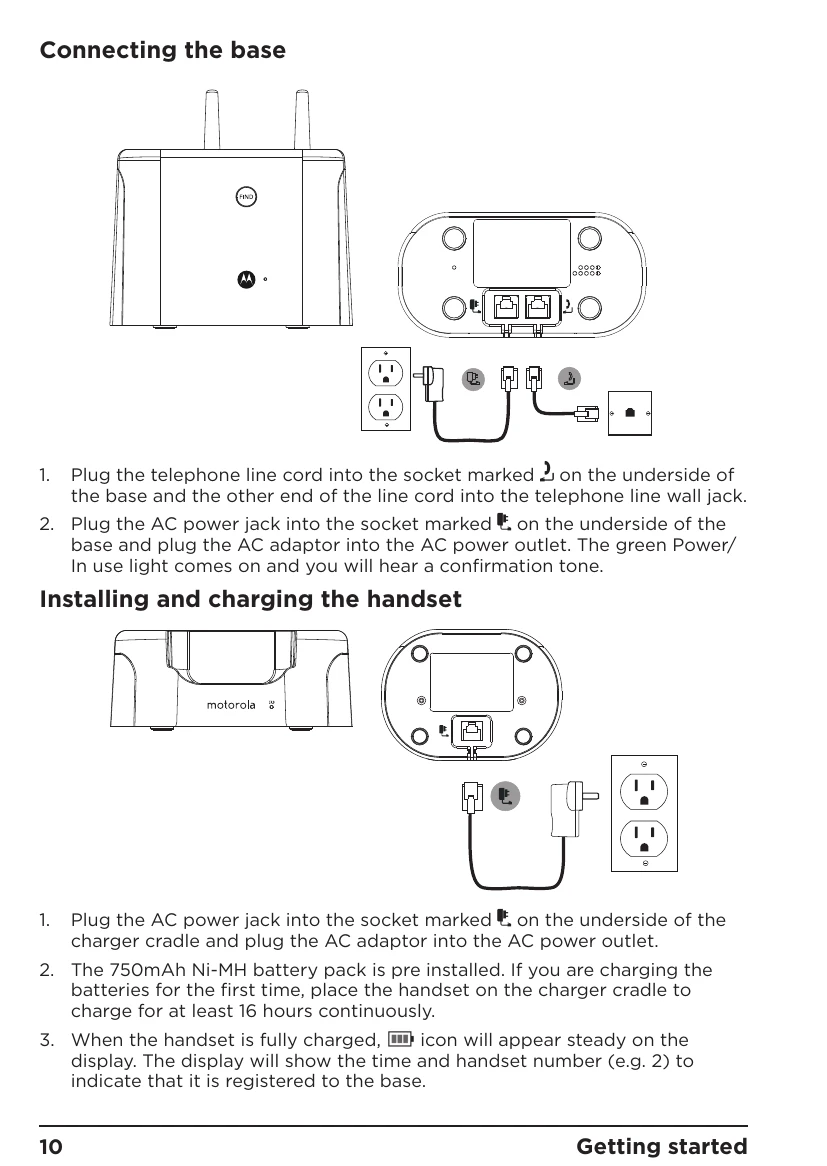
Charge the handset for 16 hours before first use. Connect the base to the phone line and power. Install the antenna. Set date and time.
Press the call button and dial the number. Use the phonebook or call lists for saved numbers. Hands-free calls can be initiated by pressing the call button twice.
Access the phonebook via the 'Names' or 'Menu' options. Store up to 200 contacts with names and numbers. Entries can be copied between handsets.
The answering machine can record up to 25 minutes of messages. It can be switched on/off, have its answer delay adjusted, and messages can be played back or deleted.
| Problem | Possible Cause | Solution |
|---|---|---|
| Noise interference on radio or television | Base or charger cradle too close to the device. | Move the base or charger cradle further away. |
| Answering machine does not record messages | Answering machine is off. | Switch the answering machine on. |
| Memory is full. | Delete some messages. | |
| Answer mode set to 'Answer Only'. | Change the mode to 'ANSWER & REC'. | |
| Cannot access messages remotely | Remote access is switched off. | Switch remote access on. |
| Incorrect PIN code. | Enter the correct PIN code. | |
| Cannot record outgoing message | Answering machine stops recording. | The memory may be full. Delete some messages. |
| Maximum message length exceeded. | Keep messages to a maximum of 3 minutes. |