Brand: Motorola
Category: Telephone
Document Type: Manual
Language: EN
Brand: Motorola
Category: Telephone
Document Type: Manual
Language: EN
Uploaded: Nov. 21, 2025, 8:23 p.m.
Consumer products have a one-year warranty, and accessories have a ninety-day warranty.
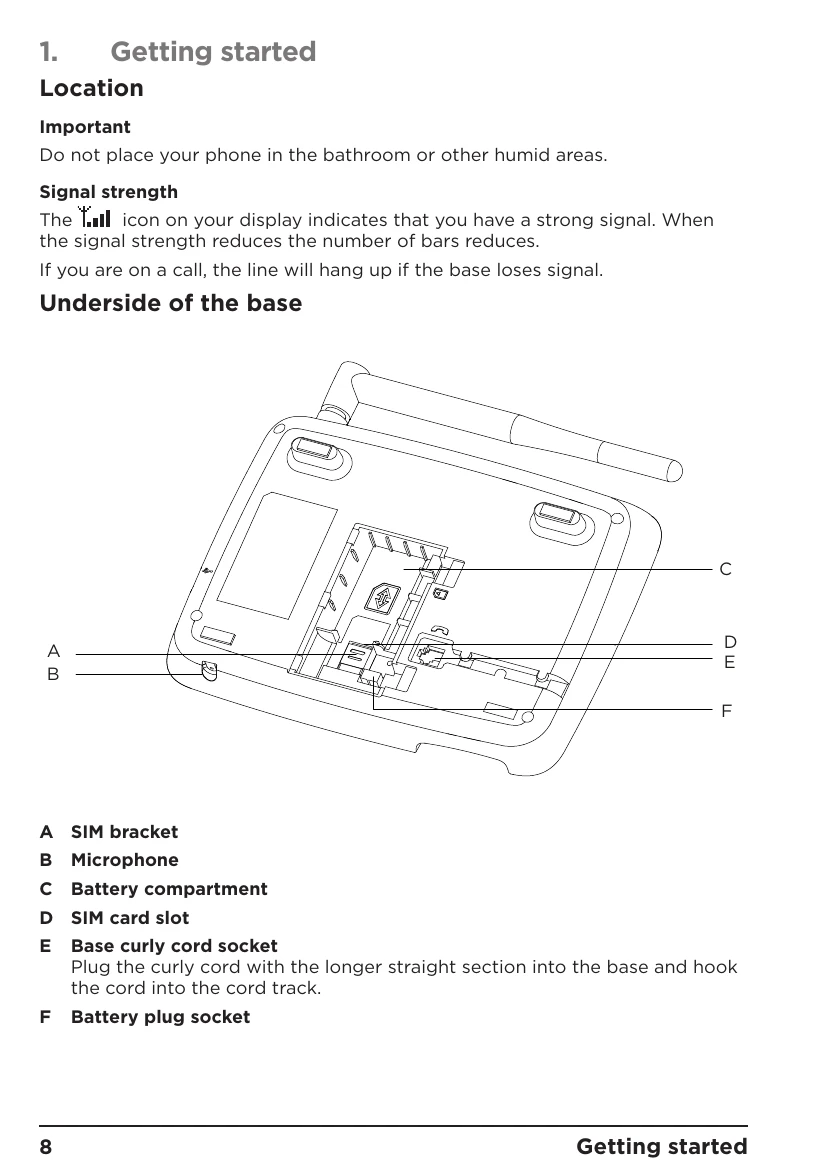
Before first use, ensure the battery is charged for 16 hours. Insert the SIM card into the designated slot. Connect the handset to the base using the curly cord. Plug the power adapter into the base and a wall socket.
To make a call, lift the handset or press the call button. Dial the number and press call, or use speed dial keys. To end a call, hang up or press the end call button. The phone supports SMS, contacts management, caller ID, and has an FM radio function.
Access the menu to adjust sound settings, display contrast, call settings, security settings, date and time, language, and network options.
| Problem | Solution |
|---|---|
| No display when the phone is turned on | Check the USB cable is connected correctly. Check the battery is charged and connected. Try turning the phone on and off again. |
| Calls will not connect | Check the network signal. Try turning the phone on and off again. Talk to your network operator. |
| Display shows Inset SIM | Insert the SIM card. If the SIM is already inserted, remove and insert again. Try another SIM card. |
| The phone will not charge | The charger may be damaged, try replacing with another charger. The battery may be damaged, try replacing the battery. The base charging connection may be damaged and the base will need replacing. |
| The phone has signal but will not make calls | The phone may not have enough charge, try charging the phone. Talk to your network operator. |
| The phone has not picked up the network | The phone number may be invalid, check with the network operator. The signal may be weak, try moving the phone to a different place. |
| Battery icon is not scrolling during charge | Check that the power adaptor is securely plugged into the charger and mains power wall socket. The battery is full. The battery icon will appear steady on the display. |
| The phone does not ring | Check that the ring tone is not set to off. |