Brand: NEC
Category: Cordless Telephone
Document Type: Manual
Language: EN
Brand: NEC
Category: Cordless Telephone
Document Type: Manual
Language: EN
Uploaded: Nov. 21, 2025, 7:13 p.m.
Manual Publish Date: 2022-02-01
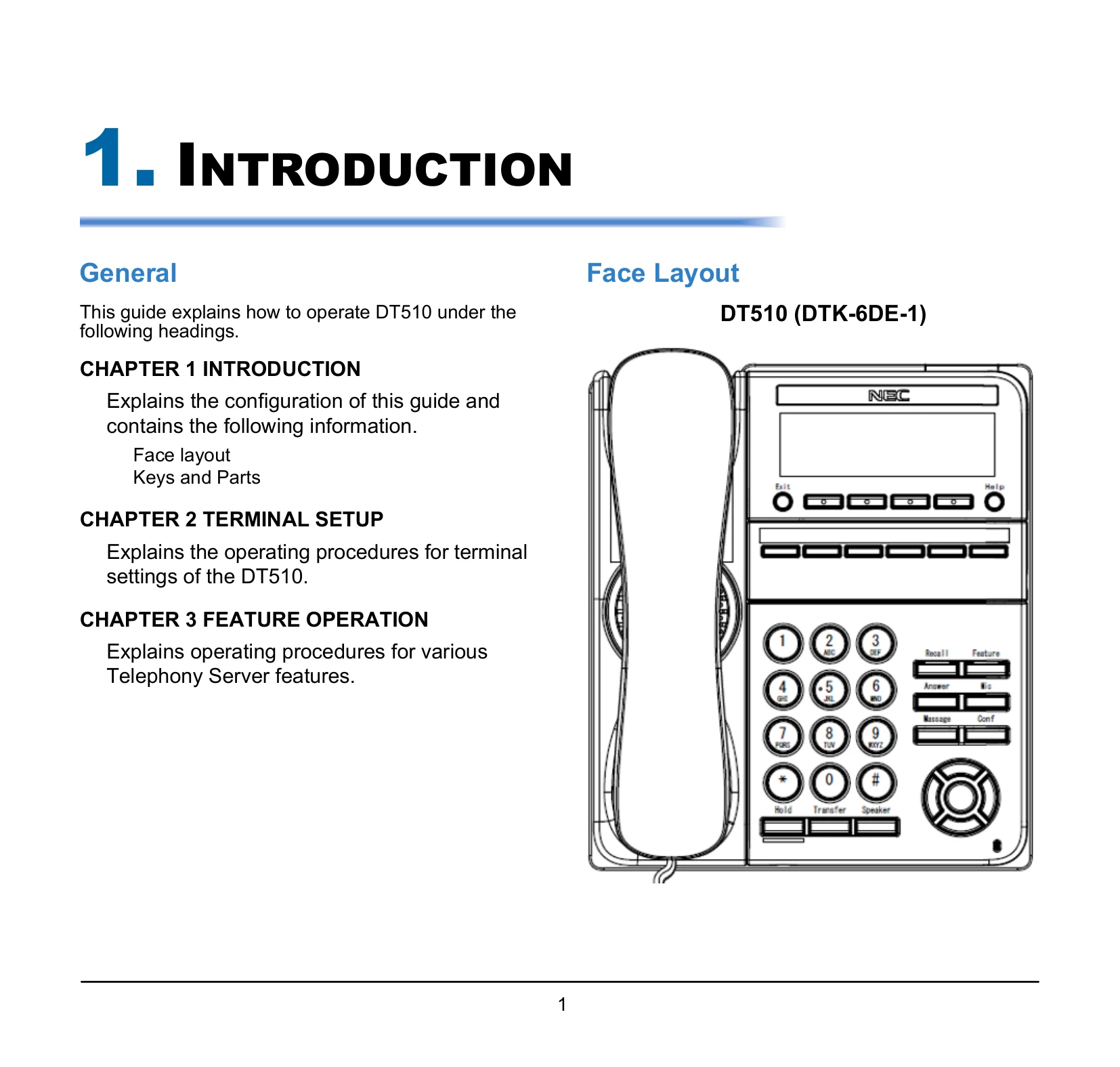
Covers the basics of the phone, including its face layout and key functions.
Explains how to adjust settings like handset receiver volume, speaker volume, ringer tone, and LCD contrast using the Up/Down keys and Feature keys.
Details various telephone functions:
| Function Number | Function | Additional Data |
|---|---|---|
| 00 | Not Defined | Extension number or any numbers (up to 24 digits). Press HOLD to write. |
| 01 | DSS / One-Touch | |
| 02 | Microphone Key (ON/OFF) | |
| 03 | DND Key | |
| 04 | BGM (ON/OFF) | |
| 05 | --Not Used-- | |
| 06 | Transfer Key | |
| 07 | Conference Key | |
| 08 | Incoming Call Log | |
| 09 | Day/Night Mode Switch | Mode Number (1-8) |
| 10 | Call Forward – Immediate | |
| 11 | Call Forward - Busy | |
| 12 | Call Forward - No Answer | |
| 13 | Call Forward – Busy/No Answer | |
| 14 | Call Forward – Both ring | |
| 15 | Follow Me | |
| 16 | --Not Used-- | |
| 17 | --Not Used-- | |
| 18 | Text Message Setup | Message Numbers (01-20) |
| 19 | External Group Paging | External Paging Number (1-8) |
| 20 | External All Call Paging | |
| 21 | Internal Group Paging | Internal Paging Number (01-64) |
| 22 | Internal All Call Paging | |
| 23 | Meet-Me Answer to Internal Paging | |
| 24 | Call Pickup | |
| 25 | Call Pickup for Another Group | |
| 26 | Call Pickup for Specified Group | Call Pickup Group Number |
| 27 | Speed Dial – Common / Private | Speed Dial Number (Common / Private) |
| 28 | Speed Dial –Group | Speed Dial number (Group) |
| 29 | Repeat Redial | |
| 30 | Saved Number Redial | |
| 31 | Memo Dial | |
| 32 | Meet - Me Conference | |
| 33 | Override (Off-Hook Signaling) | |
| 34 | Break - In | |
| 35 | Camp On | |
| 36 | Step Call | |
| 37 | DND / FWD Override Call | |
| 38 | Message Waiting | |
| 39 | Room Monitoring | |
| 40 | Handset Transmission Cutoff | |
| 41 | Buzzer | Extension Number |
| 42 | Boss - Secretary Call | Extension Number |
| 43 | Series Call | |
| 44 | Common Hold | |
| 45 | Exclusive | |
| 46 | Department Group Log Out | |
| 47 | Reverse Voice over | Extension Number |
| 48 | Voice Over | Extension Number |
| 49 | Call Redirect | Extension Number or Voice Mail Number |
| 50 | Account Code | |
| 51 | General Purpose Relay | Relay No (0, 1-8) |
| 52 | Automatic Answer with Delay Message Setup | |
| 53 | Automatic Answer with Delay Message Start | |
| 54 | External Call Forward by Door Box | |
| 55 | Extension Name Change | |
| 56 | General Purpose LED Operation | |
| 57 | General Purpose LED Indication | |
| 58 | Automatic Transfer at Department Group Call | Extension Group Number (1-8 or 01-64) |
| 59 | Delayed Transfer at Department Group Call | Extension Group Number (1-8 or 01-64) |
| 60 | DND at Department Group Call | Extension Group Number (1-8 or 01-64) |
| 61 | --Not Used-- | |
| 62 | Flash Key | |
| 63 | Outgoing Call Without Caller ID (ISDN) | |
| 64 | --Not Used-- | |
| 65 | --Not Used-- | |
| 66 | --Not Used-- | |
| 67 | --Not Used-- | |
| 68 | --Not Used-- | |
| 69 | --Not Used-- | |
| 70 | --Not Used-- | |
| 71 | --Not Used-- | |
| 72 | Keypad Facility Key | |
| 73 | Keypad Hold Key | |
| 74 | Keypad RETRIEVE Key | |
| 75 | Keypad Conference Key | |
| 76 | Application Key | |
| 77 | Voice Mail (In-Skin) | Extension Number or Pilot Number |
| 78 | Conversation Recording - Voice Mail | |
| 79 | Automated Attendant (In-Skin) | Extension Number or Pilot Number |
| 80 | Tandem Ringing | 1=Set 0=Cancel Extension Number to Tandem Ring |
| 81 | Automatic Transfer to Transfer Key | Trunk Line No. (001-200) |
| 82 | --Not Used-- | |
| 83 | Conversation Recording Function (VMSU) | 0=Pause 1=Re-recording 2=Address 3=Erase 4=Urgent Page |
| 84 | Drop Key | |
| 85 | --Not Used-- | |
| 86 | Private Call Refuse | |
| 87 | Caller ID Refuse | |
| 88 | Dial-In Mode Switching | |
| 89 | Do-Not-Call Setup | |
| 90 | Do-Not-Call Registration | |
| 91 | Live Recording Key | |
| 94 | Call Attendant | |
| 97 | Doorphone (1~8:Doorphone No.) | |
| #04 | Change Restriction Class | One-time Toll Restriction |
| #06 | Power Saving for Power Save Group | Power Save Group Number 00~32 (00 = All Groups) |
| #07 | Fixed Operation Mode | Night Mode Service Group No. (01~32) |
| #08 | Bluetooth Connect | |
| #09 | Bluetooth Path | |
| #10 | Conference Record | |
| #11 | Major Alarm | |
| #12 | Minor Alarm | |
| #13 | Calling Party Number Notification | Any number up to 24 digits |
| #14 | Multi-Device Support |