Manual for DB500

Manual for DB500

Brand: NEC

Category: Mobile Phone

Document Type: Manual

Language: EN

Uploaded: Nov. 21, 2025, 8:56 p.m.
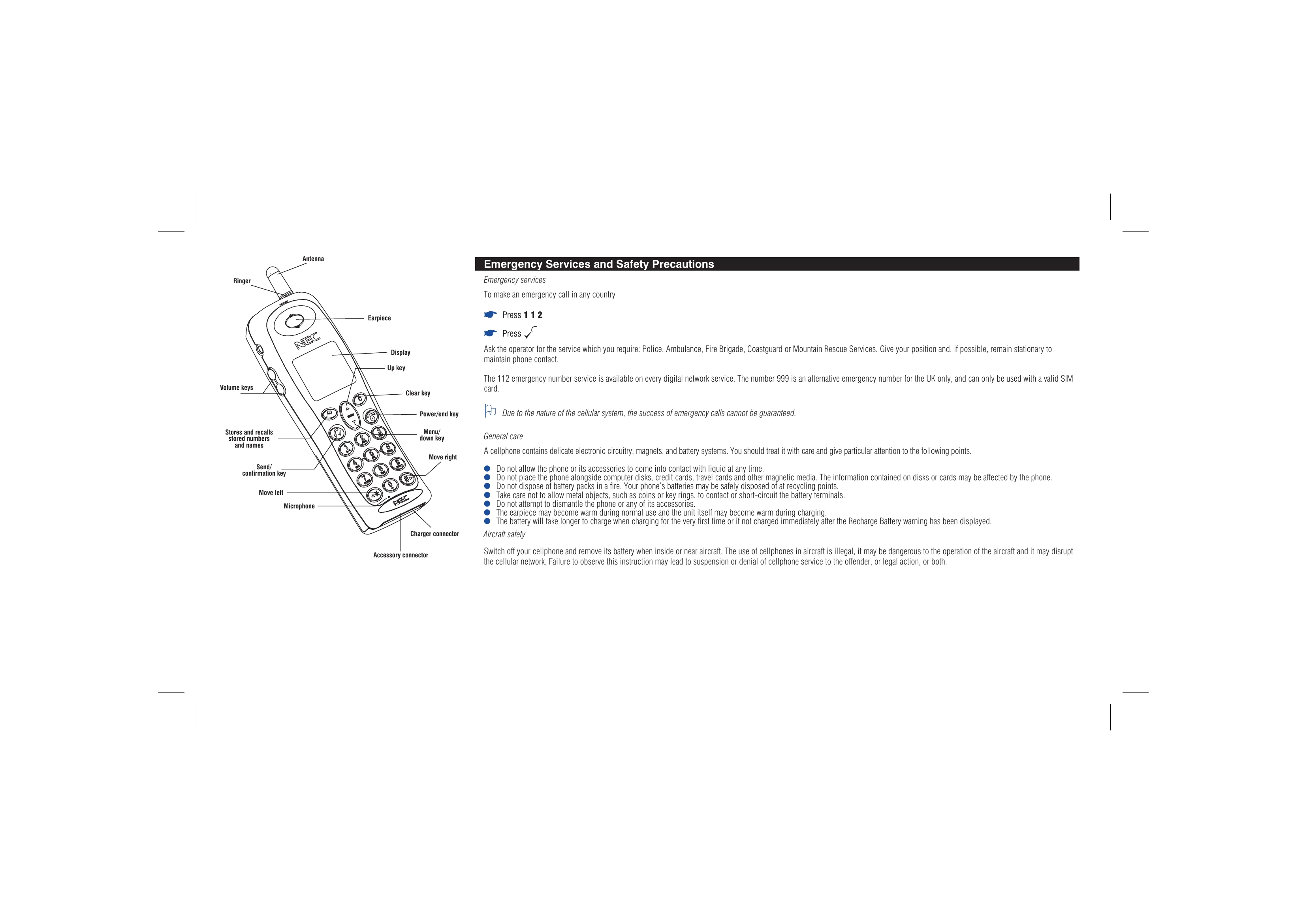
Getting Started

  • Insert a valid SIM card.
  • Charge the battery fully.
  • Enter PIN 1 code if necessary.
  • Switch the phone on by holding the power key.

Basic Calls & Phone Use

  • Receiving a call: Press the key.
  • Rejecting a call: Press briefly.
  • Making a call: Key in the phone number and press the key.
  • Ending a call: Press the key.
  • Emergency calls: Dial 112.

Caring for Batteries

  • Check battery level using the icon on the screen.
  • A 'Recharge Battery' warning indicates low power.
  • Change the battery by removing the old one and inserting a new one.
  • Charge the battery using the provided charger; the battery icon will pulse.

Display Information

  • The LCD alphanumeric display shows network, signal strength, messages, time, and keypad input.
  • LCD Icons indicate battery level, short message waiting, call forwarding, call connected, and voice mail waiting.
Privacy Policy