Brand: NEC
Category: Mobile Phone
Document Type: Manual
Language: EN
Brand: NEC
Category: Mobile Phone
Document Type: Manual
Language: EN
Uploaded: Nov. 21, 2025, 6:39 p.m.
Manual Publish Date: 2005-08
Please consult the 'Three Warranty License' for specific warranty details and maintenance information.
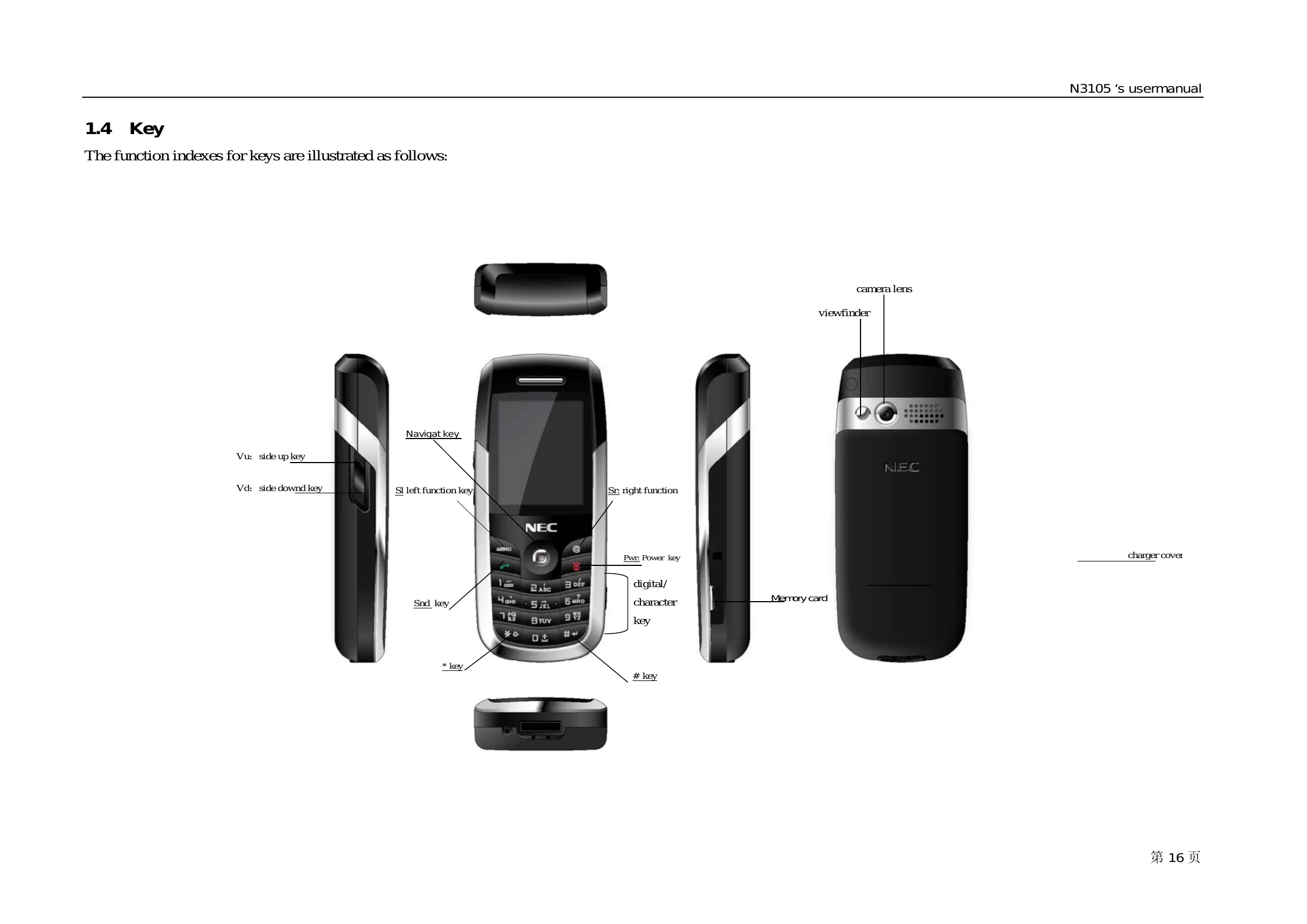
This manual provides comprehensive instructions for the NEC N3105 mobile phone, covering essential functions and features to facilitate work and leisure activities.
Key features and operations include:
The manual also details safety precautions and important notes for optimal and safe usage of the device.
| Problem | Possible Cause | Solution |
|---|---|---|
| Phone does not turn on. | Battery is discharged. | Charge the battery. |
| Cannot make or receive calls. | No network signal. | Move to an area with better signal coverage. |
| SIM card is not inserted or is invalid. | Insert or replace the SIM card. | |
| Screen is blank. | Phone is off. | Press the Power key to turn on the phone. |
| Display settings are incorrect. | Check display settings in the menu. | |
| Battery drains quickly. | High screen brightness or active background applications. | Reduce screen brightness and close unnecessary applications. |
| Poor network signal. | In areas with weak signal, the phone uses more power to maintain connection. |