Brand: NEC
Category: Mobile Phone
Document Type: Manual
Language: EN
Brand: NEC
Category: Mobile Phone
Document Type: Manual
Language: EN
Uploaded: Nov. 21, 2025, 8:18 p.m.
No warranty information is available in the provided document excerpt.
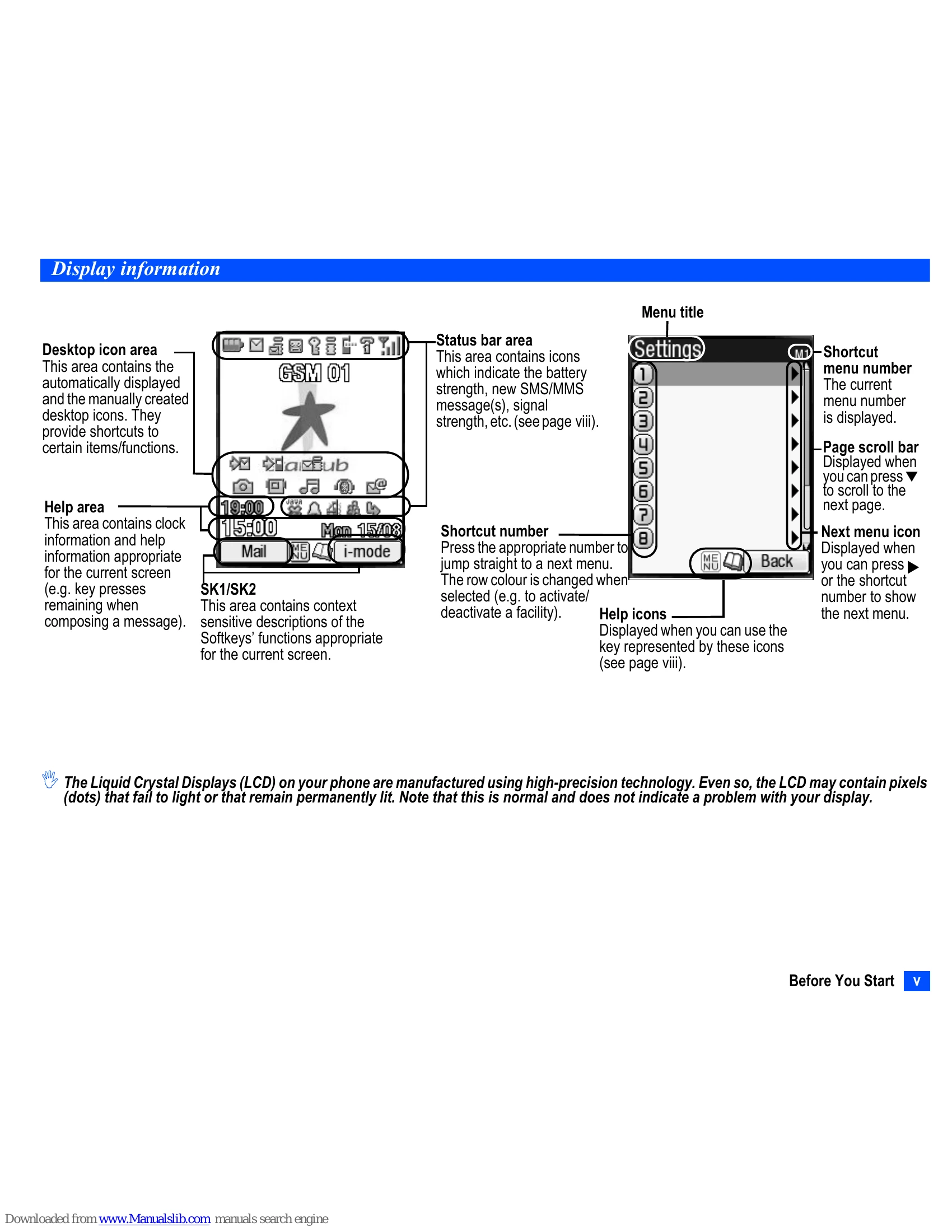
This manual provides instructions on operating the NEC N411i mobile phone. It covers basic functions such as making and receiving calls, sending messages, using the camera, and managing contacts. Key features like i-mode, Java applications, Bluetooth, and IR data exchange are also detailed. The guide includes information on device setup, display information, keypad shortcuts, and safety precautions.
| Key | Operation that involves pressing a key | See page | Operation that involves pressing and holding a key | See page |
|---|---|---|---|---|
| MENU | Accessing the Main menu screen | xi | Setting/Cancelling the Side key lock | 22 |
| SK1 | Accessing the Mail screen | 45 | Accessing the Inbox screen | 46 |
| SK2 | Accessing the i-mode menu screen | 41 | Accessing the Java™ applications screen | 70 |
| Accessing the Phonebook list screen | 51 | Accessing the Message screen | 29 | |
| Accessing the Phone modes screen | 23 | Setting the phone to Meeting mode/Returning to the previous mode | 23 | |
| Accessing the My data screen | 64 | Accessing the voice recall | 8 | |
| ▼ | Accessing the received calls list | 12 | - | - |
| ▼ | Accessing the missed calls list | 12 | - | - |
| ▼ | Accessing the dialled calls list | 12 | - | - |
| ○ | Highlighting a desktop icon | 21 | Accessing the homepage | 42 |
| 0 | Ending a call or returning to the standby screen | - | Powering off | 5 |
| CLR | Cancelling the Cell Broadcast message display | 35 | Deleting all the automatically displayed desktop icons | 20 |
| Deleting character or returning to the previous screen | - | Deleting all characters when you enter text | - | |
| 1 | Entering phone numbers | 6 | Calling the Voice mail centre | 57 |
| 2 to 9 | Entering phone numbers | 6 | One-touch dial to the corresponding number in the phonebook(SIM) | 8 |
| 0 | Entering phone numbers | 6 | Entering + when you make an international call | 14 |
| # | Entering # | 6 | Entering a pause | - |
| * | Entering * | 6 | Switching the ALS line 1/2 (if the SIM card supports ALS) | 22 |
| Side up | Accessing the volume control screen when your phone is open (Use▲▼, Side keys or 0 to 9 keys to adjust the volume.) Activating the ring silencer function when you receive a call | 22 22 | Accessing the camera view finder screen | 58 |
| Side down | Accessing the volume control screen when your phone is open (Use▲▼, Side keys or 0 to 9 keys to adjust the volume.) Activating the ring silencer function when you receive a call | 22 22 | Turning on the light (To turn it off, press any key or open/close your phone.) | - |