Brand: NEC
Category: Monitor
Document Type: Manual
Language: EN
Brand: NEC
Category: Monitor
Document Type: Manual
Language: EN
Uploaded: Nov. 21, 2025, 7:51 p.m.
This warranty covers defects in material and workmanship for three years from the date of first consumer purchase.
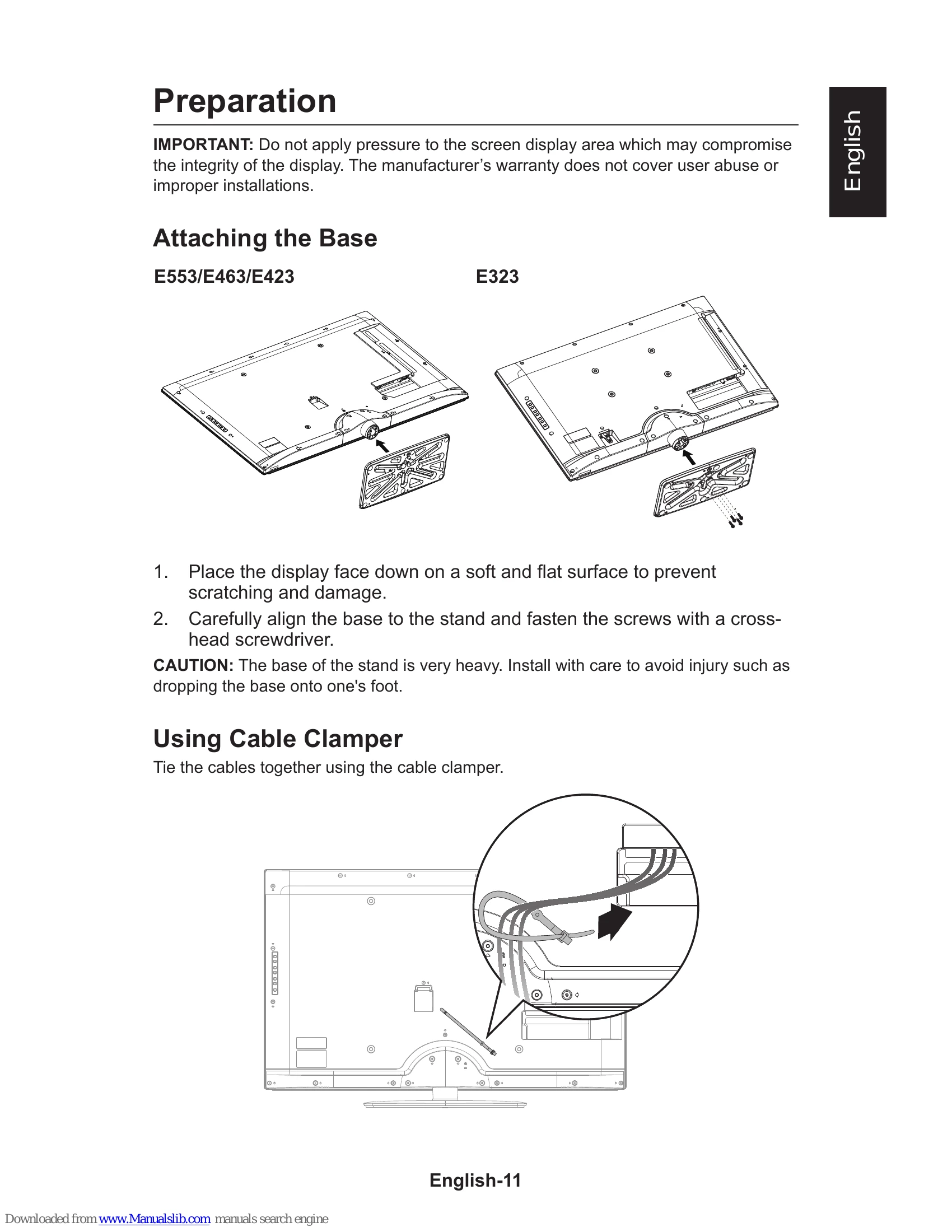
1. Attach the base to the display using screws and a screwdriver.
2. Tie cables together using the cable clamper.
3. For wall mounting, remove the base and attach a UL-listed bracket.
4. Connect the display to a power outlet and press the power button on the remote or display.
Use the side panel controls or remote to navigate menus, select sources, adjust volume and channels.
Menu Navigation: Press MENU to open/exit. Use Navigation Ring (up/down/left/right) to select and OK to confirm.
Source Selection: Press INPUT or SOURCE button to cycle through inputs like TV, AV, COMP, HDMI/PC.
Volume and Channels: Use VOL +/- and CH +/- buttons.
| Symptoms | Items To Check And Actions To Follow |
|---|---|
| "Ghost" or double image when using the tuner |
|
| No power |
|
| No picture |
|
| Good picture but no sound |
|
| Good sound but poor color |
|
| Poor picture |
|
| Snowy picture and noise when using the tuner |
|
| Presence of a horizontal dotted line |
|
| Display not responding via the remote control |
|