DESCRIPTION
NEC MONOCHROME CHARACTER DISPLAY optimized for use as a computer terminal. These are designed and manufactured to provide excellent displaying with high resolution image well suited for use with any personal or professional computer.
FEATURES
- High Reliability: All solid state circuitry stabilized power supply assures a high quality picture, regardless of changes in temperature or AC power line fluctuations.
- Flat Screen: The flat CRT is angled at 80 degrees to reduce glare and reflections.
- High Resolution: Video bandwidth (20MHz) is wide enough to allow display of 25 lines of 80 characters without distortion.
- Audio Amplifier: A 1.0 watt audio amplifier is included in these models.
- Simple and Functional Design: Attractive styling combined with the reliability of all solid-state circuitry make the NEC CHARACTER DISPLAY ideal for use with personal or professional computers.
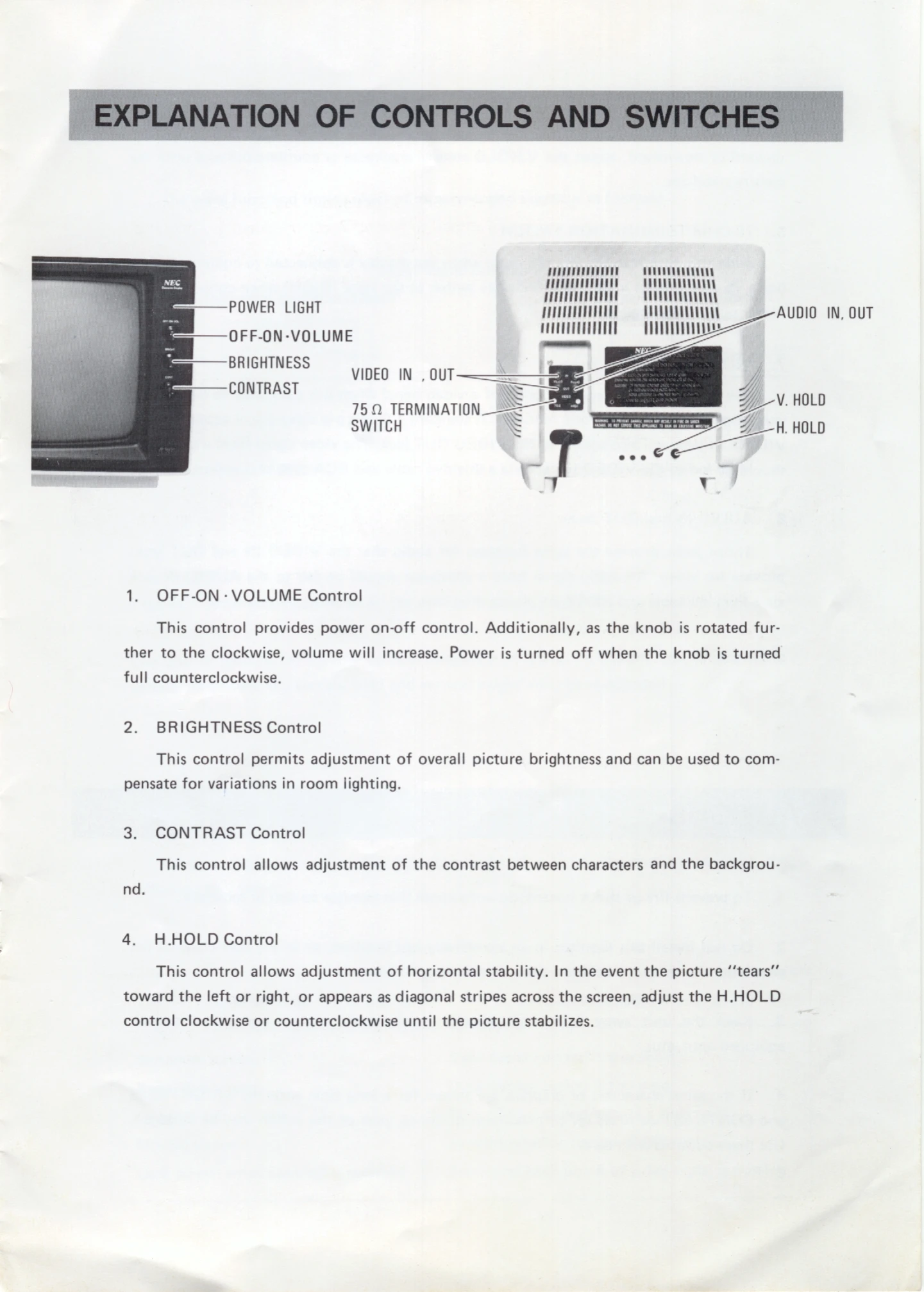
EXPLANATION OF CONTROLS AND SWITCHES
- OFF-ON VOLUME Control: Provides power on-off control and volume adjustment.
- BRIGHTNESS Control: Adjusts overall picture brightness.
- CONTRAST Control: Adjusts contrast between characters and background.
- H.HOLD Control: Adjusts horizontal stability.
- V.HOLD Control: Adjusts vertical stability.
- 75-OHM TERMINATION SWITCH: Selects impedance for connected equipment.
- VIDEO IN and OUT Jacks: For video signal input and pass-through.
- AUDIO IN and OUT Jacks: For audio signal input and pass-through.
CAUTIONS
- Do not expose to rain or moisture.
- Avoid hot locations and ensure ventilation.
- Keep away from high-capacity transformers and motors.
- Avoid displaying static images for long periods at maximum brightness/contrast to prevent screen damage.
VIDEO INPUT SIGNAL
Details on recommended signal waveforms and timing charts for Horizontal and Vertical Synchronization. Notes on symptoms and causes for incorrect signal input.
CONNECTION
Instructions for connecting one or more displays to a microcomputer, including setting the 75 OHM TERMINATION SWITCH.
METHOD OF CHANGING LINE VOLTAGE
Instructions for changing the line voltage setting (110/120/220/240V) by adjusting the VOLTAGE SELECTOR TIP.
SPECIFICATIONS
Detailed technical specifications including Picture Tube, Phosphor, Video Input Signal, Controls, Operating Temperature, Power Supply, Dimensions, and Weight.