Brand: NEC
Category: Monitor
Document Type: Manual
Language: EN
Brand: NEC
Category: Monitor
Document Type: Manual
Language: EN
Uploaded: Nov. 21, 2025, 7:39 p.m.
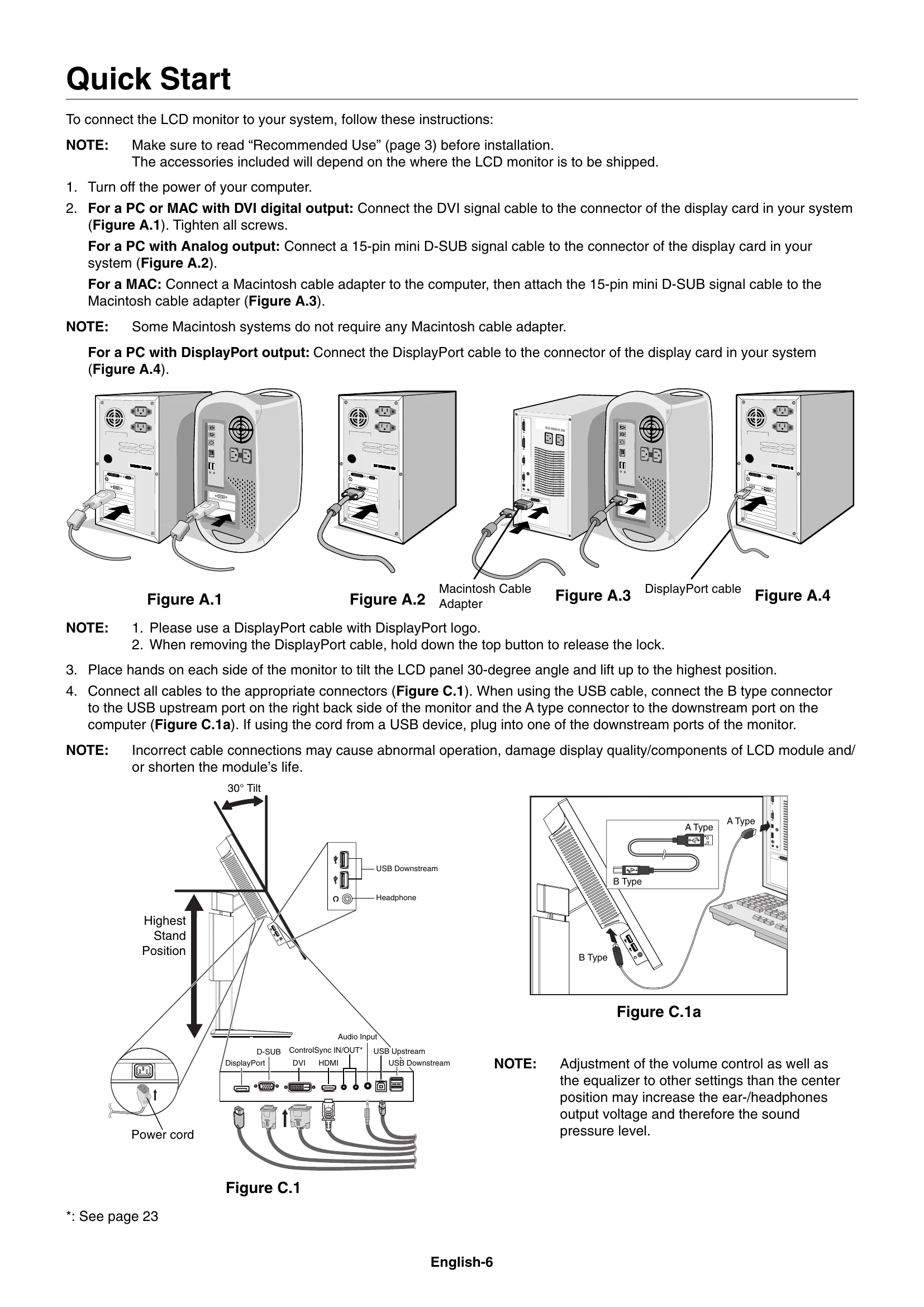
To connect the LCD monitor to your system, follow these instructions:
Place a hand on each side of the monitor and lift or lower to the desired height.
Before rotating, disconnect power and cables. Raise the screen to the highest level and tilt. Then, place a hand on each side and turn clockwise or counter-clockwise.
Grasp the top and bottom sides of the monitor screen and adjust the tilt and swivel as desired.
Follow the instructions provided by the manufacturer of the display mount.
| Problem | Possible Cause/Solution |
|---|---|
| No picture |
|
| Power Key does not respond |
|
| Image Persistence |
|
| "OUT OF RANGE" message |
|
| Image is unstable, unfocused, or swimming |
|
| LED on monitor is not lit |
|
| Picture is not as bright |
|
| Display image is not sized properly |
|
| No Video |
|
| No Sound |
|
| Brightness variations over time |
|
| USB Hub does not operate |
|
| Human sensor does not work |
|
| ControlSync does not work |
|