Brand: NEC
Category: Other
Document Type: Manual
Language: EN
Brand: NEC
Category: Other
Document Type: Manual
Language: EN
Uploaded: Nov. 21, 2025, 8:34 p.m.
Manual Publish Date: 2019-01-01
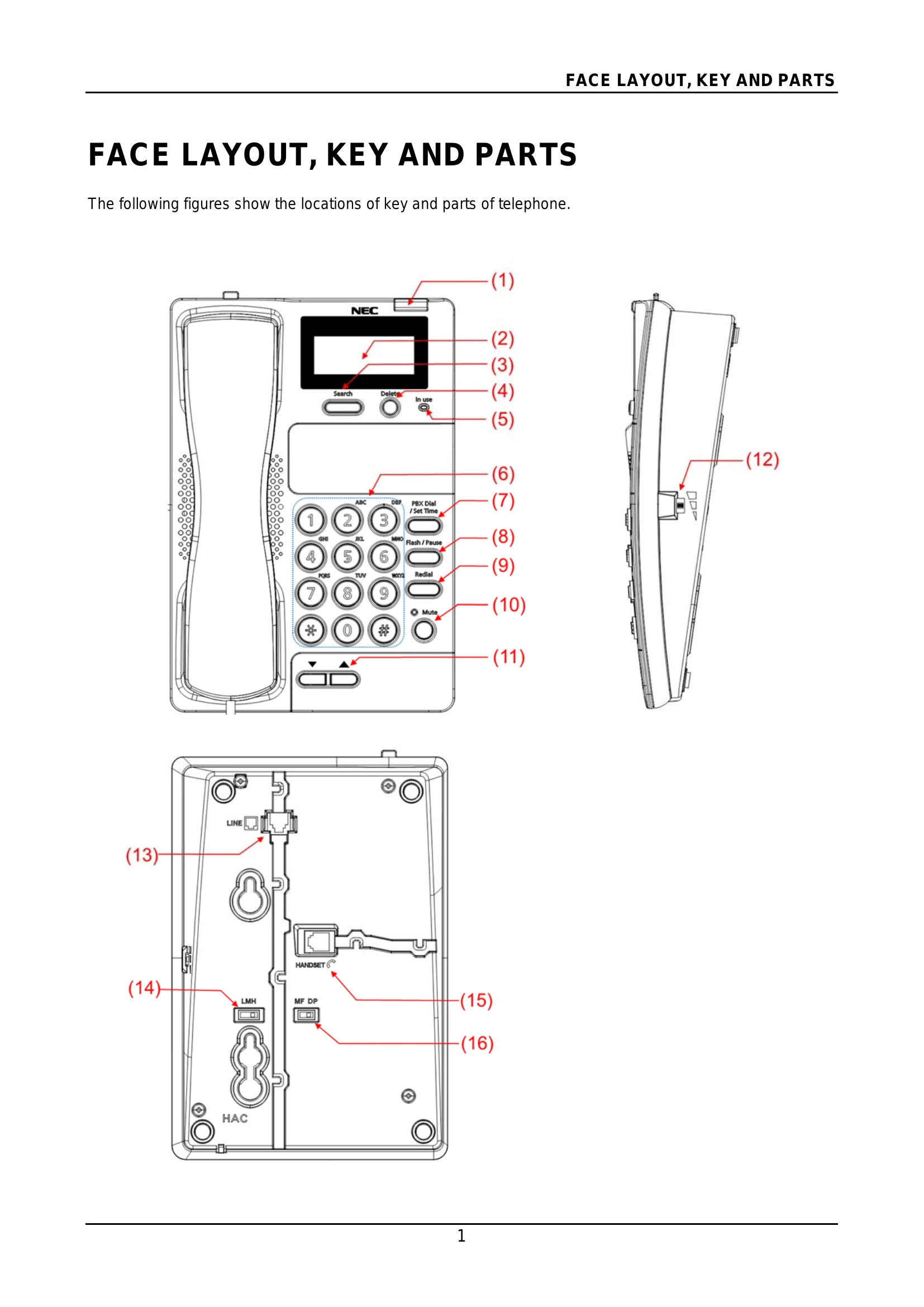
Making a Call: Pick up the handset, wait for dial tone, and dial the desired number. Replace the handset to end the call.
Preview Dialing: Dial the number with the handset on-hook. Use the DELETE key to correct digits. Lift the handset to initiate the call.
Receiving a Call: Lift the handset when the phone rings. Converse with your caller and replace the handset to end the call.
Volume Adjustment: Use the Handset Volume Control Switch to adjust the volume as needed.
Muting: Press the MUTE key to temporarily switch off the microphone. Press it again to resume normal conversation.
| Problem | Solution |
|---|---|
| No dial tone /Will not dial out |
|
| Phone does not ring |
|
| Cannot be heard by the other party |
|