Brand: NEC
Category: Other
Document Type: Manual
Language: EN
Brand: NEC
Category: Other
Document Type: Manual
Language: EN
Uploaded: Nov. 21, 2025, 7:09 p.m.
Refer to the manual for detailed warranty information.
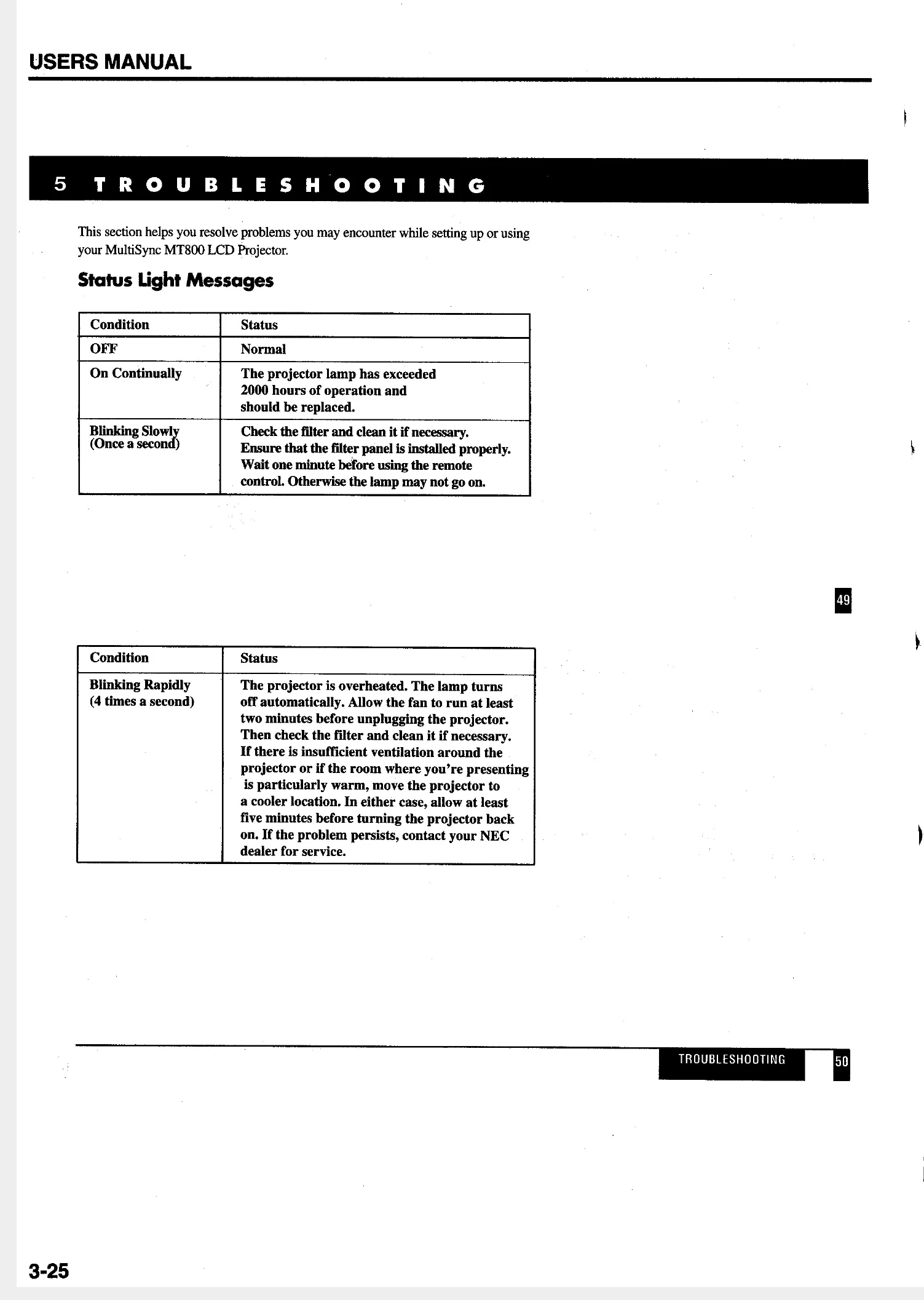
| Condition | Status |
|---|---|
| OFF | Normal |
| On Continually | The projector lamp has exceeded 2000 hours of operation and should be replaced. |
| Blinking Slowly (Once a second) | Check the filter and clean it if necessary. |
| Ensure that the filter panel is installed properly. | |
| Wait one minute before using the remote control. Otherwise the lamp may not go on. | |
| Blinking Rapidly (4 times a second) | The projector is overheated. The lamp turns off automatically. Allow the fan to run at least two minutes before unplugging the projector. |
| Then check the filter and clean it if necessary. If there is insufficient ventilation around the projector or if the room where you're presenting is particularly warm, move the projector to a cooler location. | |
| In either case, allow at least five minutes before turning the projector back on. If the problem persists, contact your NEC dealer for service. |
| Problem | Check These Items |
|---|---|
| Does not turn on | Check that the cord is plugged in and that the power switch on the back panel is on. Ensure that the air filter and filter panel are installed correctly. (See page 43.) |
| Check the status light to see if the projector has overheated. | |
| No picture | Use the menu icons to select your source (Video, S-Video or RGB). (See page 36.) Ensure your cables are connected properly. Use icons to adjust the brightness and contrast. Remove the lens cap. |
| Image isn't square to the screen | Reposition the projector to improve its angle to the screen. |
| Picture is blurred | Adjust the focus. (See page 17.) Reposition the projector to improve its angle to the screen. Ensure that the distance between the projector and screen is within the adjustment range of the lens. |
| Image is scrolling vertically, horizontally or both | Use icons to select the source you want to input. |
| Remote control does not work | Install new batteries. (See page 44.) Make sure there are no obstacles between you and the projector. Make sure you are within 23 feet (7m) of the projector. |
| Status indicator is lit or blinking | See the Status Light message chart on page 49. |
| Cross color in RGB mode | If "Auto Picture" is off, turn it on. If "Auto Picture" is on, turn it off and balance the image with the Picture Adjustment icon and Fine Picture Adjustment icon. |