Brand: NEC
Category: Other
Document Type: Spec Sheet
Language: EN
Brand: NEC
Category: Other
Document Type: Spec Sheet
Language: EN
Uploaded: Nov. 21, 2025, 7:16 p.m.
Manual Publish Date: 1995-09-21
None
Comprehensive Support Document for NEC Pinwriter P2/P3 Series
This document provides detailed specifications, switch settings, and troubleshooting information for the NEC Pinwriter P2 and P3 dot-matrix printers.
Key Features:
Switch Settings: Detailed configurations for various modules (6302, 6303, 6306, 6307) controlling character sets, baud rates, and printer functions.
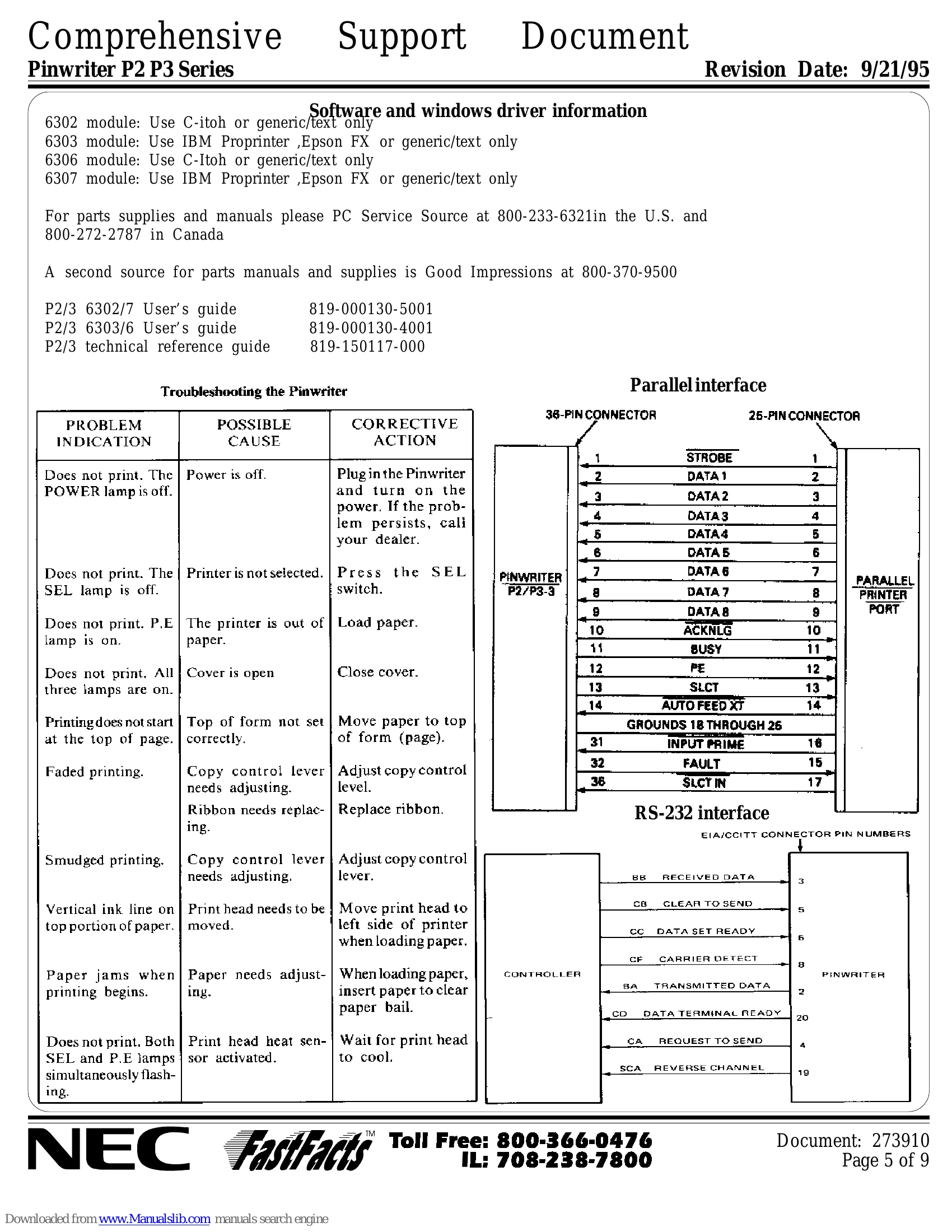
Troubleshooting: A table provides common problems, possible causes, and corrective actions for issues like "Does not print", "Faded printing", and "Smudged printing".
| PROBLEM INDICATION | POSSIBLE CAUSE | CORRECTIVE ACTION |
|---|---|---|
| Does not print. The POWER lamp is off. | Power is off. | Plug in the Pinwriter and turn on the power. If the problem persists, call your dealer. |
| Does not print. The SEL lamp is off. | Printer is not selected. | Press the SEL switch. |
| Does not print. P.E lamp is on. | The printer is out of paper. | Load paper. |
| Does not print. All three lamps are on. | Cover is open | Close cover. |
| Printing does not start at the top of page. | Top of form not set correctly. | Move paper to top of form (page). |
| Faded printing. | Copy control lever needs adjusting. Ribbon needs replacing. |
Adjust copy control level. Replace ribbon. |
| Smudged printing. | Copy control lever needs adjusting. | Adjust copy control lever. |
| Vertical ink line on top portion of paper. | Print head needs to be moved. | Move print head to left side of printer when loading paper. |
| Paper jams when printing begins. | Paper needs adjusting. | When loading paper, insert paper to clear paper bail. |
| Does not print. Both SEL and P.E lamps simultaneously flash. | Print head heat sensor activated. | Wait for print head to cool. |