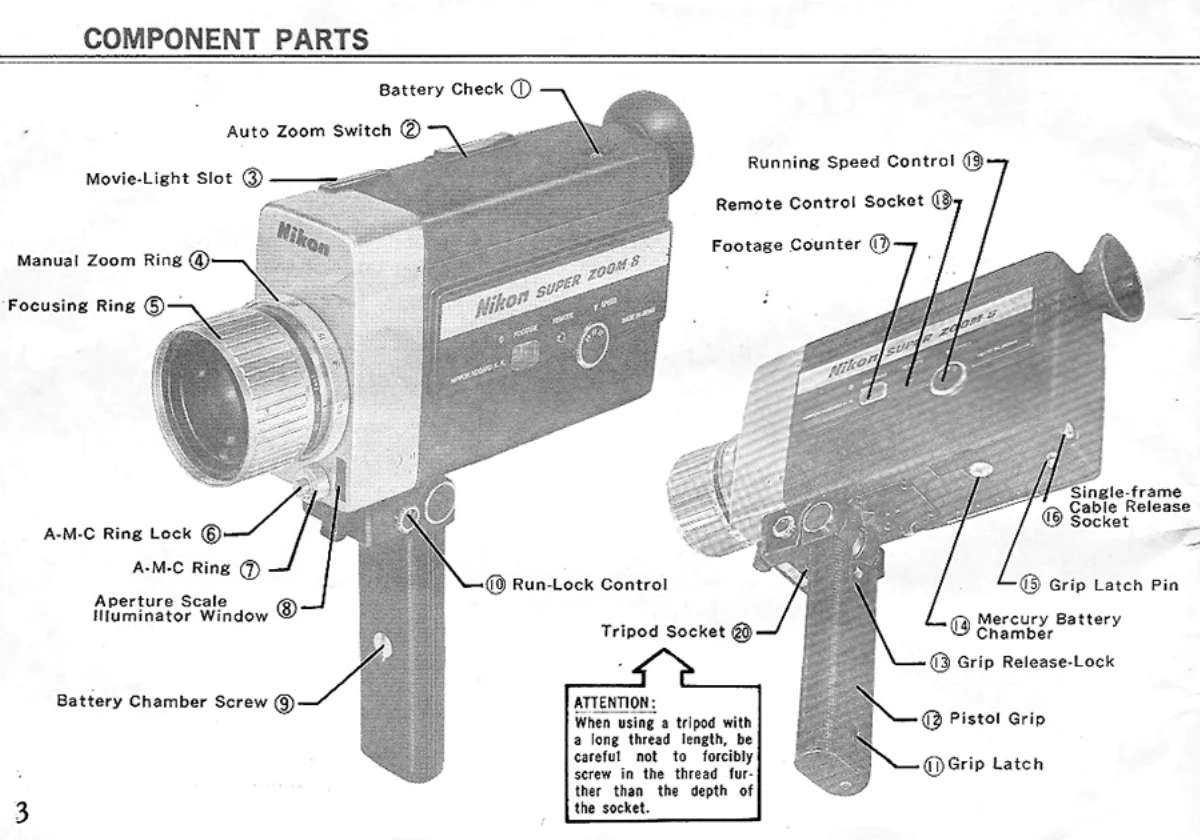
Loading Film: Open the cartridge chamber cover, drop in a Kodapak Super-8 cartridge, ensuring the cartridge guide pin aligns with the notch. Push the rear of the cartridge down until it clicks, then close and lock the cover.
Setting Speed: Use the Running Speed Control to select 18 fps (standard silent), 24 fps (sound speed, slower motion effect), or 12 fps (speeded-up motion effect).
Exposure: The camera features a fully automatic CdS exposure system. For checking exposure, lightly press the trigger to the first click-stop. The aperture needle will move to indicate the selected aperture. Ensure it falls between f/1.8 and f/16 for correct exposure. Manual exposure control is also available.
Focusing: Use the split-image rangefinder in the viewfinder for focusing. Rotate the focusing ring until the vertical lines appear continuous.
Zooming: Utilize the Auto-Zoom feature by pressing 'T' (telephoto) or 'W' (wide-angle) on the Auto-Zoom Switch. Manual focal-length settings can be made using the Manual Zoom Ring.
Shooting: Fully depress the trigger to start the camera and film.
Special Effects: Fade-in/fade-out effects can be achieved by turning the A-M-C Ring to 'C' (closed) position. Single-frame exposures are possible with a cable release.