Brand: Nikon
Category: Digital Camera
Document Type: Quick Start Guide
Language: EN
Brand: Nikon
Category: Digital Camera
Document Type: Quick Start Guide
Language: EN
Uploaded: Aug. 10, 2025, 12:14 a.m.
Guaranteed against manufacturing defects for one year from the original purchase date.
Press and hold the movie button for about 3 seconds to turn the camera on. Press and hold the movie button for about 3 seconds when the camera is on to turn it off. The camera also has an auto-off function after 30 seconds of inactivity.
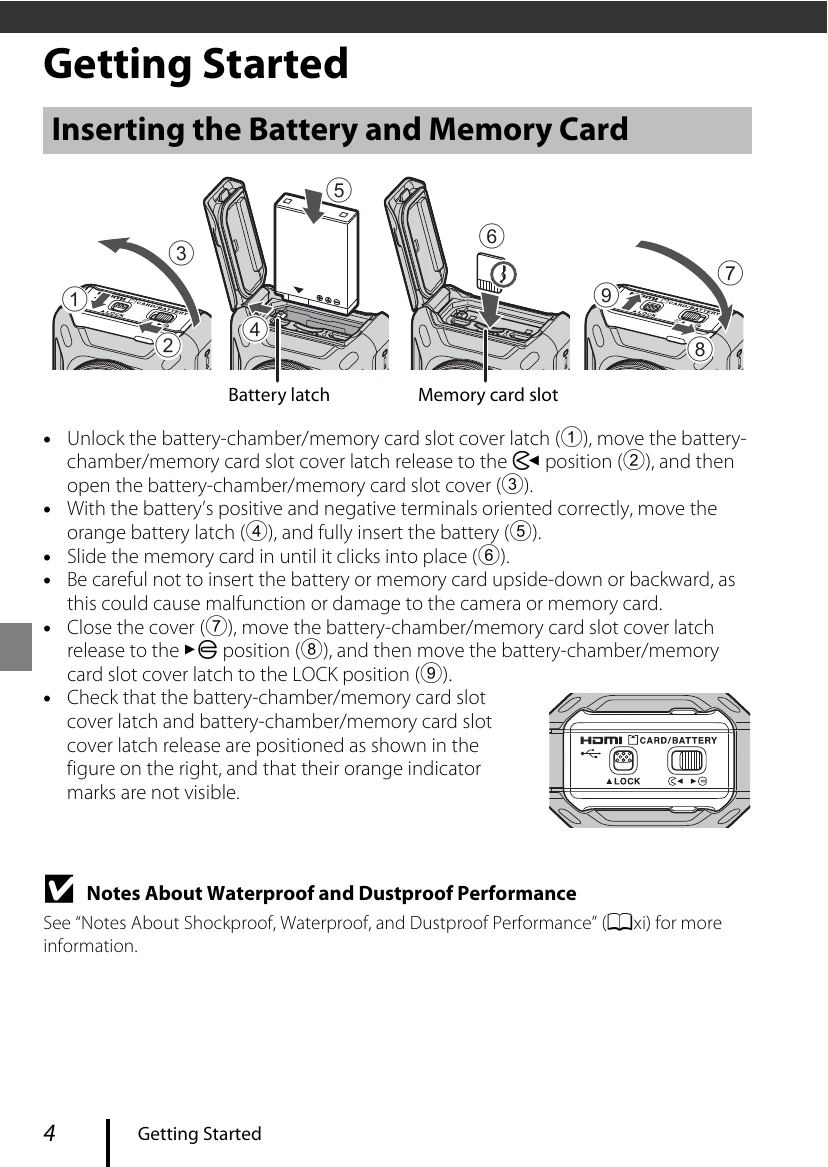
Unlock the battery/memory card cover, insert the battery correctly, and then slide the memory card in until it clicks. Close the cover securely and ensure the latch is in the LOCK position.
Connect the camera to the Charging AC Adapter using the USB cable. The power-on lamp will flash green while charging and turn off when complete. Charging takes approximately 2 hours and 20 minutes.
Install the SnapBridge 360/170 app, enable Bluetooth and Wi-Fi on your smart device, and turn off the camera's airplane mode. Put the camera into pairing standby mode by pressing the movie or photo button. Then, follow the app's instructions to connect.