Manual for KeyMission 80

Manual for KeyMission 80

Brand: Nikon

Category: Digital Camera

Document Type: Manual

Language: EN

Uploaded: Aug. 10, 2025, 12:14 a.m.
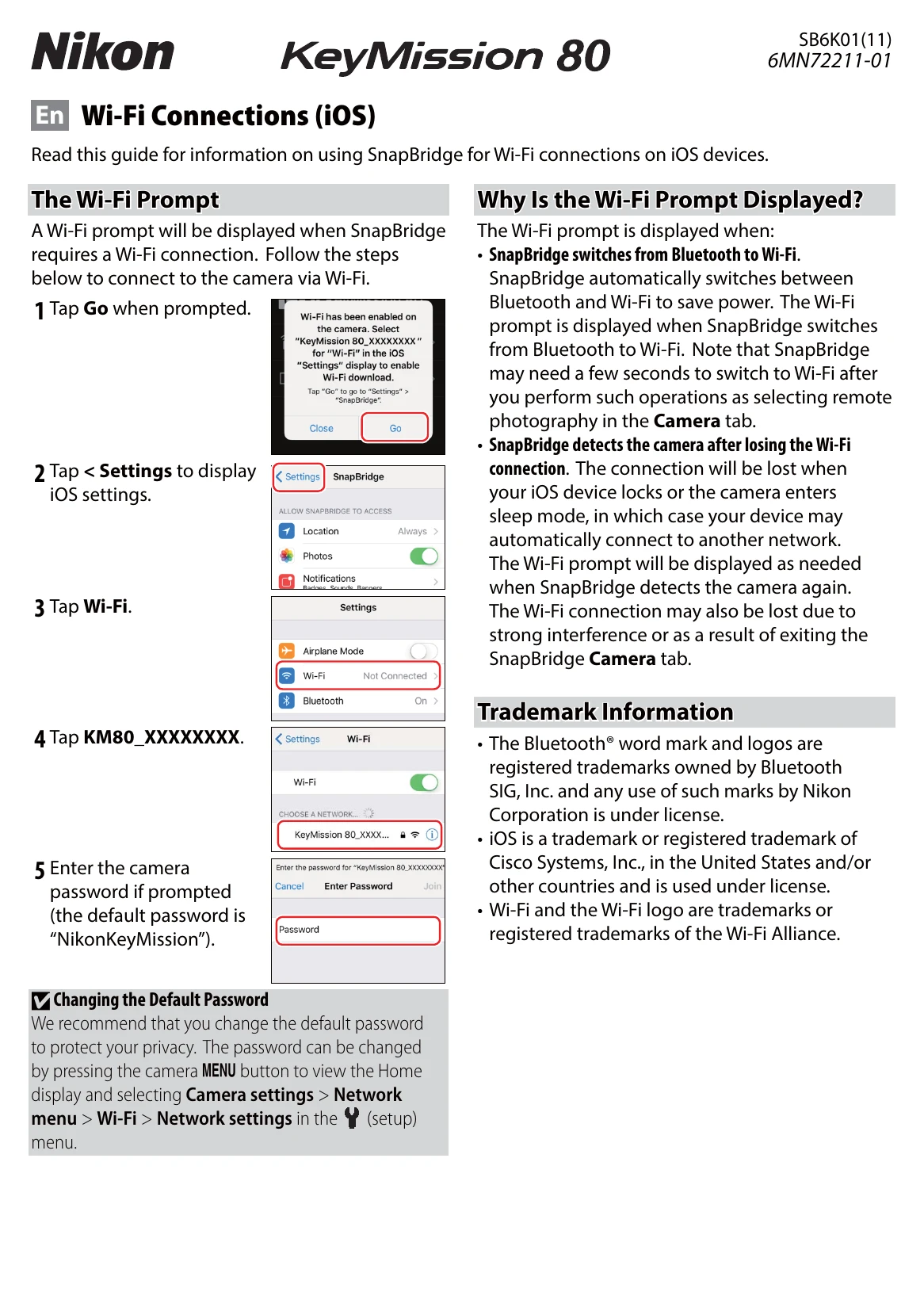
Connecting to Wi-Fi (iOS)

  1. When SnapBridge prompts for a Wi-Fi connection, tap 'Go'.
  2. Tap '< Settings' to access iOS settings.
  3. Tap 'Wi-Fi' and then select your camera's network (e.g., 'KeyMission 80_XXXXXXXX').
  4. Enter the camera password if prompted (default is 'NikonKeyMission').

Re-establishing Pairing

  1. In SnapBridge's Connect tab, go to 'Connection options' and tap 'End pairing'. Quit the app.
  2. In iOS Settings, go to Bluetooth, tap the info icon next to your camera, and select 'Forget This Device'.
  3. On the camera, navigate to Camera settings > Network menu > Connect to smart device to initiate new pairing.
  4. In SnapBridge, start the app, tap 'Connection options', select your camera, and confirm pairing on both devices.
Privacy Policy